Resize Now (Manual Apply)
Resize Now applies a recommendation when you decide: one container at a time, with full control over which values land. It works for every workload, including Smart Sizing with HPA / Autopilot workloads where Realtime Resizing is unavailable.
Click Resize Now on a container card in the Smart Sizing tab:
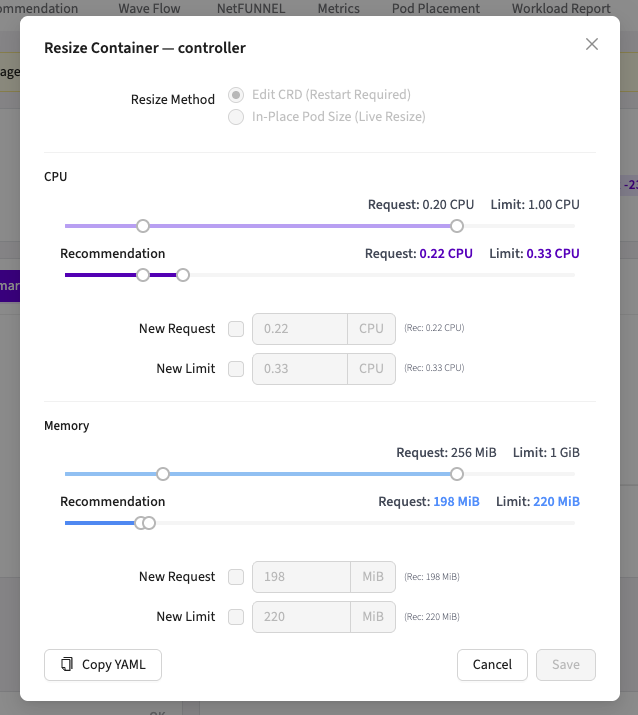
Resize Method
| Method | What happens | Availability |
|---|---|---|
| Edit CRD (Restart Required) | Patches the workload manifest (spec.template.spec.containers[*].resources); pods restart via the workload's normal rolling-update strategy | Always, any Kubernetes version, any workload kind |
| In-Place Pod Resize (Live Resize) | Sends a /resize request to each running pod; new CPU/memory take effect without restarting the pod | Requires cluster support (below); Wave checks at runtime and disables the option when unsupported |
The Edit CRD label mirrors the button in the console. Despite the name, this method patches the workload's own manifest (spec.template.spec.containers[*].resources on the Deployment or StatefulSet), not a Wave Custom Resource, and is unrelated to CRD Mode.
In-Place Pod Resize cluster requirements
| Kubernetes version | In-Place status |
|---|---|
| < 1.27 | Not available; use Edit CRD |
| 1.27-1.32 | Alpha, requires manually enabling the InPlacePodVerticalScaling feature gate |
| 1.33-1.34 | Enabled by default |
| ≥ 1.35 | GA |
Wave verifies support with a dry-run against the cluster when the modal opens. If in-place resize isn't available, the radio option is disabled with a tooltip explaining why.
Container resize policy. A container's resizePolicy is a list of per-resource entries, each pairing a resourceName with its restartPolicy. If the entry for CPU or memory sets restartPolicy: RestartContainer, that resource cannot be resized in place, and the corresponding inputs are disabled. Set restartPolicy: NotRequired for that resource to allow live resizing:
resizePolicy:
  - resourceName: cpu
    restartPolicy: NotRequired
  - resourceName: memory
    restartPolicy: NotRequired
Choosing values
Each of the four fields (CPU request, CPU limit, memory request, memory limit) has its own checkbox, so partial updates (CPU only, requests only) are fine:
- Inputs are pre-filled with the recommendation, with the current value shown as fallback and the recommendation as a hint (
Rec: 0.22 CPU). - Only checked fields are applied; at least one must be enabled, and zero values are rejected; Wave never writes a zero request or limit to the cluster.
- In In-Place mode, the memory limit field is unavailable (the in-place path applies memory requests only).
Copy YAML generates the resource snippet for the checked values, useful when the change should go through your GitOps pipeline instead of the console.
Your first Resize Now on a container also captures its original values, enabling the Restore Original button.
Troubleshooting
| Symptom | Cause / fix |
|---|---|
| In-Place option disabled | Cluster fails the dry-run capability check: Kubernetes too old, feature gate off, or the API rejects pod resize. Use Edit CRD |
| In-place apply rejected with insufficient node resources | The new request doesn't fit on the pod's current node. Wave does not evict the pod; use Edit CRD to reschedule via rollout |
| Manifest change reverted within minutes | Argo CD auto-sync detected drift and restored the Git state; turn off auto-sync for this workload or apply the change through Git (use Copy YAML) |
| Save rejected with a zero-value error | An enabled field has no usable value (no recommendation yet); uncheck it or enter a value manually |
| Modal is read-only with a "Managed by CRD" tooltip | Console is in CRD mode; apply resources through your GitOps flow |