See every GPU and every GPU workload,then share, isolate and prioritize them.
An operations layer that makes GPUs and GPU workloads visible, then shareable. It starts on the GPU cluster you run today.


Stock NVIDIA device plugin. One whole card per workload.
One card split across several workloads. That much is open source. HAMi Enterprise, from Dynamia, adds overcommit, priority, turbo and elastic memory.
One card. One job. Most of it out of reach.
Kubernetes hands out GPUs in whole units. A job that asks for a GPU gets the whole card, even when it uses a small part of it, and nothing else can reach the rest. Most teams cannot see this happening. Which workload sits on which card, whether a card marked allocated is actually busy, which card is faulty and which is empty. So they buy more cards.
Committed 29,000 MiB. The 5,972 MiB that does not fit on the card is held in the server main memory.
Both bars are the same physical card, drawn at the same width. Measured on one NVIDIA A10G under KServe. The number changes with the card type and with the workload. Block sizes are schematic; real demand differs per model.
MIG, time-slicing and MPS divide a card only inside the memory it has
NVIDIA already offers three ways to put more than one workload on a card. Each of them divides the card only inside the memory the card physically has.
MIG splits a card into fixed hardware partitions. Time-slicing gives each workload the whole card in turns. MPS lets several processes send work to the card at the same time.
Scroll the table sideways to see every column.
| What it can do | PureKubernetes | MIG | Time-slicing | MPS | HAMi Enterprise+ Wave GPU |
|---|---|---|---|---|---|
| Share one card across several workloads | – | ✓Up to 7 · fixed profiles | ✓No limit | ✓Up to 48 | ✓By the MiBopen source |
| Protect one workload’s memory from another | –Not applicable | ✓ | –None | ✓CUDA 11.4+ · cap must be set | ✓Hard isolationopen source |
| Keep one crash from taking down the others | ✓ | ✓ | ✓ | ●Limited | ✓open source |
| Cards it works on | ✓All | ●Ampere and newer data center cards only | ✓Pascal and newer | ✓Most | ✓NVIDIA, Ascend, Cambricon and three more familiesopen source |
| Give a workload more memory than the card holds | – | – | – | – | ✓Idle models move to host memory |
| Serve the important workload first | – | – | – | – | ✓The other job pauses, it is not killed |
| Change a memory limit while the workload runs | –Restart required | –Restart required | – | – | ✓No restart |
In the last column, rows marked “open source” are in the HAMi open source project. The three rows without that mark need HAMi Enterprise.
Based on NVIDIA’s own documents: Improving GPU Utilization in Kubernetes, the MIG User Guide, and the MPS documentation. MIG needs an Ampere or newer data center card, so it is not available on L40S, L4 or A10G. All three divide the card only within its physical capacity, have no notion of priority, and cannot change a limit while the workload runs.
Two steps. The first one needs nothing installed.

Four screens on the GPU cluster you run today. The stock NVIDIA device plugin, whole-card allocation, nothing new installed. Every card, every workload, 29 health checks, and reservations corrected against measured demand.


One card split across several workloads, past the limit of what physically fits. Memory overcommit, task priority, turbo mode and elastic memory. This is where the measured results on this page come from.
The order matters. You see your own numbers first, then decide whether sharing the card is worth it.
Four screens, on the cluster you run today
Wave GPU reads what the cluster already reports and turns it into four screens. None of them needs card sharing installed.
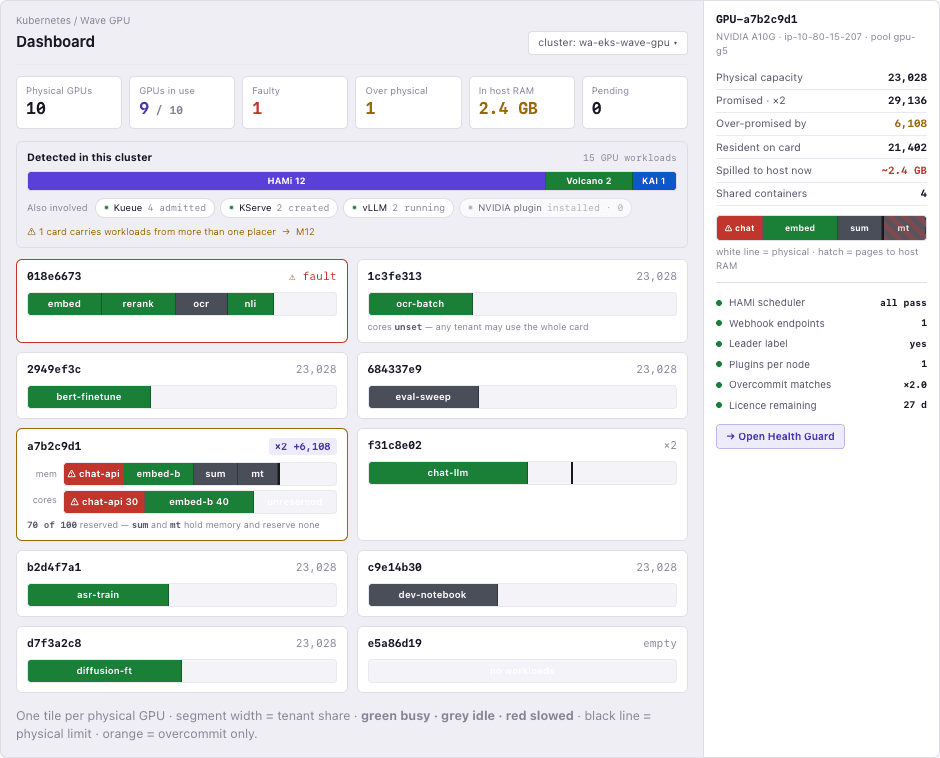
Every card in the cluster on one screen
A map of the cluster, one tile per card. On a plain GPU cluster it shows the state of each card and the workloads on it. On a cluster that shares cards, it also shows the memory promised to each workload.
Busy, idle, faulty and empty are marked on every card, whether the card is whole or shared. Green means running, grey means idle, red means slowed down.
The detail opens without leaving the map. Physical capacity, promised memory, what is actually loaded, how much moved to host memory, and the card health checks, in one panel.
When a card is shared, the panel draws the memory promised to workloads, the physical limit, and the amount promised above that limit. A dashboard that shows usage alone does not have that number.
Answers “what state is the GPU in right now” as a chain: card, split, promise, workload.
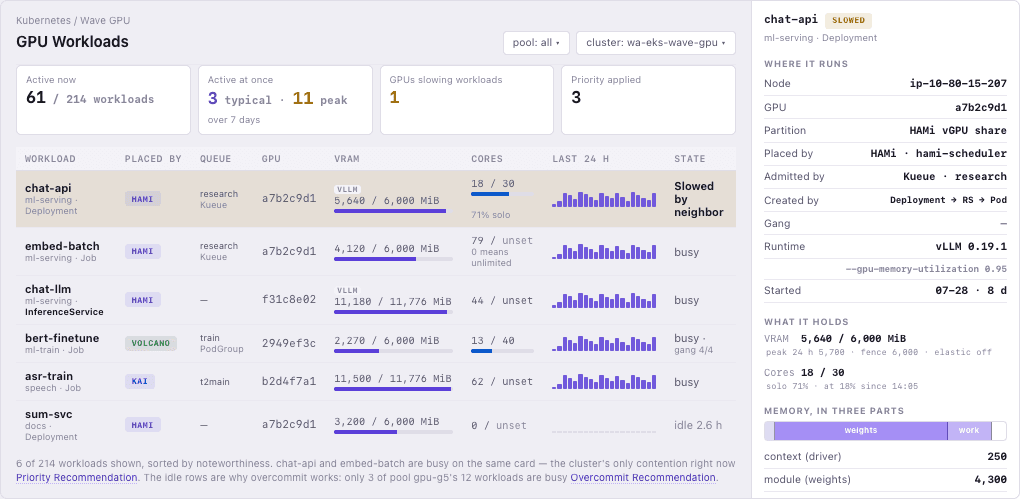
What each GPU workload is actually doing
Every GPU workload in the cluster in one table: what it uses, how it runs, and how it was placed.
Memory and compute, used against reserved, the pattern over the last 24 hours, and the current state. When a workload is slowed down, the table names the workload causing it.
The kind of object, such as Deployment, Job or InferenceService. The runtime, such as vLLM. And whether the pods have to start together as a group.
The scheduler that placed it (HAMi, Volcano, KAI) and the queue it came through (Kueue). The placement path stays visible on a cluster running several schedulers at once.
Answers “are the GPU workloads running well” in one table.
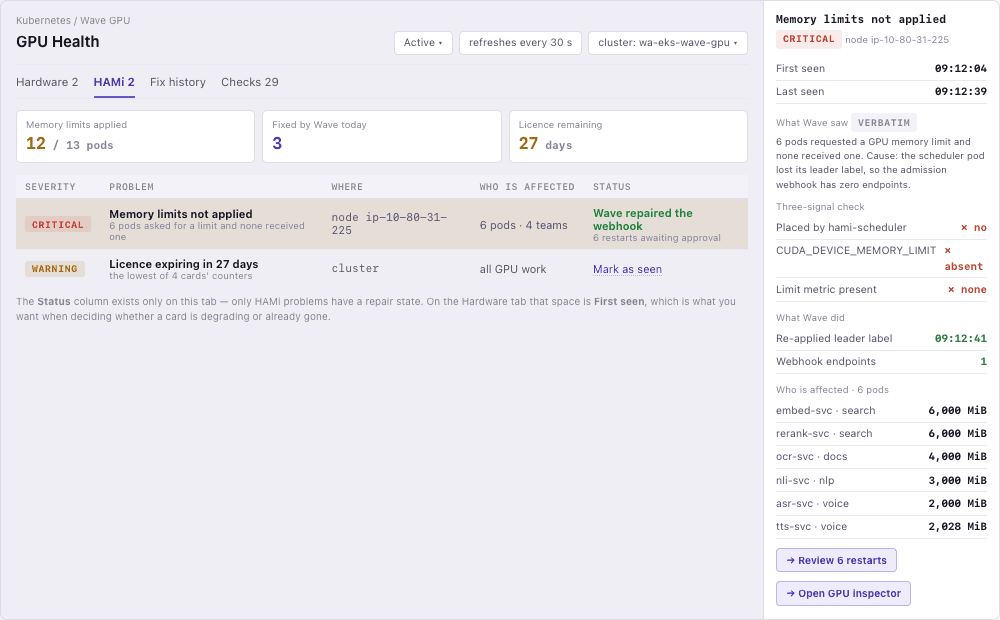
29 checks: 12 on the hardware, 17 on the sharing layer
GPU trouble comes from two places. A hardware fault and a sharing-layer fault have different causes and different fixes, so they are checked separately.
XID errors, ECC memory errors, temperature, PCIe and throttling, read from DCGM signals. These run on any GPU cluster, shared or not.
These 17 apply only when card sharing is in use. They cover isolation, the admission webhook, the device plugin, configuration drift and the license. Each finding comes with its cause and the pods affected, quoted from the source.
A safe repair, such as re-applying a label, is applied automatically. A pod restart is prepared and waits for approval.
Finds isolation that has quietly turned off, before a person notices.
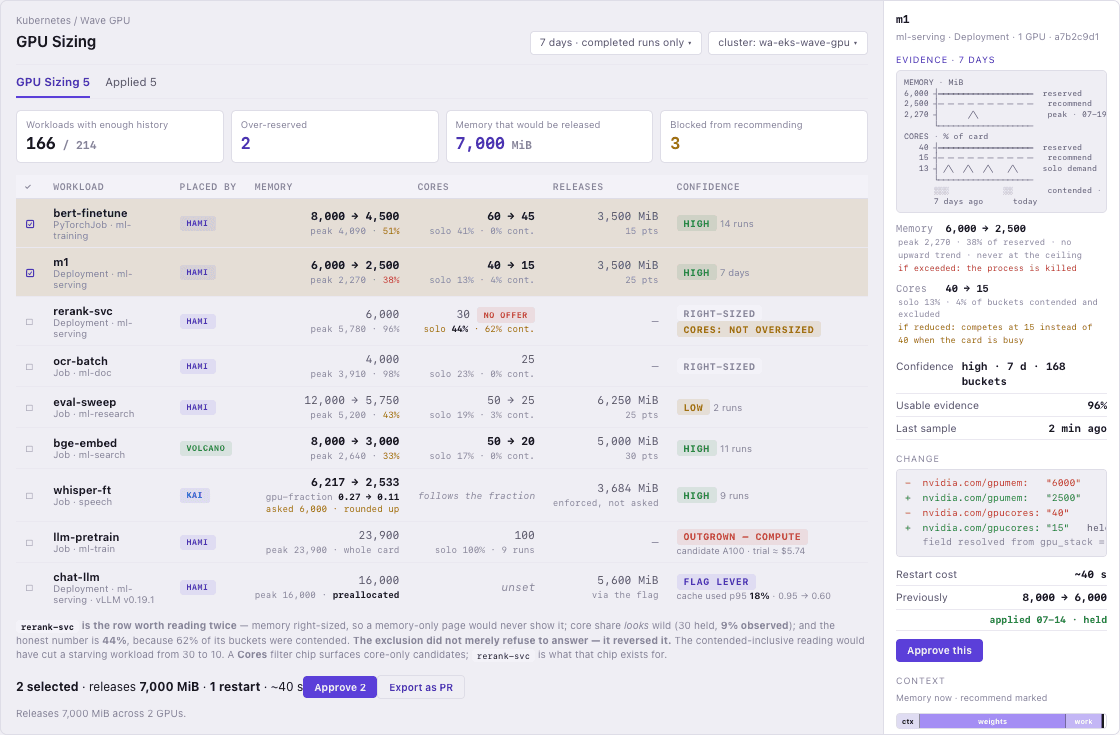
Guessed GPU reservations, corrected by measurement
A GPU reservation usually starts as a guess. GPU Sizing measures what a workload actually uses and proposes a reservation that fits it.
It measures how much GPU a workload really uses and compares that with the reservation. When the gap is large, it proposes a smaller value.
Memory is never cut below the highest point the workload reached, because crossing a memory limit ends the process. A workload that already fits gets no proposal.
Nothing changes on its own. Approve it on the screen, or export it as a pull request. If a workload crosses its limit after the change, the previous value is restored.
When reservations match measurements, more workloads fit safely on the same card.
Runs on the cluster you have today
The four screens above need nothing installed beyond the GPU cluster you already run. The stock NVIDIA device plugin, one whole card per workload, no sharing layer. There is nothing to rewrite.
Wave GPU is a layer on top. Your scheduler is not replaced.
It drops into clusters running Kubeflow, Kueue or KServe.
PyTorch, TensorFlow and vLLM workloads run exactly as they do now.
The four screens above need nothing installed beyond the GPU cluster you already run. Everything below is the second step: sharing the card.
Share one card across several workloads, with HAMi Enterprise from Dynamia
HAMi is a sharing layer for Kubernetes, built by Dynamia. The base sharing capability is part of the HAMi open source project. Four further capabilities open in HAMi Enterprise: overcommit, priority, turbo and elastic memory. Wave GPU operates all five. It measures where sharing is safe, proposes the settings, and watches what happens after.
One card shared safely by several workloads
You do not ask for “half a GPU”. You write a number of MiB in the manifest, and the container sees exactly that much.
PyTorch and TensorFlow run with no code change. The work happens in the infrastructure layer.
NVIDIA, Huawei Ascend, Cambricon, Hygon, Iluvatar and Moore Threads are handled the same way.
It is middleware on standard Kubernetes. Your scheduler stays where it is.
resources:
  limits:
    nvidia.com/gpu: 1
    nvidia.com/gpumem: 10000   # MiB · hard limit
nvidia.com/gpucores: 30 # % · share when workloads competeIdle models move to host memory so the busy ones keep the card
Overcommit means promising workloads more memory than the card physically has.
An inference model that has had no request for a while is moved out of GPU memory and into the server main memory. Nobody has to clean up.
When a new request arrives, the model moves back into GPU memory. The caller never sees this happen.
Because the memory limit can be set above the physical capacity, two to three times as many inference services fit on one card, counted against the same card sharing without overcommit. Counted against a card with no sharing at all, the results in the last section are larger.
Expensive GPU memory stops being fixed storage. It becomes fast storage for whatever is working right now.
All four workloads believe they are alive. None of them knows which of the two it is sitting in.
This does not hold when every model is busy at the same time. Models then move back and forth across the PCIe bus and everything gets slower. The value is in a set of models that are used only now and then. Wave GPU works out a safe ratio for each node and recommends it.
Production is served first, and the job behind it is not killed
A workload that must not be late, such as real-time inference, takes the compute the moment it asks for it.
The lower-priority job pauses at a CUDA kernel boundary, which is a safe point between two units of GPU work. It is not force-killed.
The paused job keeps its state in GPU memory and carries on from there once the card is free again.
Batch work fills the gaps when the production service is quiet. Production response time does not change.
The lower-priority job is not killed. It stops at a safe point and continues when the card is free. Its work stays in GPU memory the whole time.
Turning it on is one annotation, nvidia.com/priority. Workload code does not change. Wave GPU uses its record of past contention to propose which workload should be the higher one.
Close to the speed of an unshared card, with memory isolation still on
To share a card, the engine has to look at every GPU call once. The more small operations a workload sends, the more this adds up.
Memory isolation stays exactly as it was. Only the compute-side check is bypassed. Isolation is not given up.
LLM serving and real-time inference, where speed comes before density.
It is switched on with an environment variable. No code change.
Speed cost against the same card with no sharing layer. Lower is better. Measured on one NVIDIA A10G, with a workload that sends many small operations one after another.
Measured with a workload that sends many small operations one after another. A workload built from large matrix operations spends less of its time in the check, so the difference there is smaller.
A traffic spike raises the limit instead of restarting the container
The GPU memory limit is changed without restarting the container and without dropping the requests already in flight.
When traffic spikes and memory jumps for a moment, the workload borrows from the memory still free on the node.
Once the load falls, the limit goes back down and the other workloads on the node get that memory.
Long-running LLM serving, where the time spent restarting is time the service cannot answer.
When the spike has passed, the limit goes back down and the memory returns to the other workloads on the node.
With a fixed limit only, the process is ended during the spike, and the service cannot answer while it starts again.
How many workloads fit on one card
The same card, with more workloads on it. No extra cards bought. The three columns are the same test run three ways, so they can be read against each other directly.
Measured on one NVIDIA A10G with 23,028 MiB, using the same workloads on the same cluster, in June and July 2026. Results change with the card type and with the workload, so we measure them again on your own cluster in a three-week pilot.
See Wave GPU on your own cluster
Tell us about your GPU cluster and we will get in touch.
Request a demo