How Alerts Works
This page provides a technical deep-dive into the Wave Alerts system architecture, evaluation pipeline, and delivery mechanisms.
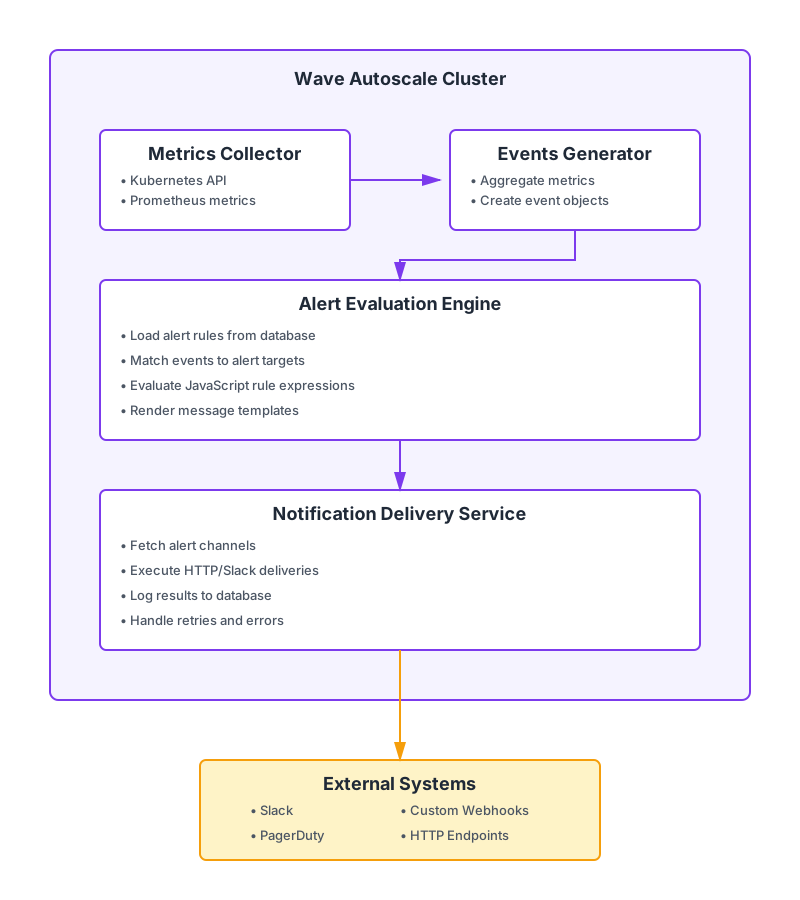
Architecture Overview
Data Model
Alert Channels
Alert channels are stored with the following schema:
struct AlertChannel {
    id: String,                        // UUID v7
    name: String,                      // Human-readable name
    alert_channel_type: AlertChannelType, // http | slack_webhook | slack_web_api
    metadata_json: AlertChannelData,   // Type-specific configuration
    created_at: i64,                   // Unix timestamp
    updated_at: i64,                   // Unix timestamp
    deleted_at: Option<i64>,           // Soft-delete timestamp
}
AlertChannelData Variants:
// HTTP Webhook
struct AlertChannelHttpData {
    url: String,
    method: Option<HttpMethod>,        // POST | PATCH | PUT | DELETE
    headers: Option<HashMap<String, String>>,
    proxy: Option<String>,
}

// Slack Webhook
struct AlertChannelSlackWebhookData {
    webhook_url: String,
    proxy: Option<String>,
}

// Slack Web API
struct AlertChannelSlackWebApiData {
    token: String,                     // Bot token (xoxb-)
    channel: String,                   // Channel ID or name
    proxy: Option<String>,
}
Alert Rules
Alert rules are stored with the following schema:
struct Alert {
    id: String,                            // UUID v7
    title: String,                         // Human-readable title
    event_type: AlertEventType,            // deployment_workload_metrics | etc
    event_targets: EventTargets,           // None | All | Specific
    event_rule_expression: String,         // JavaScript expression
    event_rule_check_interval_min: i32,    // Evaluation frequency
    alert_messages_json: Vec<AlertMessage>,// Messages to send
    created_at: i64,                       // Unix timestamp
    updated_at: i64,                       // Unix timestamp
    deleted_at: Option<i64>,               // Soft-delete timestamp
}
EventTargets Variants:
enum EventTargets {
    None,                                  // Disabled
    All {
        resource_type: ResourceType        // deployment
    },
    Specific(Vec<Resource>)                // Targeted resources
}

struct Resource {
    resource_type: ResourceType,           // deployment
    namespace: Option<String>,             // None = all namespaces
    name: Option<String>,                  // None = all names
}
AlertMessage:
struct AlertMessage {
    alert_channel_id: String,              // Reference to AlertChannel.id
    message: String,                       // Template with ${variable} syntax
}
Alert Logs
Every alert execution is logged:
struct AlertLog {
    id: String,                            // UUID v7
    alert_log_group_id: String,            // Groups logs from same evaluation
    alert_channel_id: String,              // Which channel was used
    alert_id: String,                      // Which alert fired
    alert_title: String,                   // Alert title (denormalized)
    response_json: String,                 // HTTP response body
    is_error: bool,                        // Success/failure flag
    reason: String,                        // Error details
    created_at: i64,                       // Unix timestamp
}
Log Retention: 30 days (configurable)
Event Types and Schemas
1. Deployment Workload Metrics
Event Type: deployment_workload_metrics
Description: Aggregated CPU and memory metrics collected over a time window.
Available Fields:
| Field | Type | Description | Usage Context |
|---|---|---|---|
evaluation_period_minutes | number | How long metrics have been collected | Rule expression |
cpu_utilization_arr | number[] | Array of CPU utilization percentages | Rule expression |
memory_utilization_arr | number[] | Array of memory utilization percentages | Rule expression |
namespace | string | Resource namespace | Message template |
workload_name | string | Workload name | Message template |
alert_title | string | Alert rule title | Message template |
alert_time | string | Trigger timestamp (ISO 8601) | Message template |
Available Functions:
max(array)- Maximum value from arraymin(array)- Minimum value from arrayavg(array)- Average value from arraysum(array)- Sum of array values
Example Rule Expression:
evaluation_period_minutes >= 5 &&
(max(cpu_utilization_arr) >= 80 || avg(memory_utilization_arr) >= 80)
Example Message Template:
🔴 ${alert_title}

Workload: ${namespace}/${workload_name}
CPU Usage: ${max(cpu_utilization_arr)}%
Memory Usage: ${avg(memory_utilization_arr)}%
Evaluation Period: ${evaluation_period_minutes} minutes
Time: ${alert_time}
Default Configuration:
- Check Interval: 1 minute
- Default Target: All deployments
- Default Rule:
evaluation_period_minutes >= 5 && (max(cpu_utilization_arr) >= 80 || avg(memory_utilization_arr) >= 80)
2. Deployment Scheduling Phase
Event Type: deployment_scheduling_phase
Description: Monitors deployment lifecycle START and END events.
Available Fields:
| Field | Type | Description | Usage Context |
|---|---|---|---|
phase | string | "START" or "END" | Rule expression, message template |
deployment_count | number | Number of deployments in this phase | Rule expression, message template |
scheduling_title | string | Title of the scheduling configuration | Message template |
occurred_at | number | Unix timestamp when the phase occurred | Message template |
alert_title | string | Alert rule title | Message template |
alert_time | number | Unix timestamp when the alert fired | Message template |
Example Rule Expression:
phase == "START" || phase == "END"Example Message Template:
📦 Deployment ${phase == "START" ? "Started" : "Ended"}

${scheduling_title}: ${deployment_count} deployment(s) ${phase == "START" ? "started" : "ended"}
Time: ${alert_time}
Default Configuration:
- Check Interval: 1 minute
- Default Target: None (must configure)
- Default Rule:
phase == "START" || phase == "END"
3. Autopilot Logs Missing
Event Type: autopilot_logs_missing
Description: Detects when Autopilot logs are missing for extended periods.
Available Fields:
| Field | Type | Description | Usage Context |
|---|---|---|---|
missing_duration_minutes | number | Minutes since the last log was received | Rule expression, message template |
error_duration_minutes | number | Minutes since the last successful Autopilot operation | Rule expression, message template |
namespace | string | Resource namespace | Message template |
workload_name | string | Workload name | Message template |
alert_title | string | Alert rule title | Message template |
alert_time | number | Unix timestamp when the alert fired | Message template |
Example Rule Expression:
missing_duration_minutes >= 3 && error_duration_minutes >= 1Example Message Template:
⚠️ Autopilot Logs Missing

Workload: ${namespace}/${workload_name}
Missing for: ${missing_duration_minutes} minutes
Action: Check Autopilot pod health
Time: ${alert_time}
Default Configuration:
- Check Interval: 1 minute
- Default Target: All deployments
- Default Rule:
missing_duration_minutes >= 3
Evaluation Pipeline
The alert evaluation pipeline processes events through five stages, from metrics collection to notification delivery.
Request Flow
Collect Metrics and Generate Events
The metrics collector gathers data from multiple sources:
- Kubernetes API: Pod metrics, deployment status
- Prometheus: CPU, memory utilization
- Autopilot Logs: Log timestamps, gap detection
Events are aggregated into three types:
deployment_workload_metrics: Aggregated over evaluation period (e.g., last 5 minutes)deployment_scheduling_phase: Instantaneous START/END eventsautopilot_logs_missing: Gap detection with duration calculation
Load Active Alerts
Query database for alerts where deleted_at IS NULL to get all active alert configurations that need to be evaluated.
Filter by Event Type
Match alert.event_type to event.event_type to only process alerts that are relevant to the current event.
Filter by Targets
Check if event resource matches alert targets:
EventTargets::None: Skip evaluation (alert disabled)EventTargets::All: Match all resources of the typeEventTargets::Specific: Match only listed resources (namespace/name wildcards supported)
Check Evaluation Interval
Skip evaluation if last execution was within event_rule_check_interval_min to prevent duplicate alerts.
Prepare JavaScript Context
Build JavaScript evaluation context with event fields (e.g., cpu_utilization_arr, namespace, workload_name).
Execute Rule Expression
Run event_rule_expression using embedded JavaScript engine:
- Expression must return boolean (
true= trigger,false= skip) - Syntax errors cause evaluation to fail (logged as error)
- 100ms timeout per evaluation
- Memory limit: 10MB per evaluation
JavaScript Engine: Uses embedded JavaScript runtime (QuickJS or V8) with sandboxed execution. No access to filesystem, network, or system APIs.
Validate Expression Result
Ensure result is boolean, handle type coercion if necessary.
Load Alert Channels
Fetch channel configurations referenced in alert_messages_json.
Render Message Templates
For each message, interpolate variables using the event context:
Template: "CPU: ${max(cpu_utilization_arr)}%"
Context:  { cpu_utilization_arr: [70, 75, 82, 88] }
Result:   "CPU: 88%"
Template Syntax:
${variable}- Simple variable interpolation${function(array)}- Function call (max, avg, min, sum)${condition ? 'yes' : 'no'}- Ternary operator (limited support)
Apply Template Functions
Execute embedded functions (max, avg, min, sum) on array values to compute aggregated metrics.
Validate Template Output
Ensure all variables resolved successfully. Missing variables cause rendering errors and the alert will not be sent.
Fetch Channel Configuration
Load channel from database by alert_channel_id to get endpoint details (URL, authentication, proxy settings).
Build HTTP Request
Construct HTTP request based on channel type (HTTP webhook, Slack webhook, or Slack Web API) with appropriate headers and body.
Execute Delivery
Send notification with appropriate authentication and headers. No automatic retries to prevent alert storms.
Log Delivery Result
Write AlertLog entry with timestamp, response, status, and error details (if any). Logs are retained for 30 days.
Delivery Mechanisms
Wave supports three notification delivery methods, each with specific request construction and error handling.
HTTP Webhook Delivery
Generic HTTP webhook delivery supports any endpoint that accepts HTTP requests.
Request Construction:
POST /webhook HTTP/1.1
Host: example.com
Content-Type: application/json
Authorization: Bearer <token>
User-Agent: WaveAutoscale/1.0

{
  "text": "<rendered message>"
}
Construct HTTP Request
Build request with configured method (POST/PUT/PATCH/DELETE) and target URL.
Add Custom Headers
Apply custom headers from channel configuration (e.g., Authorization, Content-Type).
Set Request Body
Encode rendered message as JSON and set as request body.
Apply Proxy
If configured, route request through HTTP proxy (supports authenticated proxies).
Execute Request
Send request with 30-second timeout and wait for response.
Parse Response
Parse HTTP status code and response body. Log for debugging purposes.
Success Criteria:
- HTTP 2xx status code
- Response body received (logged for debugging)
Failure Handling:
- HTTP 4xx/5xx → Log error with status code and body
- Timeout → Log timeout error
- Network error → Log connection error
- No automatic retries (by design - prevents alert storms)
Slack Webhook Delivery
Simplified Slack integration using incoming webhooks.
Request Construction:
POST /services/T00000000/B00000000/XXXXXXXXXXXXXXXXXXXX HTTP/1.1
Host: hooks.slack.com
Content-Type: application/json

{
  "text": "<rendered message>"
}
POST to Webhook URL
Send HTTP POST request to Slack webhook URL with JSON body containing the message.
Slack Processing
Slack processes the webhook and posts message to the configured channel.
Parse Response
Slack responds with "ok" (success) or error message. Parse and log result.
Success Criteria:
- HTTP 200 status
- Response body contains "ok"
Failure Handling:
- Slack errors logged (invalid_token, channel_not_found, etc.)
- Rate limiting handled (HTTP 429 → logged, no retry)
Slack Web API Delivery
Advanced Slack integration using the Web API for richer features.
Request Construction:
POST /api/chat.postMessage HTTP/1.1
Host: slack.com
Content-Type: application/json
Authorization: Bearer xoxb-<token>

{
  "channel": "C1234567890",
  "text": "<rendered message>"
}
Authenticate Request
Include bot token in Authorization: Bearer header for API authentication.
Specify Target Channel
Set target channel using channel ID (e.g., C1234567890) or channel name (e.g., #alerts).
POST to API Endpoint
Send request to Slack Web API chat.postMessage endpoint.
Parse API Response
Slack responds with JSON containing message details or error information.
Success Criteria:
- HTTP 200 status
- JSON response with
ok: true
Failure Handling:
- Authentication errors (invalid_auth, token_revoked)
- Channel errors (channel_not_found, not_in_channel)
- Rate limiting (HTTP 429)
- All errors logged with details from Slack API response
Performance Characteristics
Evaluation Throughput
- Alerts Evaluated: Up to 1000 alerts/second per evaluation cycle
- Expression Evaluation: ~1ms per rule (JavaScript execution)
- Target Matching: O(n) where n = number of specific resources in EventTargets
Delivery Latency
- Local Processing: < 10ms (rule evaluation + template rendering)
- HTTP Delivery: 100-500ms (depends on endpoint latency)
- Slack Delivery: 200-800ms (depends on Slack API latency)
- Total End-to-End: ~1-2 seconds from event generation to notification delivery
Resource Usage
- Memory: ~50MB per 1000 alert rules
- CPU: ~0.1 core per 100 alerts evaluated per minute
- Database: ~1KB per alert rule, ~500 bytes per alert log entry
- Network: Minimal (only outbound HTTP requests for notifications)
Scalability Limits
- Max Alerts per Cluster: 10,000 (soft limit, configurable)
- Max Channels per Cluster: 1,000 (soft limit)
- Max Alert Logs Retained: 30 days (configurable)
- Max Message Size: 4KB (Slack limit)
- Max Concurrent Deliveries: 100 (connection pool size)
Security Model
Authentication
- API Access: Bearer token authentication required for alert/channel CRUD
- RBAC: Role-based access control (admin required for alert management)
- Audit Trail: All changes logged with user ID and timestamp
Channel Security
HTTP Webhooks:
- HTTPS strongly recommended (HTTP allowed but discouraged)
- Bearer tokens/API keys stored encrypted at rest
- No credential exposure in logs (masked in AlertLog entries)
Slack Integration:
- Bot tokens stored encrypted at rest
- Webhook URLs treated as secrets
- Tokens never logged or exposed in API responses
Expression Sandboxing
- JavaScript execution in isolated sandbox
- No access to filesystem, network, or system calls
- Memory and CPU limits enforced
- Timeout prevents infinite loops
Network Security
- Outbound connections only (no inbound from alert channels)
- Proxy support for enterprise environments
- TLS certificate validation enforced
- No credential caching (credentials fetched per delivery)
Error Handling and Debugging
Validation Errors
Rule Expression Validation:
{
  "is_valid": false,
  "error": "Syntax error: Unexpected token '}'",
  "metadata": null
}
Message Template Validation:
{
  "is_valid": false,
  "error": "Invalid fields used: unknown_field. Allowed fields: cpu_utilization_arr, memory_utilization_arr",
  "metadata": {
    "used_fields": ["unknown_field"],
    "preview": null
  }
}
Runtime Errors
Rule Evaluation Failure:
- Logged to AlertLog with
is_error: true - Reason: "JavaScript execution error: < details> "
- Alert remains active (no automatic disable)
Delivery Failure:
- Logged to AlertLog with
is_error: true - Reason includes HTTP status code and response body
- Example: "HTTP 401: Unauthorized - Invalid token"
Debugging Tips
- Check Alert Logs: Primary source of truth for what happened
- Test Channels: Use test button before deploying to production
- Validate Expressions: Use validation API before saving rules
- Monitor Latency: Track
created_atin AlertLog to measure delivery time - Audit Changes: Review
updated_attimestamps to correlate issues with config changes
Advanced Topics
Custom Functions
Currently supported functions in rule expressions:
max(array)  // Maximum value
min(array)  // Minimum value
avg(array)  // Average (mean) value
sum(array)  // Sum of all values
Example Usage:
// Alert if max CPU in last 5min > 80% AND avg memory > 70%
evaluation_period_minutes >= 5 &&
max(cpu_utilization_arr) > 80 &&
avg(memory_utilization_arr) > 70
Alert Deduplication
Alerts do NOT deduplicate by default. If a rule evaluates to true every check interval, it will send notifications every interval.
Best Practice: Add evaluation period requirements to avoid rapid-fire alerts:
// Without period requirement (alerts every minute if CPU > 80%)
max(cpu_utilization_arr) > 80

// With period requirement (alerts only if sustained 5+ minutes)
evaluation_period_minutes >= 5 && max(cpu_utilization_arr) > 80
Multi-Channel Delivery
A single alert can send to multiple channels:
{
  "alert_messages_json": [
    {
      "alert_channel_id": "pagerduty-prod",
      "message": "CRITICAL: ${alert_title} - ${namespace}/${workload_name}"
    },
    {
      "alert_channel_id": "slack-ops",
      "message": "⚠️ Alert: ${alert_title}\nWorkload: ${namespace}/${workload_name}\nCPU: ${max(cpu_utilization_arr)}%"
    }
  ]
}
Both messages are rendered and delivered independently. If one fails, the other still attempts delivery.
Proxy Configuration
For enterprise environments requiring HTTP proxies:
{
  "type": "http",
  "data": {
    "url": "https://external-api.example.com/webhook",
    "proxy": "http://proxy.corp.example.com:8080"
  }
}
Proxy applies to:
- HTTP webhook deliveries
- Slack webhook deliveries
- Slack Web API deliveries
Authentication to proxy (if required) must be included in proxy URL:
http://username:password@proxy.corp.example.com:8080