Idle Node Detection
An idle node is one you pay for around the clock but no workload is using. Idle Node Detection finds them, nodes running only node-level DaemonSets or nothing at all, and totals the CPU and memory they waste, so you can consolidate workloads or scale the nodes down instead of paying for empty capacity.
Open it under Wave Diagnosis in the sidebar, then Idle Nodes. The cluster selector and date-range picker scope the view, and the finding banner answers "Are you paying for nodes you don't use?"
What counts as idle
A node is idle when it carries no application pods — only node-level DaemonSets. That is what the Detected Reasons column shows: Node only contains DaemonSet pods.
A node reading as completely empty is treated as a data gap, not as idle (Wave 3.4.5+). A schedulable node always runs at least some DaemonSet pods, so a zero-pod reading means Wave's pod cache lost that node's pods — a metrics or agent gap followed by a cache eviction — rather than a genuinely unused node. Such a node is classified as indeterminate and skipped for both raising and resolving an idle finding, so a transient collection gap no longer produces a flapping idle node. Earlier versions reported these as Node has no pods.
The console status label for a finding that has cleared was also renamed from active to resolved in 3.4.5.
Pod classification
To decide whether a node is idle, Wave first sorts every pod on it into three groups:
- System pods run core Kubernetes and platform services and are expected on every node, so they never count as utilization. Examples:
kube-proxy,coredns,etcd, and anything inkube-systemoristio-system. - DaemonSet pods are one-per-node agents for monitoring, logging, and networking, expected even on an unused node. Examples:
node-exporter,fluentd,calico-node, a metrics or log collector. - Application pods are the real work: Deployments, StatefulSets, and Jobs. Even one of these means the node is in use.
So the rule is simple: only DaemonSets (or nothing) and zero application pods equals idle.
Safety period. A node must stay idle across an extended window (about a week by default), not just a moment, before it is flagged. This keeps short-lived states, like a cluster-autoscaler scale-down delay or a batch job finishing, from tripping a false positive.
Opt-out. To exclude a node you keep on purpose (reserved or standby capacity), annotate it and it drops out of detection:
kubectl annotate node <node-name> waveautoscale.io/idle-node-detection="false"The Idle Nodes page
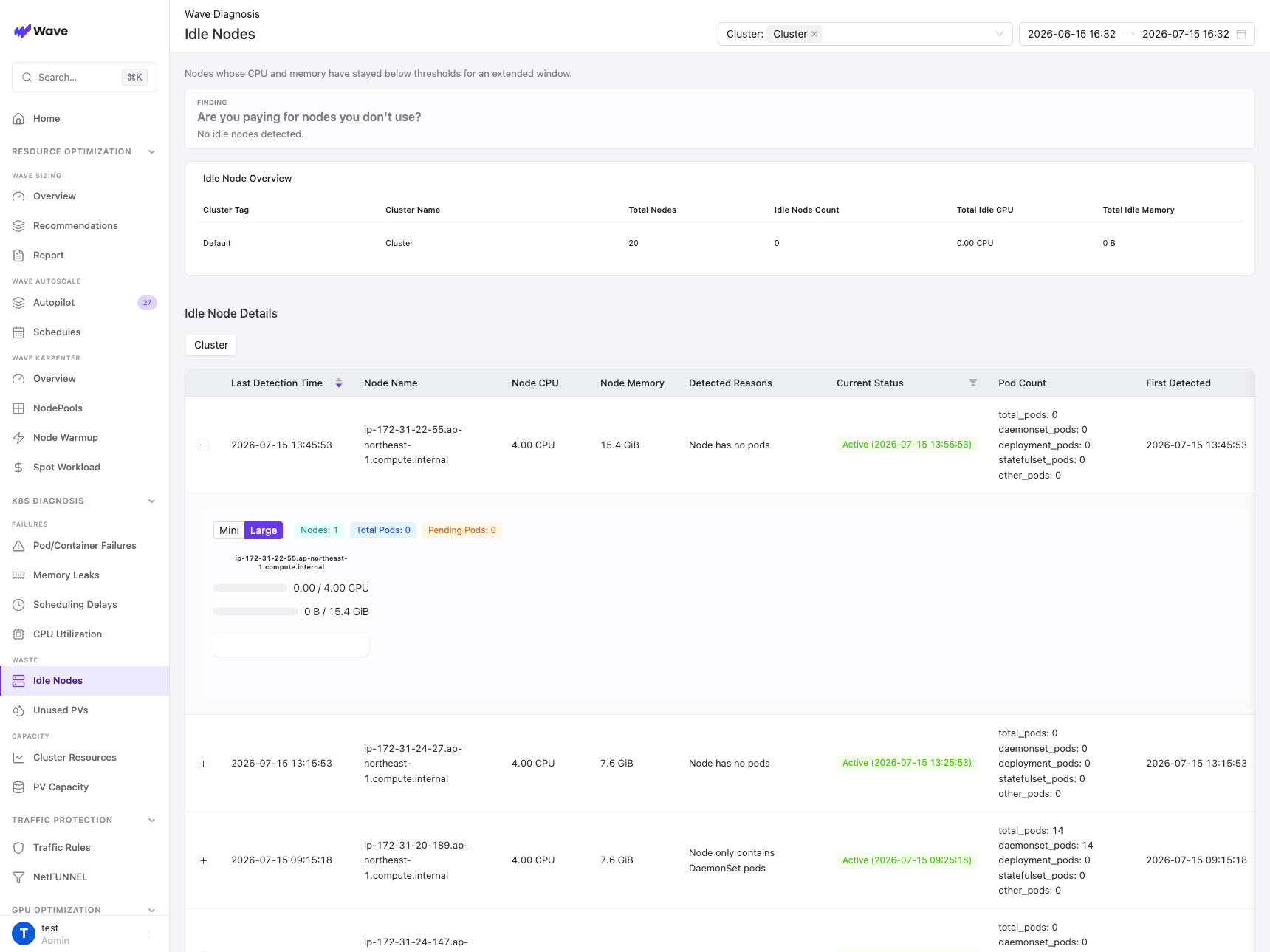
Idle Node Overview. A per-cluster rollup: Cluster Tag, Cluster Name, Total Nodes, Idle Node Count, Total Idle CPU, and Total Idle Memory. The Idle Node Count reflects nodes that are idle right now (seen in the most recent detection window and not yet recovered), so it measures current waste rather than history.
Idle Node Details. One row per node that was idle at some point in the selected range, newest first: Last Detection Time, Node Name, Node CPU, Node Memory, Detected Reasons, Current Status, Pod Count, and First Detected.
- Current Status: Active (green) means the node has since picked up workloads and is no longer idle; Idle (red) means it is idle right now. Filter to either.
- Pod Count breaks down as total, daemonset, deployment, statefulset, and other, so you can confirm at a glance that only DaemonSets remain.
Expand a row for the node snapshot: a Mini / Large card showing the node's CPU and memory usage against its capacity, plus the pods that were on it at detection time. That is enough to decide whether to remove, reassign, or keep the node.
What to do when a node is flagged
-
Remove it when it is truly idle with no future need. Drain it (keeping DaemonSets), delete the node, then terminate the underlying instance:
kubectl drain <node-name> --ignore-daemonsets --delete-emptydir-data kubectl delete node <node-name> # then terminate the VM/instance in your cloud provider -
Consolidate when you would rather raise utilization than delete. Relax the taints or labels that keep workloads off the idle node, let the scheduler pack onto it, then delete the nodes that empty out elsewhere. This reclaims capacity at zero cost, useful when Cluster Resource Forecast warns of a shortage.
-
Keep it when the node is idle on purpose. Add the opt-out annotation above so it stops appearing in the report.
Verify before deleting. Confirm the node cleared the full idle window, check its labels, taints, and annotations for a reserved purpose, and confirm ownership with the team if it is unclear. Deleting the wrong node can cause a production outage.
When idle is legitimate
Some idle nodes are intentional. Opt these out rather than deleting them:
- Reserved or burst capacity held for traffic spikes.
- Scheduled batch jobs: nodes kept for nightly ETL or cron work.
- Blue-green standby nodes waiting for the next deployment swap.
- GPU nodes between training runs. These are the most expensive to leave idle by mistake (a single
p3.8xlargeidles at roughly 12 dollars per hour), so tag them clearly or scale them to zero when unused.
Use cases
Cut spend on unused nodes
Sort the details by node capacity, confirm the largest nodes cleared the full idle window, then drain and delete them. Ten idle m5.xlarge nodes removed is roughly 1,500 dollars a month back, with no impact on running workloads.
Reclaim capacity instead of buying it
When Cluster Resource Forecast warns of a shortage while nodes sit idle, consolidate onto the idle capacity first: relax the taints or labels blocking placement, let workloads pack on, and delete the nodes that empty elsewhere. That is a capacity increase at zero cost.
Find leftovers after big changes
Migrations, large workload deletions, and failed autoscaling all leave nodes behind. Idle Node Detection surfaces those orphans automatically, so cluster cleanup does not depend on someone remembering to audit by hand.
Related
- Wave Diagnosis Overview
- Cluster Resource Forecast: if capacity is forecast to run short while nodes sit idle, consolidate onto them first.
- Smart Sizing: right-size workloads so they pack onto fewer nodes, which turns more nodes idle to reclaim.
- Pod Scheduling Delay: scheduling failures alongside idle nodes usually mean taints, labels, or affinity are blocking placement.