Auto Clean Up
Auto Clean Up identifies and removes unused Persistent Volumes to reduce storage costs and prevent orphaned resources from accumulating in your cluster. Instead of manual cleanup scripts and periodic audits, Wave continuously monitors for unused PVs and safely removes them using multiple layers of protection mechanisms.
What is Auto Clean Up?
Auto Clean Up is Wave's intelligent PV cleanup system that automatically detects and removes orphaned Persistent Volumes, those in Released or Available phase with no bound PVC.
The system employs multiple protection mechanisms including finalizer detection, PVC binding checks, annotation-based opt-outs (both PV-level and StorageClass-level), and volume attachment verification. Detection metadata is tracked with timestamps for audit compliance and operational visibility.
How It Works
Auto Clean Up operates through a continuous detection and cleanup cycle:
Detection Phase
- Scan All PVs: Checks every Persistent Volume in the cluster
- Phase Check: Evaluates if PV is in a potentially unused state:
- Phase is Released (previous PVC deleted, reclaim policy = Retain)
- Phase is Available (never been bound to a PVC)
- Phase is Bound but the referenced PVC no longer exists
- Apply Protection Checks: Verifies PV doesn't have active protections (see Protection Mechanisms below)
- Record Detection Details: Logs PV name, namespace, storage class, capacity, phase, detection reasons, and timestamp
Protection Mechanisms
Wave applies multiple layers of protection to prevent accidental deletion:
1. Custom Finalizer Protection
- Detects custom finalizers (e.g.,
velero.io/*,backup.company.com/*) - Excludes standard Kubernetes/CSI auto-managed finalizers (
kubernetes.io/*,k8s.io/*,external-attacher/*,external-provisioner.*) - PVs with custom finalizers are never marked as unused
2. PVC Binding Check
- Verifies if the bound PVC still exists in the cluster
- Uses efficient HashMap lookup for real-time validation
- PVs with existing PVCs are protected automatically
3. PV-Level Annotation
- Annotation:
waveautoscale.io/pv-cleanup: disabled - Administrators can protect individual PVs
- Takes precedence over all other settings
4. StorageClass-Level Annotation
- Same annotation (
waveautoscale.io/pv-cleanup: disabled) on StorageClass - Protects all PVs using that StorageClass
- More efficient than per-PV annotations for broad exclusions
5. Volume Attachment Check
- Detects active CSI
VolumeAttachmentresources - Prevents deletion of PVs that are currently attached
- Protects against race conditions during pod scheduling
6. Global Enable/Disable Toggle
- Master switch in Settings → PV Lifecycle
- When disabled: Detection continues, but no deletions occur
- Allows safe testing and auditing before enabling cleanup
Cleanup Phase (if enabled)
If Auto Clean Up is globally enabled and the PV passes all protection checks:
- Check Global Toggle: Verify cleanup is enabled in Settings → PV Lifecycle
- Apply Protection Checks: Verify PV doesn't match any protection mechanism
- Call Delete API: Submit deletion request to Kubernetes API
- Log Status: Record as InProgress, Completed, or Failed with error details
- Track Resolution: If PV becomes bound again, mark as resolved (prevents cleanup)
Configuration
Auto Clean Up uses both global and granular configuration:
| Setting | Description | Location | Default |
|---|---|---|---|
| Enable Cleanup | Global on/off toggle | Storage → PV Auto Cleanup | Disabled |
| PV Opt-out Annotation | Per-PV cleanup disable | PV metadata: waveautoscale.io/pv-cleanup: disabled | Not set |
| StorageClass Opt-out | Disable cleanup for all PVs in a StorageClass | StorageClass metadata: waveautoscale.io/pv-cleanup: disabled | Not set |
Protection Through Explicit Configuration
Wave protects PVs through explicit mechanisms (finalizers, annotations, bindings, attachments) rather than time-based delays.
To protect PVs temporarily before cleanup:
- Use the PV-level annotation:
kubectl annotate pv <name> waveautoscale.io/pv-cleanup=disabled - Use StorageClass-level annotation to protect all PVs of a storage type
- Remove annotation when ready for cleanup eligibility
Enabling Auto Clean Up
Configure cluster-wide cleanup in the K8s Storage interface:
Step 1: Navigate to Storage
- Navigate to Storage in the Wave console
- Select the PV Auto Cleanup tab
- You'll see the global cleanup toggle and detection logs
Step 2: Enable Cleanup
- Toggle Enable Auto Cleanup to ON
- The system immediately begins (on next task cycle, ~10 minutes):
- Detecting unused PVs
- Logging all detections
- Submitting deletion API calls for eligible PVs that pass all protection checks
- PV removal typically takes 2 task cycles (~20 minutes total):
- Cycle 1: Detection + deletion API call (status: InProgress)
- Cycle 2: Verification of deletion completion (status: Completed)
Step 3: Monitor Detection Logs
Even before enabling cleanup, you can review detected unused PVs:
- Navigate to Insights → Cost Efficiency
- Select the Unused PV Detection tab
- Review all detected unused PVs with their detection reasons and status
This allows you to audit detected PVs before enabling actual cleanup.
Protection Configuration
Wave provides flexible opt-out mechanisms at both PV and StorageClass levels.
PV-Level Protection
Protect individual PVs from cleanup using Kubernetes annotations:
Adding the Opt-Out Annotation
Add this annotation to PVs you want to exclude from cleanup:
apiVersion: v1
kind: PersistentVolume
metadata:
  name: important-backup-pv
  annotations:
    waveautoscale.io/pv-cleanup: disabled
spec:
  capacity:
    storage: 100Gi
  # ... rest of PV spec
Apply the annotation:
# Method 1: Patch existing PV
kubectl annotate pv important-backup-pv waveautoscale.io/pv-cleanup=disabled

# Method 2: Apply YAML with annotation
kubectl apply -f pv-with-annotation.yaml

# Verify annotation
kubectl get pv important-backup-pv -o jsonpath='{.metadata.annotations}'
When to Use Opt-Out
Use the opt-out annotation for:
- Backup Volumes: PVs used for periodic backups that may be temporarily unbound
- Manually Managed Storage: PVs that administrators bind/unbind regularly
- Disaster Recovery: PVs reserved for emergency failover scenarios
- Test/Development: PVs in development clusters where manual control is preferred
Annotation Takes Precedence
Even if global cleanup is enabled, PVs with the opt-out annotation will never be deleted automatically. They will still appear in detection logs but with a note indicating they're excluded from cleanup.
To resume automatic cleanup for a PV, remove the annotation:
kubectl annotate pv important-backup-pv waveautoscale.io/pv-cleanup-StorageClass-Level Protection
Protect all PVs using a specific StorageClass by annotating the StorageClass itself:
apiVersion: storage.k8s.io/v1
kind: StorageClass
metadata:
  name: backup-storage
  annotations:
    waveautoscale.io/pv-cleanup: disabled
provisioner: kubernetes.io/aws-ebs
parameters:
  type: gp3
  fsType: ext4
Apply the annotation to an existing StorageClass:
# Annotate StorageClass to protect all its PVs
kubectl annotate storageclass backup-storage waveautoscale.io/pv-cleanup=disabled

# Verify annotation
kubectl get storageclass backup-storage -o jsonpath='{.metadata.annotations}'

# View all PVs using this StorageClass
kubectl get pv -o json | jq -r '.items[] | select(.spec.storageClassName=="backup-storage") | .metadata.name'
When to Use StorageClass-Level Protection
Use StorageClass annotation for:
- Backup Storage Tiers: StorageClasses dedicated to backup workloads that cycle PVs frequently
- Development/Test Storage: StorageClasses used by dev teams who manually manage PV lifecycles
- Specialized Storage: Premium or archive storage classes requiring manual oversight
- Migration Periods: Temporarily protect all PVs during cluster migrations or storage reconfigurations
StorageClass vs. PV Annotation
| Approach | Use Case | Scope | Efficiency |
|---|---|---|---|
| StorageClass Annotation | Protect all PVs of a storage type | All PVs in class | High (one annotation) |
| PV Annotation | Protect specific individual PVs | Single PV | Lower (per-PV) |
Best Practice: Use StorageClass annotation for broad protection, PV annotation for exceptions.
To re-enable cleanup for the entire StorageClass:
kubectl annotate storageclass backup-storage waveautoscale.io/pv-cleanup-Static PVs (Manually Created)
What are Static PVs? Static PVs are Persistent Volumes manually created by administrators without using a StorageClass (dynamic provisioning).
Auto Clean Up Behavior:
- Static PVs are treated identically to dynamically provisioned PVs
- All protection mechanisms apply: finalizers, PV-level annotation, volume attachments, PVC binding check
- StorageClass-level annotation protection does NOT apply (no StorageClass to annotate)
- If in Available or Released phase with no protections, they will be cleaned up
Protecting Static PVs:
Since StorageClass-level protection doesn't apply, use:
-
PV-level annotation (recommended):
kubectl annotate pv my-static-pv waveautoscale.io/pv-cleanup=disabled -
Custom finalizers (if using backup tools):
apiVersion: v1
kind: PersistentVolume
metadata:
  name: my-static-pv
  finalizers:
    - velero.io/my-backup-finalizer
Important for Static PV Users
If you regularly create static PVs (e.g., for NFS shares, iSCSI LUNs), add the opt-out annotation immediately after creation to prevent accidental cleanup while waiting for PVC binding.
For dynamic provisioning, use StorageClass-level annotation instead for easier management.
Detection Reasons
Auto Clean Up records specific reasons for marking each PV as unused:
| Detection Reason | Meaning | Common Cause |
|---|---|---|
| PV phase is Released | Previous PVC deleted, volume not reclaimed | StatefulSet with Retain reclaim policy deleted |
| PV phase is Available | PV created but never bound | Manually created PV waiting for claim |
| Associated PVC {name} no longer exists | PVC reference exists but PVC missing | PVC deleted without deleting PV |
| No PVC is bound to this PV | PV has no claim reference | Orphaned PV from failed provisioning |
Multiple detection reasons may apply to a single PV. All reasons are logged for audit purposes.
Protection Reasons (PV marked as NOT unused):
| Protection Reason | Meaning | Action Needed |
|---|---|---|
| PV has custom finalizers | External system (backup tool, operator) managing PV | Remove finalizer when safe, or leave protected |
| PV cleanup explicitly disabled via annotation | Admin opted out this specific PV | Remove annotation to re-enable cleanup |
| Storage class has cleanup disabled | Entire StorageClass opted out | Remove StorageClass annotation to re-enable |
| PV has active volume attachments | CSI volume currently attached to a node | Wait for pod termination and detachment |
| PVC still exists | Bound PVC found in cluster | PV is actively in use, properly protected |
Understanding Protection Status
Check why a PV is or isn't being cleaned up:
Check All Protection Mechanisms
PV_NAME="your-pv-name"

echo "=== PV Phase ==="
kubectl get pv $PV_NAME -o jsonpath='{.status.phase}'

echo -e "\n\n=== PV Annotations ==="
kubectl get pv $PV_NAME -o jsonpath='{.metadata.annotations.waveautoscale\.io/pv-cleanup}'

echo -e "\n\n=== StorageClass ==="
SC_NAME=$(kubectl get pv $PV_NAME -o jsonpath='{.spec.storageClassName}')
echo "StorageClass: $SC_NAME"
kubectl get storageclass $SC_NAME -o jsonpath='{.metadata.annotations.waveautoscale\.io/pv-cleanup}'

echo -e "\n\n=== Finalizers ==="
kubectl get pv $PV_NAME -o jsonpath='{.metadata.finalizers}'

echo -e "\n\n=== Bound PVC ==="
PVC_NAME=$(kubectl get pv $PV_NAME -o jsonpath='{.spec.claimRef.name}')
PVC_NS=$(kubectl get pv $PV_NAME -o jsonpath='{.spec.claimRef.namespace}')
echo "Claim: $PVC_NS/$PVC_NAME"
kubectl get pvc -n $PVC_NS $PVC_NAME 2>&1

echo -e "\n\n=== Volume Attachments ==="
kubectl get volumeattachment -o json | jq -r ".items[] | select(.spec.source.persistentVolumeName==\"$PV_NAME\") | .metadata.name"
This script checks all six protection mechanisms to understand why a PV is or isn't eligible for cleanup.
Cleanup Status
Each cleanup attempt transitions through these status values:
| Status | Meaning | Description |
|---|---|---|
| NULL / Detection Only | Tracked but not cleaned | Cleanup globally disabled, protected by mechanisms, or deletion failed |
| InProgress | Deletion submitted | Kubernetes API call succeeded, waiting for volume controller |
| Completed | Successfully deleted | PV no longer exists in cluster |
How Failed Deletions are Tracked
Failed deletions don't have a separate "Failed" status. Instead, they're tracked as:
Status: NULL(no cleanup status set)Error flag: trueError reason: <specific error message>
This allows you to distinguish between:
- PVs that haven't been attempted yet (cleanup disabled or protected)
- PVs where cleanup was attempted but failed (error flag set with reason)
Check the Error Reason column in the logs to see specific deletion failures.
Viewing Cleanup Logs
Monitor detected unused PVs and cleanup activity. The detection logs are available in two locations:
Option 1: Storage → PV Auto Cleanup (Recommended)
- Navigate to Storage
- Select the PV Auto Cleanup tab
- This view includes:
- Enable Auto Cleanup toggle at the top
- Comprehensive detection log table below
- All PV details, detection reasons, and cleanup status
Use this view when you want to both configure settings AND review logs in one place.
Option 2: Insights → Cost Efficiency
- Navigate to Insights → Cost Efficiency
- Select the Unused PV Detection tab
- This view shows:
- Detection log table only (read-only)
- Focus on cost analysis and efficiency metrics
- Same data as Storage view
Use this view for cost analysis and when reviewing efficiency insights across multiple areas.
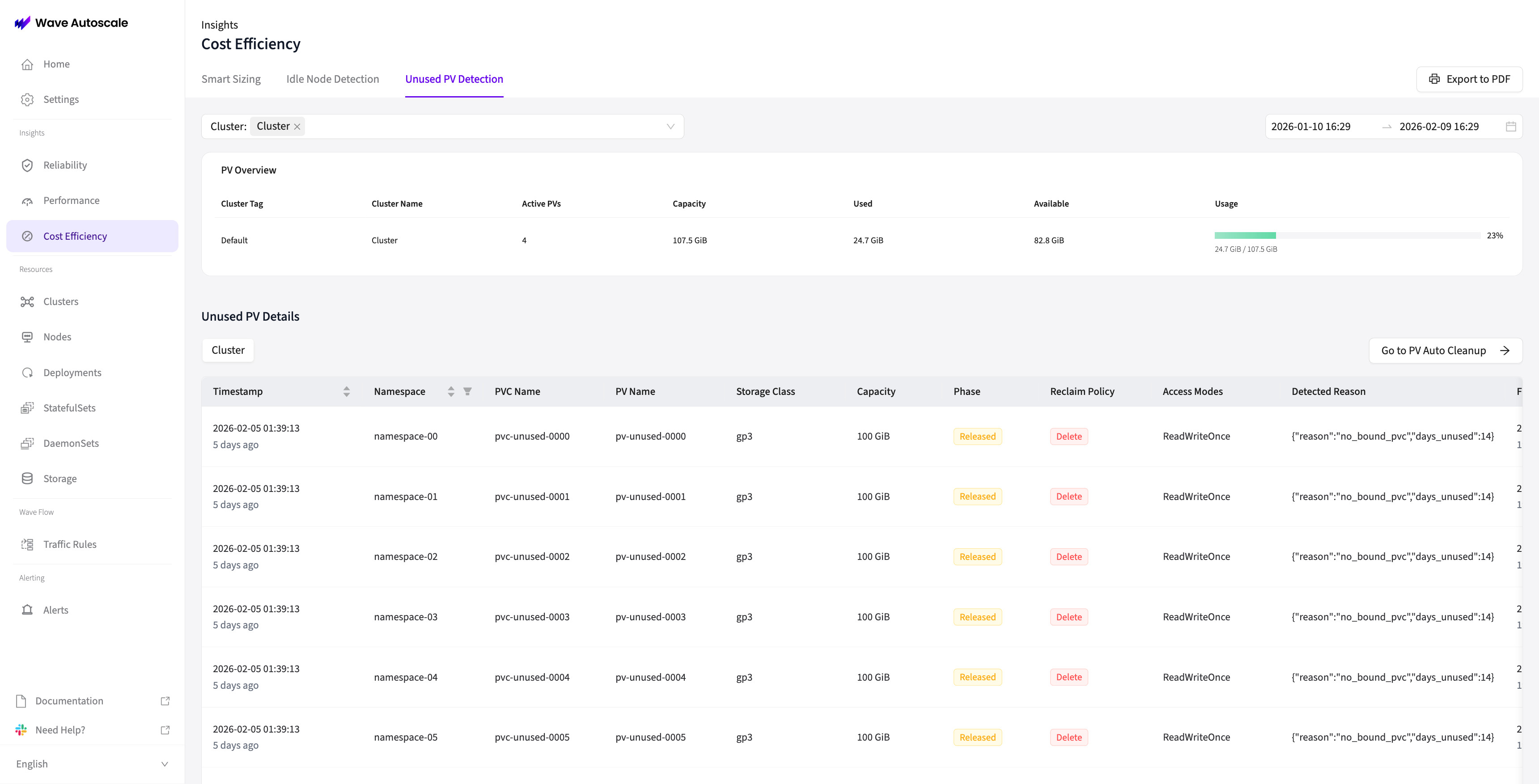
Log Table Columns
| Column | Information | Use Case |
|---|---|---|
| Timestamp | When log entry was created | Sort by detection time |
| Namespace | Kubernetes namespace | Context for associated workloads |
| PV Name | Persistent Volume name | Identify specific volume |
| PVC Name | Bound PersistentVolumeClaim name | Track PV-PVC relationship |
| Storage Class | Storage class name | Cost analysis by storage tier |
| Capacity | PV size in GiB/TiB | Calculate potential cost savings |
| Phase | Current K8s phase | Understand PV lifecycle state |
| Reclaim Policy | Retain, Delete, or Recycle | Understand cleanup behavior |
| Access Modes | ReadWriteOnce, ReadWriteMany, etc. | Storage access characteristics |
| Detection Reason | Why marked as unused (JSON list) | Audit trail and troubleshooting |
| First Detected | Initial detection timestamp | Track when PV became unused |
| Last Detected | Most recent scan timestamp | Verify continuous monitoring |
| Resolved At | When PV was no longer unused | Track resolution events |
| Clean Up Status | InProgress, Completed, or Pending | Track cleanup progress |
| Enabled | Whether cleanup is enabled | Verify configuration |
| Deleted | Whether PV was successfully deleted | Confirm deletion |
| Deletion Error | Error flag if deletion failed | Identify failures |
| Error Reason | Specific error message | Troubleshoot deletion issues |
Detection Reason Format: Displayed as a JSON-parsed list with bullet points showing multiple reasons (e.g., "PV is in Released/Available phase", "No active volume attachments").
The table supports sorting, filtering (by status, error state), and pagination for easy navigation through large clusters.
Common Scenarios
Understand how Auto Clean Up handles different real-world situations:
💾 PVC Deleted, PV Retained
Scenario: StatefulSet deleted, PVCs removed, but PVs remain with Retain reclaim policy
Behavior:
Cycle N: PVC deleted → PV phase changes to Released
Cycle N+1 (10 min later): Auto Clean Up detects unused PV, logs detection, and calls deletion API if cleanup enabled
Cycle N+2 (20 min later): Verifies PV deletion completed
Total time until removal: ~20 minutes (2 task cycles at default 10-minute interval)
Why it happens: Retain reclaim policy prevents automatic Kubernetes deletion Cost impact: PV incurs storage costs until cleaned up Manual action: Can manually delete PV immediately, or add annotation to protect temporarily
🔄 StatefulSet Scale Down
Scenario: StatefulSet scaled from 5 to 2 replicas
Behavior:
PVCs for replicas 2-4 remain (not deleted by scale-down)
PVs remain bound to existing PVCs
Auto Clean Up does NOT detect as unused
Why it happens: StatefulSet scale-down doesn't delete PVCs Cost impact: Unused PVCs and PVs continue incurring costs Manual action: Manually delete unneeded PVCs to trigger cleanup detection
⚠️ Manual PV Creation
Scenario: Administrator manually creates PV, waiting to bind to future PVC
Behavior:
Cycle N: PV created in Available phase
Cycle N+1 (10 min later): Auto Clean Up detects unused PV and calls deletion API if cleanup enabled
Cycle N+2 (20 min later): Verifies PV deletion completed
Total time until removal: ~20 minutes (2 task cycles at default 10-minute interval)
Prevention: Add opt-out annotation immediately after creation to protect during initial cycles.
kubectl annotate pv manual-pv waveautoscale.io/pv-cleanup=disabledAlternative: Use StorageClass annotation if you regularly create manual PVs of a specific type:
kubectl annotate storageclass manual-storage waveautoscale.io/pv-cleanup=disabled✅ PV Rebound After Detection
Scenario: PV detected as unused, then rebound before next cleanup cycle
Behavior:
Cycle 1: PVC deleted, PV Released
Cycle 1: Auto Clean Up detects unused, records detection
Cycle 2: New PVC claims the PV (rebound)
Cycle 2: Auto Clean Up detects PV is now bound
Cycle 2: Marks PV as resolved_at=now(), closes detection log
Result: PV NOT deleted (resolution tracking prevented cleanup)
Why it happens: Manual rebinding, PVC recreation, or operational recovery Result: Resolution tracking successfully prevented unnecessary deletion
Troubleshooting
Common Issues and Solutions
PV Not Being Cleaned Up
PV detected as unused but not deleted despite global cleanup being enabled.
Checklist:
- Verify global cleanup is enabled in Storage → PV Auto Cleanup
- Check PV-level opt-out annotation:
kubectl get pv <pv-name> -o jsonpath='{.metadata.annotations.waveautoscale\.io/pv-cleanup}' - Check StorageClass-level protection:
# Get the StorageClass name for the PV kubectl get pv <pv-name> -o jsonpath='{.spec.storageClassName}' # Check if StorageClass has opt-out annotation kubectl get storageclass <sc-name> -o jsonpath='{.metadata.annotations.waveautoscale\.io/pv-cleanup}' - Check for custom finalizers:
Look for non-Kubernetes finalizers (e.g.,
kubectl get pv <pv-name> -o jsonpath='{.metadata.finalizers}'velero.io/*,backup.company.com/*) - Verify PVC doesn't exist:
# Check if the bound PVC still exists kubectl get pvc -A | grep <pv-claim-ref-name> - Check for volume attachments:
kubectl get volumeattachment -o json | jq -r '.items[] | select(.spec.source.persistentVolumeName=="<pv-name>")' - Review cleanup status for error messages in the Unused PV Detection logs
- Check RBAC permissions:
kubectl auth can-i delete pv --as=system:serviceaccount:wave-autoscale:wave-autoscale-sa
PV Cleaned Unexpectedly
Concerned that PV was deleted when it shouldn't have been.
Verification:
- Check detection logs for why PV was marked as unused
- Verify protection status at time of deletion:
- Did PV have opt-out annotation?
- Did StorageClass have opt-out annotation?
- Were there custom finalizers?
- Was PVC actually deleted?
- Were there volume attachments?
- Review cleanup logs for deletion timestamp and status
- Check Wave audit logs for configuration changes
- Restore from backup if critical and investigate root cause
- Add appropriate protection to similar PVs to prevent recurrence
Wrong PV Deleted
PV that should have been excluded was deleted.
Steps:
- Check if PV had opt-out annotation before deletion
- Review logs for detection reasons (were they valid?)
- Verify cleanup was intentionally enabled globally
- Restore PV data from backup if critical
- Add opt-out annotation to similar PVs to prevent recurrence
Cleanup Failed with Error
PV marked for cleanup but status shows Failed.
Common errors:
- RBAC permissions: ServiceAccount lacks
deletepermission on PVs- Solution: Update ClusterRole with PV delete permission
- Storage provider lock: Underlying storage has active mount or snapshot
- Solution: Remove mounts/snapshots, cleanup will retry
- API timeout: Kubernetes API temporarily unavailable
- Solution: Cleanup will retry on next cycle (typically every few minutes)
- Finalizers blocking: PV has finalizers preventing deletion
- Solution: Review and remove finalizers if safe:
kubectl patch pv <pv-name> -p '{"metadata":{"finalizers":null}}'
- Solution: Review and remove finalizers if safe:
Check error_reason field in logs for specific error message.
Cost Savings Analysis
Auto Clean Up provides tangible cost savings:
Example Cluster:
- 50 unused PVs detected (average 100 GiB each)
- Total: 5000 GiB (5 TiB) of wasted storage
- Storage cost: $0.10/GiB/month
Monthly Savings:
5000 GiB × $0.10/GiB/month = $500/month saved
Annual savings = $6,000/year
View detected unused PVs in the console to calculate your potential savings based on your storage tier pricing.
Related Documentation
- PV Lifecycle Overview: Understand the complete PV Lifecycle Management system
- Getting Started: Step-by-step setup guide for Auto Clean Up
- Auto Expansion: Learn about automatic PVC expansion