Unused PV Detection
Unused PV Detection automatically discovers Persistent Volumes not attached to any Pod, helping you clean up orphaned storage and reduce wasted storage costs.
What is Unused PV Detection?
Unused PV Detection scans all Persistent Volumes (PVs) in your cluster to identify those that are no longer in use. These "unused" or "orphaned" PVs consume storage budget while serving no purpose – they're either unbound entirely or bound to deleted PersistentVolumeClaims (PVCs).
The Insight identifies two types of unused PVs:
- Released PVs: Previously bound to PVCs that were deleted; PV retains data but can't be reused due to
Retainreclaim policy - Available PVs: Never bound to any PVC; created but unused (often from incorrect provisioning or failed deployments)
Common causes of unused PVs:
- Deleted applications that left PVCs behind
- Test environments torn down without cleaning up storage
- Failed deployments that created but never used PVCs
- Misconfigured storage classes with
Retainpolicy - Manual PV provisioning that was never claimed
Data Loss Risk
Deleting PVs permanently destroys data. Always verify data is no longer needed or backed up before deletion. Unused PV Detection helps identify candidates, but you must validate before taking action.
How It Works
Unused PV Detection follows this analysis pipeline:
- PV Scanning: Iterates through all PVs in the cluster
- Status Check: Filters for Released and Available phase PVs
- Binding Analysis: Checks if PV is bound to an existing PVC
- Orphan Detection: Identifies PVs with deleted PVCs (bound but PVC doesn't exist)
- Log Update: Updates existing detection logs or creates new ones (two-loop approach)
- Safety Period: 7-day grace period before cleanup is eligible
- Auto-Cleanup: Optional deletion via
PvCleanupSettings(if enabled) - Resolution Tracking: Monitors if PVs become bound again (false positive resolution)
Technical Implementation
Unused PV Detection uses a two-loop approach for comprehensive tracking:
- File:
core/services/src/tasks/pv_unused_detection/task.rs - Detection: Bound PVs with deleted PVCs, or unbound PVs (Released/Available)
- Two Loops:
- Loop 1: Update existing logs (check if still unused, mark resolved if bound)
- Loop 2: Create new logs for newly detected unused PVs
- Cleanup: Optional auto-deletion via
PvCleanupSettings - Safety Period: 7 days before cleanup eligible
- Opt-Out Annotation:
waveautoscale.io/pv-cleanup: "false" - Update Frequency: Daily
- Minimum Data: None (real-time detection)
The two-loop approach ensures accurate tracking of PV lifecycle changes and prevents duplicate logs.
PV States and Detection
Released State
What it means:
- PV was previously bound to a PVC
- PVC was deleted
- PV retains data but is marked as Released
- PV cannot be reused (reclaim policy:
Retain)
Most common unused PV state – occurs when applications are deleted but storage is left behind.
Example:
$ kubectl get pv
NAME       CAPACITY   STATUS     CLAIM                 STORAGECLASS   REASON   AGE
pv-abc123  100Gi      Released   default/database-pvc  gp2                     30d
Detection Reason: "PVC deleted but PV retains data (Reclaim Policy: Retain)"
Available State
What it means:
- PV was provisioned (manually or dynamically)
- PV has never been bound to any PVC
- PV is waiting for a matching PVC to claim it
Less common – often from incorrect provisioning or failed deployment workflows.
Example:
$ kubectl get pv
NAME       CAPACITY   STATUS      CLAIM   STORAGECLASS   REASON   AGE
pv-xyz789  50Gi       Available   None    gp2                     15d
Detection Reason: "PV provisioned but never claimed"
Bound (but PVC Deleted)
What it means:
- PV shows as Bound in status
- Referenced PVC doesn't exist (was deleted abruptly)
- Stale binding state (Kubernetes hasn't updated PV status yet)
Rare – occurs when PVCs are deleted forcefully or during cluster disruptions.
Detection Reason: "PV bound but PVC not found"
Key Features
- Automatic Discovery: Finds all unused PVs across cluster without manual inspection
- Cluster-Wide View: Group by cluster, reclaim policy, storage class
- Capacity Tracking: Total unused storage size per PV
- Cost Estimation: Monthly storage cost per PV (based on storage class pricing)
- Safety Period: 7-day wait before marking eligible for deletion (prevents premature cleanup)
- Auto-Cleanup: Optional automatic deletion via PV Auto Cleanup feature
- Opt-Out Support: Exclude specific PVs via annotation (for backup/archive PVs)
- Resolution Tracking: Logs when PVs become bound again (false positive detection)
Understanding the Detection View
Accessing the Insight
Navigate to Cost Efficiency > Unused PV Detection in the Wave web console.

Interface Overview
Top Controls:
- Cluster Selector: Choose one or multiple Kubernetes clusters to analyze simultaneously

- Date Range Selector: Select time period to view historical unused PV logs (default: last 90 days based on data retention period)

PV Overview

The overview table provides metrics for active (bound) PVs across all selected clusters:
Table Columns:
- Cluster Tag: Short identifier for the cluster
- Cluster Name: Full cluster name
- Active PVs: Number of PVs currently bound to pods (with tooltip: "Tracks active PVs bound to pods, not detached PVs")
- Capacity: Total storage capacity across all active PVs
- Used: Total storage currently used across all active PVs
- Available: Total available (unused) storage within active PVs
- Usage: Progress bar showing used vs. capacity ratio
Note on PV Overview Table
This table shows active (bound) PVs, not unused PV statistics. It provides context about your cluster's overall storage utilization to help you understand the scale of your storage infrastructure when reviewing unused PVs.
For unused PV counts and details, see the "Unused PV Details Table" below.
Use this overview to understand total storage capacity and utilization across clusters before diving into unused PV cleanup.
Cluster Tabs

After selecting multiple clusters, use the cluster tabs to switch between them and view detailed unused PV logs for each cluster individually.
Navigation to PV Auto Cleanup

Click the "Go to PV Auto Cleanup Tab" button to navigate to the PV Auto Cleanup configuration page, where you can enable and configure automatic deletion of unused PVs.
Unused PV Details Table
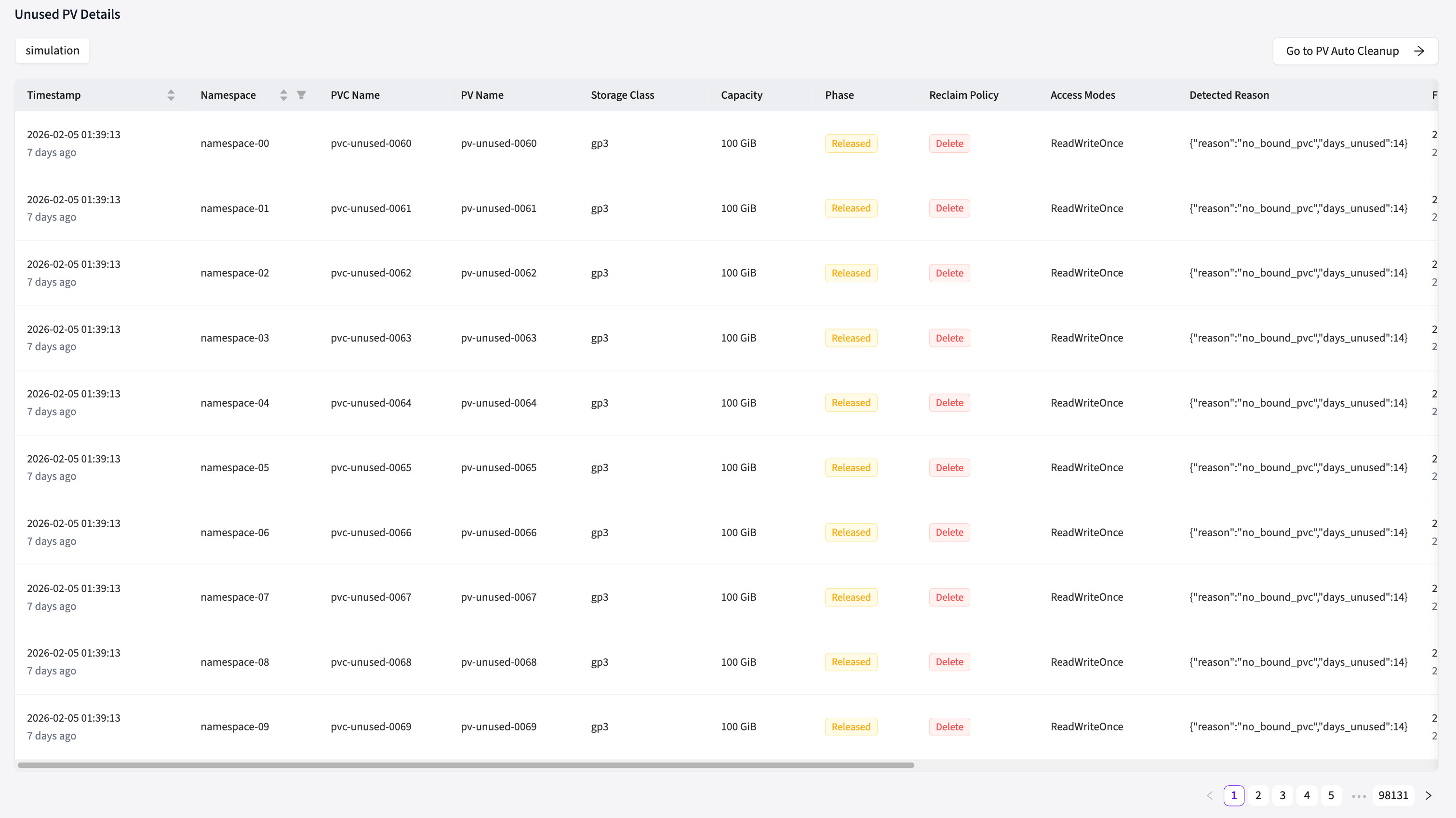
The details table shows all PVs that were detected as unused in the selected date range, with comprehensive information about each detection:
Table Columns:
- Timestamp: When this unused PV detection was recorded (with relative time like "2 days ago")
- Namespace: Kubernetes namespace of the PVC that was bound to this PV (if applicable)
- PVC Name: Name of the PersistentVolumeClaim that was bound to this PV (if applicable)
- PV Name: Exact Persistent Volume name (fixed left column for easy reference)
- Storage Class: Storage class used to provision this PV (e.g., gp2, standard, ssd)
- Capacity: Total storage size of the PV (in KiB/MiB/GiB/TiB)
- Phase: Current PV phase status:
- 🔴 Released (red): Previously bound but PVC was deleted (most common unused state)
- 🟡 Available (yellow): Never bound to any PVC
- 🔵 Bound (blue): Shows as bound but PVC doesn't exist (stale binding)
- Reclaim Policy: What happens when PVC is deleted:
- Retain: PV keeps data after PVC deletion (requires manual cleanup)
- Delete: PV should auto-delete with PVC (if unused, indicates provisioning issue)
- Recycle: Deprecated policy (rare)
- Access Modes: How the volume can be mounted:
- ReadWriteOnce (RWO), ReadWriteMany (RWX), ReadOnlyMany (ROX)
- Detected Reason: Detailed explanation of why this PV was flagged as unused (list format):
- "PVC deleted but PV retains data (Reclaim Policy: Retain)"
- "PV provisioned but never claimed"
- "PV bound but PVC not found"
- First Detected: When Wave first detected this PV as unused (with relative time)
- Last Detected: Most recent detection timestamp (with relative time)
- Resolved At: When the PV was no longer detected as unused (became bound again, or was deleted)
- Cleanup Status: Auto-cleanup tracking information (merged column showing):
- Is Enabled: Whether auto-cleanup is enabled for this PV (Yes/No tag)
- Clean Up Status: Current cleanup state (Pending/InProgress/Completed tag)
- Is Deleted: Shows "Yes" tag if PV was successfully deleted by auto-cleanup
- Deletion Error: Shows "Yes" tag with error reason tooltip if auto-deletion failed
Sorting & Filtering:
- Click column headers to sort by any field
- Use namespace filter to show only PVs from specific namespaces
- Default sort: Timestamp (most recent detections first)
Understanding Cleanup Status
The Cleanup Status column shows auto-cleanup tracking information:
- Is Enabled = No: Auto-cleanup feature is disabled, or this PV has opt-out annotation
- Clean Up Status = Pending: PV is eligible for cleanup but hasn't started (may be within safety period)
- Clean Up Status = InProgress: PV deletion is currently being processed
- Clean Up Status = Completed: PV has been successfully deleted by auto-cleanup
- Deletion Error = Yes: Auto-cleanup attempted deletion but failed (see tooltip for reason)
See PV Auto Cleanup for configuration details.
Interpreting the Data
High Priority Actions (investigate immediately):
- Released PVs with large capacity: High storage waste (prioritize by capacity × storage cost)
- PVs unused for 7+ days: Passed safety period, safe to consider for deletion
- Reclaim Policy = Retain + Released: Most common cleanup opportunity (PVC deleted, data retained)
Common Patterns to Watch:
- Multiple Released PVs from same namespace: Application was deleted but storage remains (cleanup opportunity)
- Available PVs never bound: Provisioning issues or failed deployments (investigate and delete)
- Bound phase but PVC missing: Stale binding state (cleanup needed)
- Deletion errors in Cleanup Status: Auto-cleanup failed (finalizers or permissions issue)
Understanding Detection Reasons:
- "PVC deleted but PV retains data": Application removed, PV left behind due to Retain policy
- "PV provisioned but never claimed": Dynamic provisioning created PV but no PVC claimed it
- "PV bound but PVC not found": PVC was forcefully deleted, PV shows stale binding
Next Steps:
- Review PVs with high capacity first (largest cost savings potential)
- Verify the PV has been unused for the full 7-day safety period (compare First Detected vs Timestamp)
- Check if data is still needed or backed up elsewhere
- Follow the decision tree in "What to Do When Unused PVs Detected" below
- Consider enabling PV Auto Cleanup for hands-off deletion after verification
- Monitor Resolved At and Cleanup Status columns to track cleanup progress
Use Cases
Cost Reduction Through Storage Cleanup
Delete orphaned storage to save money:
- Review unused PV list showing PVs unused for 7+ days
- Calculate monthly savings: (unused PV count) × (storage cost per GB) × (capacity per PV)
- Verify data is no longer needed (or backed up elsewhere)
- Delete unused PVs
- Realize immediate storage cost savings
Example: 20 unused 100GB PVs × $0.10/GB/month = $200/month savings
Post-Deployment Cleanup for Test Environments
Remove storage from deleted test environments:
- Delete test namespace with applications and PVCs
- Unused PV Detection identifies leftover PVs (Released state)
- Verify test data can be safely deleted
- Clean up all Released PVs from test environment
- Prevent test storage costs from accumulating
Result: Clean cluster hygiene without manual storage audits
Capacity Reclamation for Storage Quotas
Free up storage quota for new workloads:
- Storage class quota reached (can't provision new PVs)
- Unused PV Detection shows 500GB of unused storage
- Delete unused PVs to free quota
- New workloads can now provision storage
Result: Avoid quota increase requests by reclaiming wasted storage
Compliance and Data Retention Policy Enforcement
Ensure data retention policies are followed:
- Company policy: Delete data older than 90 days
- Unused PV Detection identifies Released PVs from deleted applications
- Check PV age and data retention requirements
- Delete PVs older than retention period (after archival if needed)
- Document deletion for compliance audit trail
Result: Maintain compliance while reducing storage costs
What to Do When Unused PVs Detected
Step 1: Verify Unused Status
Check PV age:
kubectl get pv <pv-name> -o jsonpath='{.metadata.creationTimestamp}'- Has it been unused for 7+ days? (Safety period)
Review PVC history:
kubectl get pv <pv-name> -o jsonpath='{.spec.claimRef}'- Why was the PVC deleted?
- Was this a test environment or production data?
Confirm data is no longer needed:
- Check with application team if data should be preserved
- Verify backups exist if data might be needed later
- Review company data retention policies
Step 2: Check Data Retention Requirements
Retain Policy: Data must be preserved
- PV was intentionally set to
Retainto prevent data loss on PVC deletion - Action: Backup data before deletion, or keep PV if required for audit/compliance
Delete Policy: Data can be safely removed
- PV automatically deleted when PVC is deleted (shouldn't appear as unused unless dynamic provisioning failed)
- Action: Investigate why PV is unused despite
Deletepolicy
Recycle Policy (Deprecated): Data scrubbed for reuse
- Rarely used in modern Kubernetes
- Action: Treat similar to
Retain(backup before deletion)
Step 3: Decide Action
Option A: Delete PV (Permanent Data Loss)
When: Data is confirmed unnecessary
Steps:
# WARNING: This permanently deletes data!
kubectl delete pv <pv-name>
Verification:
# Confirm PV is gone
kubectl get pv <pv-name>
# Error: "not found" (expected)

# (Cloud providers) Verify underlying volume deleted
# AWS: aws ec2 describe-volumes --volume-ids <volume-id>
# GCP: gcloud compute disks describe <disk-name>Result: Storage deleted, costs eliminated, data lost permanently
Option B: Backup Then Delete
When: Data might be needed for future reference
Steps:
- Mount PV to temporary pod
apiVersion: v1
kind: Pod
metadata:
  name: backup-pod
spec:
  containers:
  - name: backup
    image: busybox
    volumeMounts:
    - name: data
      mountPath: /data
  volumes:
  - name: data
    persistentVolumeClaim:
claimName: temp-pvc-for-backup- Copy data to cold storage (S3, GCS, Azure Blob)
- Verify backup integrity
- Delete PV
Result: Data preserved in cold storage, hot storage costs eliminated
Option C: Keep PV (Opt-Out)
When: PV is unused but must be retained
Steps:
# Apply opt-out annotation
kubectl annotate pv <pv-name> waveautoscale.io/pv-cleanup="false"
Reasons to Opt-Out:
- Backup PVs: Kept for disaster recovery
- Archival Storage: Retained for compliance (e.g., financial records for 7 years)
- Snapshot Sources: PVs used to create snapshots (not actively mounted)
- Blue-Green Data: Standby PVs for deployment swaps
Result: PV excluded from future unused detection reports
Option D: Enable Auto-Cleanup
When: Want Wave to handle deletion automatically
Steps:
- Navigate to PV Auto Cleanup settings
- Enable auto-cleanup for unused PVs
- Configure safety period (default: 7 days)
- Set max deletion rate to prevent accidental mass cleanup
- Apply opt-out annotation to PVs that should never be deleted
Result: Unused PVs automatically deleted after safety period without manual intervention
Auto-Cleanup Integration
Unused PV Detection and PV Auto Cleanup work together:
Detection: Unused PV Detection identifies candidates for cleanup
Eligibility Check: Auto Cleanup verifies 7-day safety period has passed
Opt-Out Respect: PVs with waveautoscale.io/pv-cleanup="false" annotation are skipped
Deletion: Auto Cleanup deletes eligible PVs automatically
Logging: All deletions logged for audit trail
See PV Auto Cleanup documentation for configuration details.
False Positive Scenarios (Legitimate Unused PVs)
Backup PVs for Disaster Recovery
- Purpose: PVs kept as cold backups (not actively mounted)
- Solution: Apply opt-out annotation
- Example: Weekly database snapshots stored as PVs
Archival Storage for Compliance
- Purpose: Data retained for audit/legal requirements (7 years for financial records)
- Solution: Apply opt-out annotation, document retention reason
- Example: Transaction logs from 2020 required for SEC audit
Snapshot Source PVs
- Purpose: PVs used to create VolumeSnapshots (not mounted but still needed)
- Solution: Apply opt-out annotation
- Example: Base image PVs for cloning new environments
Blue-Green Deployment Standby Data
- Purpose: PVs prepared for blue-green swaps (not yet attached to active deployment)
- Solution: Apply opt-out annotation during deployment window, or use temporary opt-out
- Example: Pre-loaded database PV for new version rollout
Integration with Other Insights
PV Capacity Forecast: PV Capacity Forecast shows which PVs are actively growing (in use). Unused PV Detection shows which PVs are orphaned. Together they provide complete storage visibility.
PV Auto Cleanup: Unused PV Detection identifies candidates, PV Auto Cleanup executes deletion automatically (if enabled).
Cost Efficiency Strategy: Combine with Smart Sizing Analysis and Idle Node Detection for comprehensive cost optimization across compute, storage, and capacity.
Best Practices
- Review unused PVs monthly (not weekly – avoid alert fatigue)
- Always verify 7-day unused period before deleting (safety first)
- Back up data before deletion if unsure (use cold storage like S3 Glacier)
- Use reclaim policy "Delete" for non-critical data (auto-cleanup on PVC deletion)
- Use reclaim policy "Retain" for critical data (manual cleanup process with explicit approval)
- Document retention policies for your team (how long to keep different data types)
- Enable auto-cleanup only after verifying detection accuracy (test in staging first)
- Test in staging before enabling auto-cleanup in production
- Set up approval process for production PV deletions (e.g., require 2-person sign-off)
- Track unused PV count over time to measure cleanup effectiveness
- Educate teams about proper PVC deletion (don't leave orphaned PVs)
- Use namespace quotas to prevent unlimited PV provisioning
Unused PV Detection + PV Capacity Forecast
Combine Unused PV Detection with PV Capacity Forecast for complete storage management:
- PV Capacity Forecast: Shows active PVs approaching capacity (need expansion)
- Unused PV Detection: Shows inactive PVs consuming budget (need deletion)
- Together: Understand total storage footprint (active + unused)
- Optimize: Expand active PVs, delete unused PVs
- Result: Right-sized storage infrastructure with no waste
Don't expand storage quotas before cleaning up unused PVs first!
Troubleshooting
PV Flagged as Unused But Still Needed:
- Apply opt-out annotation immediately to prevent auto-cleanup
- Verify PV is actually bound to active PVC:
kubectl get pv <pv-name> -o jsonpath='{.status.phase}' - Report false positive to Wave support
PV Not Flagged Despite Being Unused:
- Check if PV has been unused for less than 7 days (safety period)
- Verify PV phase:
kubectl get pv <pv-name>(should show Released/Available) - Confirm opt-out annotation isn't applied
Auto-Cleanup Deleting Important PVs:
- Immediately disable auto-cleanup feature
- Apply opt-out annotation to all critical PVs
- Review auto-cleanup configuration and safety period settings
- Restore from backups if data was lost
Unused PV Count Never Decreases:
- Check if opt-out annotations applied too broadly
- Verify auto-cleanup is enabled (if desired)
- Confirm teams are deleting PVs manually (if auto-cleanup disabled)
- Review PV provisioning practices (are new unused PVs being created faster than cleanup?)
Released PVs Remain After Manual Deletion Attempt:
- Finalizers may prevent deletion
- Check finalizers:
kubectl get pv <pv-name> -o jsonpath='{.metadata.finalizers}' - Remove finalizers:
kubectl patch pv <pv-name> -p '{"metadata":{"finalizers":null}}'(use with caution!) - Underlying cloud volume may still exist (check cloud provider console)
Summary
Unused PV Detection automatically discovers orphaned storage across your cluster, enabling cost reduction through systematic cleanup. By identifying Released and Available PVs, it uncovers waste from deleted applications, test environments, and failed deployments.
Combined with PV Auto Cleanup, it provides hands-off storage optimization. Combined with PV Capacity Forecast, it delivers comprehensive storage lifecycle management.
Start by reviewing unused PVs monthly, verifying data is backed up or unnecessary, and safely deleting to reclaim storage budget. Over time, this systematic approach eliminates storage waste and right-sizes your infrastructure.