Realtime Resizing
Realtime Resizing closes the loop between Smart Sizing recommendations and the cluster: every 10 minutes, Wave can apply its recommendations automatically. It is off by default. Automatic resizing only happens after you opt in at both the workload level (Apply Mode) and the container level (auto-apply). This page describes what auto-apply actually does, the thresholds that decide when a recommendation is "different enough" to apply, and the operational caveats you should know before turning it on in production.
If you have not configured Smart Sizing yet, start with Smart Sizing Overview.
Why better than VPA
The Kubernetes-native option for vertical scaling is the Vertical Pod Autoscaler (VPA). VPA historically applied recommendations by evicting and restarting pods. The VPA project has since added the InPlaceOrRecreate update mode: currently beta, enabled via a feature gate on the VPA updater and admission controller, and requiring a cluster with in-place pod resize (beta in K8s 1.33, GA in 1.35). It calls the same /resize subresource Wave uses and falls back to evict-and-recreate when the in-place change can't be applied.
So both projects can avoid pod restarts on a recent cluster. The differentiation moves upstream of the resize call: how the recommendation is chosen, when it actually applies, and how the operator sees the result. Wave Smart Sizing drives the recommendation side; Realtime Resizing wires up the apply path with the surrounding pipeline below.
What Wave adds on top of the shared in-place primitive
| Dimension | VPA (InPlaceOrRecreate, beta) | Wave Realtime Resizing |
|---|---|---|
| Hysteresis | Priority ratio only (--pod-update-threshold, default 10%) | Priority OR absolute CPU delta (≥ 50 mCPU) OR absolute memory delta (≥ 64 MiB); catches large-container drift VPA's ratio-only threshold misses |
| Insufficient-node-resources behavior | Falls back to evict-and-recreate automatically | Three explicit modes: Off, In-Place (skip the pod, retry next cycle, no silent restart), Manifest Patch (rollout-managed); no implicit fallback |
| Per-container controls | minAllowed / maxAllowed on the VPA object | Per-container buffer / min / max via Container Settings, inherited by every cycle |
| Supported workload kinds | Deployment, StatefulSet, DaemonSet (anything VPA's targetRef supports) | Plus Argo Rollout and OpenShift DeploymentConfig |
| Coordination with other writers | None: operator must avoid conflicts manually | Auto-releases when a Deployment transitions to Autopilot; documented Argo CD auto-sync caveat (see below) |
| Operator observability | VPA events + kubectl describe vpa | Apply History panel in the Wave Web Console: per workload, per container, per cycle, with old → new request/limit and outcome |
Both VPA and Wave can use the in-place primitive when your cluster supports it. Wave's value is in the surrounding pipeline: the recommendation analysis, the safer hysteresis, the explicit apply-mode model, and the operator-facing history.
Apply Modes
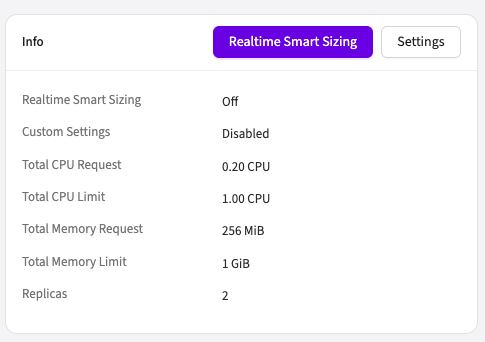
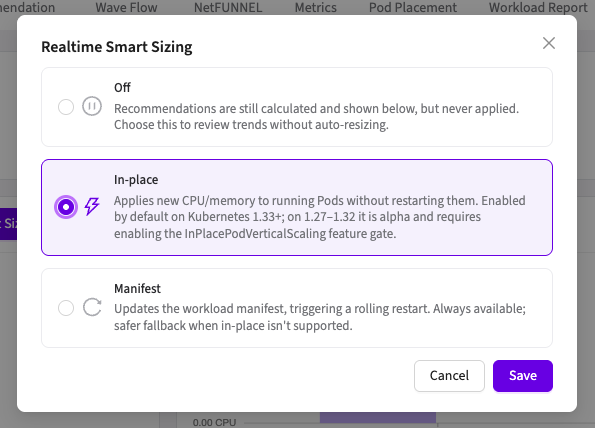
Each workload (Deployment, StatefulSet, DaemonSet, Argo Rollout, OpenShift DeploymentConfig) is configured with one of three Apply Modes. The workload detail page's Info panel shows the current mode; click Realtime Resizing to change it:
| Mode | What Wave does | When to use |
|---|---|---|
| Off | Generate recommendations, never touch the workload. | Evaluation mode: see what Smart Sizing would do without making any change. |
| In-Place Pod Resize | For each running pod, call the Kubernetes 1.27+ /resize subresource. No pod restart, no rollout, no downtime. | Most production workloads on Kubernetes 1.27+. Lowest user impact. |
| Manifest Patch | Patch the workload spec (spec.template.spec.containers[*].resources). New pods pick up new resources on the next rollout. | Clusters without in-place support, or workloads where you want changes to land via the normal rollout path. |
The default Apply Mode is Off. Wave never auto-applies until you explicitly choose a mode. Automatic application is additionally opt-in at the container level: even when the workload's Apply Mode is Manifest or In-Place, Wave does not apply anything until you enable Apply recommendations automatically in that container's Container Settings.
By default, auto-apply updates requests only. Applying CPU/memory limits is a separate per-container opt-in (Apply CPU limit / Apply memory limit): left off, your limit stays where you set it, which avoids automatic OOMKill exposure from a lowered memory ceiling.
The memory limit is applied only in Manifest mode. In-Place mode applies memory requests only, because the Kubernetes in-place resize path does not change memory limits, so with In-Place selected the Apply memory limit option has no effect.
Cluster prerequisites for In-Place
In-Place Pod Resize is a Kubernetes feature that ships behind a feature gate:
| Kubernetes version | In-Place status |
|---|---|
| < 1.27 | Not available; use Manifest mode. |
| 1.27-1.32 | Alpha: requires manually enabling the InPlacePodVerticalScaling feature gate. |
| 1.33-1.34 | Beta (enabled by default). |
| ≥ 1.35 | GA. |
Wave queries the cluster at runtime and gates the In-Place option in the Web Console accordingly; if your cluster does not support in-place resize, the radio option is disabled with an explanatory tooltip.
Skip thresholds (VPA-style hysteresis)
Every 10 minutes, Wave compares the new recommendation against the last applied snapshot for each container. If the new recommendation is too close to the last applied value, Wave skips the apply for that container: no K8s API call, no rollout, no audit-log entry.
A container is considered to have a meaningful change, and Wave applies, if any of these holds (OR-combined):
| Guard | Threshold |
|---|---|
| Priority (cumulative ratio of resource change) | ≥ 10 % |
| CPU absolute delta | ≥ 50 mCPU (0.05 core) |
| Memory absolute delta | ≥ 64 MiB |
When Aggressive Recommendations is on for the workload, the gates change: the priority-ratio check is disabled, and the absolute deltas tighten to ≥ 10 mCPU (0.01 core) and ≥ 10 MiB. Aggressive mode exists to track recent usage closely, so its hysteresis is much lighter; small shifts still get applied.
Why these numbers
- Priority 10 %: same as the Kubernetes VPA Updater's
--pod-update-thresholddefault. We adopt the industry-standard reference value used by the K8s VPA component so behavior is familiar to anyone who has run VPA in production. - CPU 50 mCPU: K8s operators conventionally set CPU requests and limits in multiples of 50 mCPU (50 / 100 / 250 / 500 / 1000). Changes below 50 mCPU are noise that should not justify a re-apply. The 50 mCPU floor is also consistent with HPA's 10 % tolerance; both are "ignore the small stuff" guards at comparable scale.
- Memory 64 MiB: for real-world container memory requests (typically 128 MiB to 1 GiB), 64 MiB is a 6-50% change, which is semantically the same scale as the 10 % priority guard. It also absorbs noise from allocator-internal chunking like jemalloc arenas or JVM regions.
How this differs from VPA
VPA's Updater looks at priority alone: a cumulative ratio computed from all containers in a pod. We OR-combine priority with two absolute-value guards. The safety net catches one case VPA misses: large containers where the ratio is below 10 % but the absolute change is operationally meaningful.
Example: a container moves from 4.00 CPU → 4.05 CPU. The ratio is 1.25 %, well under VPA's 10 % bar. But the absolute change is exactly 50 mCPU, so Wave applies anyway.
Why Realtime Resizing is disabled with HPA and Autopilot
When a workload is horizontally autoscaled (by an HPA or by Wave Autopilot), pods are created and terminated dynamically. Automatic resizing in that state causes problems in both apply modes:
- In-place mode updates the pods that are running now. Pods created moments later by a scale-up start from the workload spec with the old values, so the group ends up with mixed pod sizes. With a simple load-balancing algorithm such as round robin, traffic is not distributed evenly across pods of different sizes, and the workload can become unstable.
- Manifest mode patches the workload spec, which terminates and recreates all existing pods, a full rollout in the middle of autoscaling, with significant production impact.
For these reasons, the Realtime Resizing controls are not available for HPA and Autopilot workloads: their tab switches to Smart Sizing with HPA / Autopilot and uses the workload performance model. Review those recommendations and apply them manually with Resize Now; the recommended baseline workflow is described in Aggressive Recommendations.
Autopilot in Monitoring Mode does not scale the workload, so Realtime Resizing remains available there.
Operational caveats: read before turning auto-apply on in production
In-Place is fire-and-forget per pod
In-Place mode submits a /resize call to each running pod and moves on. Wave records the request-submission outcome (whether the API call was accepted or rejected at submission) and does not poll the kubelet's asynchronous resize status afterward.
The most common reason for an in-place resize to be rejected at submission is insufficient node resources: the new request would not fit on the node. Wave records that rejection per pod but does not trigger a rollout or eviction; the next Smart Sizing cycle (10 minutes later) re-evaluates and retries if the recommendation has not converged.
If a resize is accepted at submission but the kubelet later marks the pod as resource-deferred (for example, because the node fills up before the resize is reconciled), Wave does not see that asynchronously; it surfaces on the next cycle when the workload's actual resources still differ from the recommendation.
If you need a guaranteed reschedule onto a fitting node, use Manifest mode; that path goes through the normal pod-replacement flow.
Manifest Patch conflicts with ArgoCD auto-sync
If your workloads are managed by Argo CD with auto-sync enabled, Manifest mode will fight Argo CD: Wave patches the resources, Argo CD detects drift, Argo CD reverts. Within a few minutes you are back to the pre-apply state and Wave will try to apply again.
Turn off Argo CD auto-sync for any workload where you want Wave's Manifest mode to be the source of truth on resource values. This is the same restriction that already applies to Wave Autopilot.
In-Place mode is safe with Argo CD because the in-place resize call updates pod state directly without changing the workload spec; Argo CD does not see drift.
Deployment auto-apply releases on Autopilot transition
If a Deployment is later switched to Autopilot management, its Smart Sizing auto-apply is automatically released (turned off). Autopilot owns resource decisions for the workloads it manages, and Wave will not have two writers fighting over the same fields.
Re-enabling Smart Sizing auto-apply on a workload that has gone through Autopilot requires turning Autopilot off first.
Per-container buffer / min / max constrain every cycle
Each container's Container Settings (buffer percentage, min CPU/memory floor, max CPU/memory ceiling) constrain the recommendation before it goes through the skip-threshold check.
Where to see history
Each apply attempt (one that cleared the skip thresholds and went to the K8s API) is logged in the workload detail page under Smart Sizing → Apply History. The table shows: time, mode (in-place / manifest), container name, old → new CPU/memory request and limit, and the outcome (applied / failed).
Recommendations that were skipped by the skip thresholds do not appear in this table; they produce no K8s API call and no audit-log entry by design. If you expected a tiny drift to land and it did not, that is usually the explanation. Recompute the deltas against the last applied row and check them against the priority / CPU / memory guards.
To roll a container back to its pre-Wave values entirely, use Restore Original.
Recommended rollout sequence
- Start with Off on all workloads. Observe recommendations for a few days.
- Pick one non-critical workload, switch it to In-Place (or Manifest if you do not have K8s 1.27+ / Argo CD restrictions).
- Enable auto-apply for one or two containers in that workload.
- Verify a few successful apply rows in the history table, watch the resulting resource trend over a few cycles.
- Roll out to more workloads.