Node Warmup
Node Warmup proactively provisions nodes and pre-pulls container images before workloads need them, reducing first pod startup from 31 seconds to 3 seconds (10x faster). Navigate to Karpenter > Node Warmup in the sidebar.
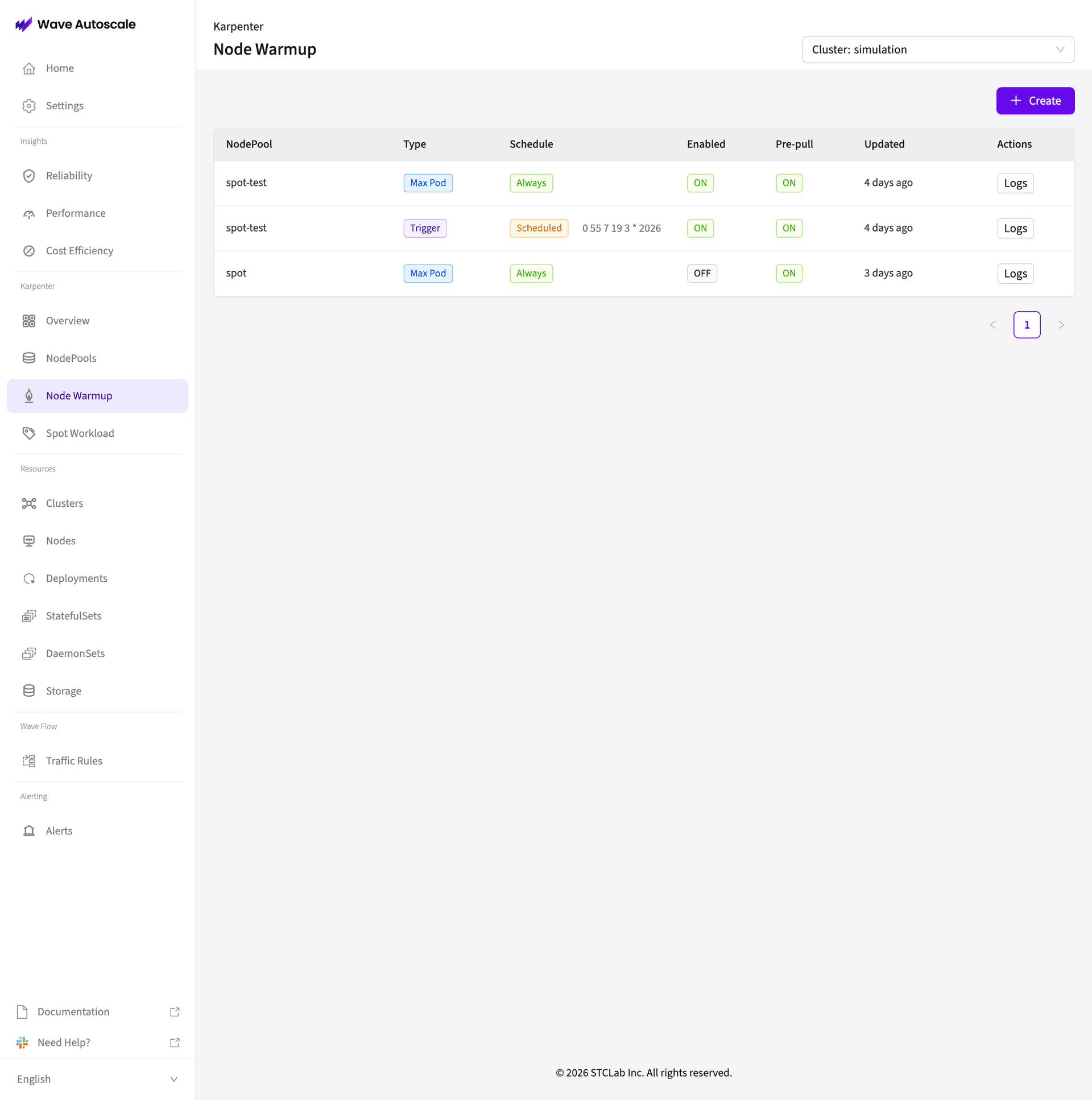
Node Warmup List
The list view shows all configured warmup rules:
| Column | Description |
|---|---|
| NodePool | Target Karpenter NodePool |
| Type | Warmup mode — Max Pod or Trigger |
| Schedule | Always (continuous) or Scheduled (cron-based) |
| Enabled | ON/OFF toggle |
| Pre-pull | Image pre-pull ON/OFF |
| Updated | Last configuration change |
| Actions | View warmup logs |
Click + Create to add a new warmup rule, or click an existing row to edit.
Creating a Warmup Rule
Click + Create to open the configuration panel:
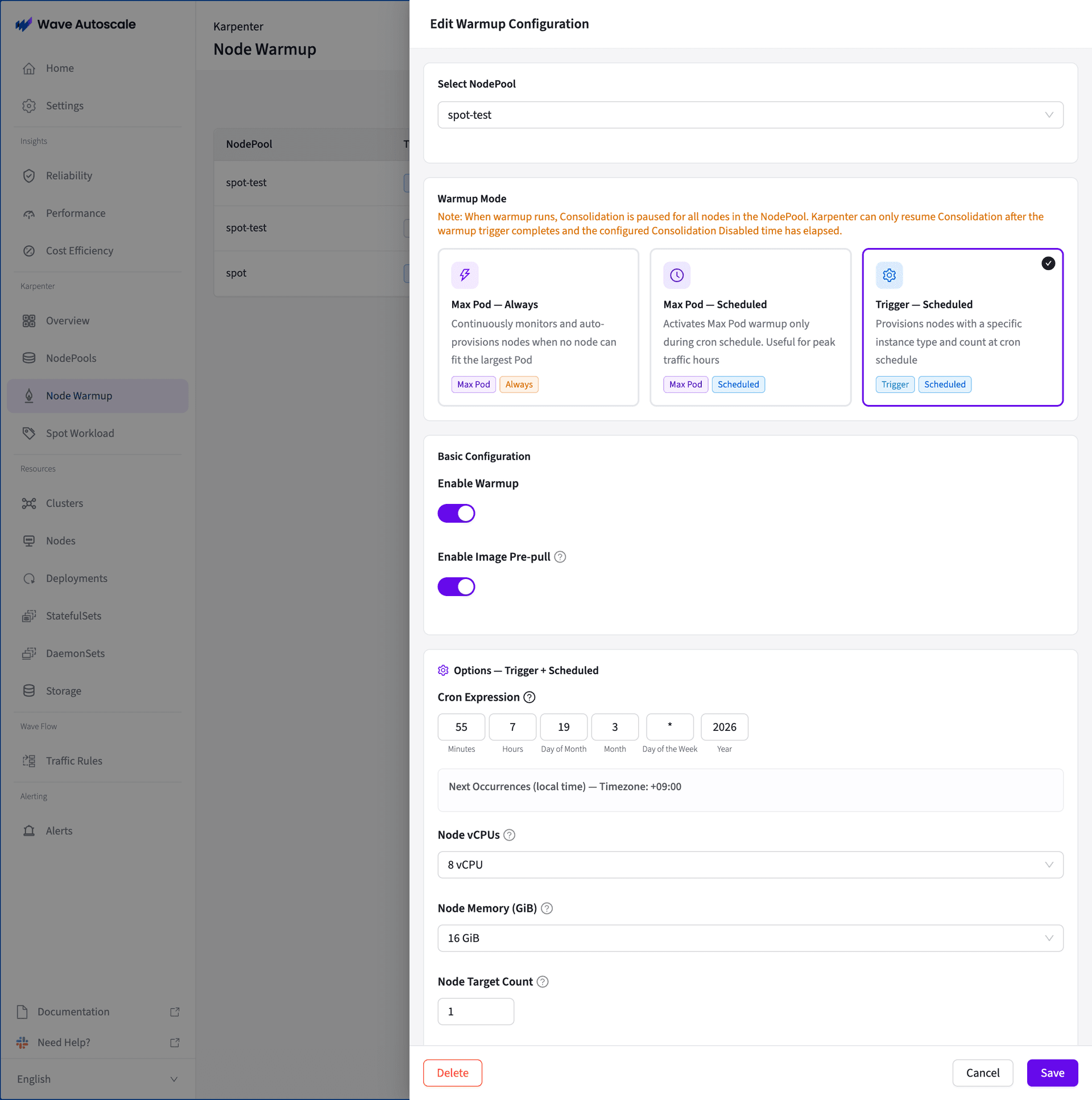
Step 1: Select NodePool
Choose the target NodePool from the dropdown.
Step 2: Choose Warmup Mode
Three modes are available:
| Mode | Description |
|---|---|
| Max Pod — Always | Continuously monitors and auto-provisions nodes when no existing node can fit the largest Pod in the NodePool |
| Max Pod — Scheduled | Activates Max Pod warmup only during a cron schedule. Useful for peak traffic hours |
| Trigger — Scheduled | Provisions nodes with a specific instance type and count at a cron schedule |
When warmup runs, Karpenter Consolidation is paused for all nodes in the NodePool. Karpenter can only resume Consolidation after the warmup trigger completes and the configured Consolidation Disabled time has elapsed.
Step 3: Basic Configuration
- Enable Warmup — Toggle ON to activate
- Enable Image Pre-pull — Toggle ON to pre-cache container images on warmed nodes
Step 4: Mode-Specific Options
For Trigger — Scheduled mode:
- Cron Expression — Schedule when warmup triggers (e.g.,
0 55 7 19 3 * 2026) - Node vCPUs — CPU specification for provisioned nodes (e.g., 8 vCPU)
- Node Memory (GiB) — Memory specification (e.g., 16 GiB)
- Node Target Count — Number of nodes to provision (e.g., 1)
Step 5: Save
Click Save to create the warmup rule. The rule appears in the list view.
Viewing Logs
Click Logs in the Actions column to view warmup execution logs:
Logs show warmup pod creation, image pre-pull progress, and node readiness events.
Benchmark
| Scenario | Time to First Pod Ready | Improvement |
|---|---|---|
| Vanilla Karpenter | ~31 seconds | — |
| With Node Warmup | ~3 seconds | 10x faster |
The 31-second baseline includes node provisioning (~15s), kubelet registration (~5s), image pull (~10s), and pod scheduling (~1s). Node Warmup eliminates provisioning and image pull wait times.
Best Practices
- Use for latency-sensitive workloads — Most valuable for web frontends, API gateways, and real-time processing where cold start latency impacts users
- Monitor utilization — Track warmed node utilization in the Dashboard. If warmed nodes sit idle for extended periods, consider using Scheduled mode instead of Always
- Pair with Spot instances — Combine with Spot Workload Placement for fast startup times and cost savings
Related
- Getting Started — Install and configure Karpenter integration
- Dashboard — Monitor warmed node status and capacity metrics
- Spot Workload Placement — Automatic spot/on-demand splitting