Predictive Scaling
This is an opt-in capability, not how Autopilot works by default. Predictive Scaling is off unless you turn it on (forecastHorizon: 0 in CRD Mode). Out of the box Autopilot is reactive and fast: it scales from the workload's own measured performance, typically deciding within about 10 seconds, rather than forecasting future demand. Turn Predictive Scaling on only for the workloads described under When to Use.
For known, scheduled events such as a campaign launch or a business-hours peak, prefer Autopilot Scheduler instead. Schedule-based guardrails are more predictable than a forecast, and they need no training history.
Predictive Scaling uses time-series forecasting to predict future load and scale your workload before traffic arrives, preventing latency spikes during sudden increases.
How It Works
Without Predictive Scaling (Reactive):
- Traffic spike hits
- Metrics cross threshold
- Autopilot scales up
- New pods start (30-60 seconds)
- Result: Brief performance degradation during pod startup
With Predictive Scaling (Proactive):
- Autopilot forecasts load increase
- Scales up before traffic arrives
- Pods ready when traffic hits
- Result: No performance degradation
Enabling Predictive Scaling
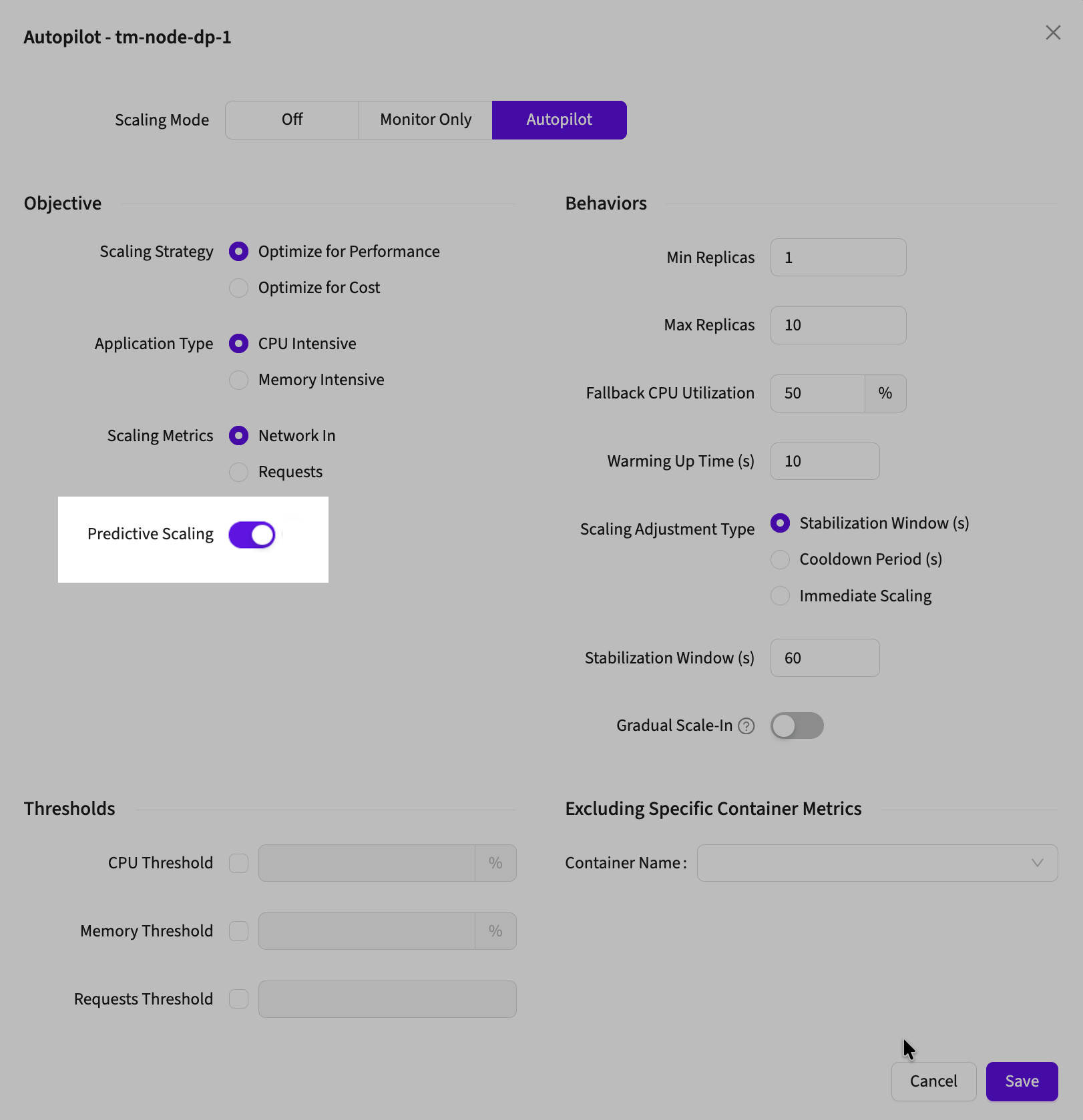
In the Autopilot configuration modal:
- Find "Predictive Scaling" under the Objective section
- Toggle the switch to ON
- Save configuration
Requirements:
- Needs 7+ days of historical metrics for accurate forecasting
- Works with both "Optimize for Performance" and "Optimize for Cost" strategies
When to Use
Enable Predictive Scaling For:
Workloads with Predictable Patterns:
- E-commerce sites (daily traffic cycles)
- Business applications (weekday spikes, weekend dips)
- Content platforms (consistent usage patterns)
- APIs with recurring load patterns
When You Need:
- Zero latency during traffic increases
- Protection against flash traffic spikes
- Proactive capacity management
Don't Use For:
Workloads with Random Traffic:
- New applications without traffic history
- Services with completely unpredictable spikes
- Low-traffic services (insufficient data)
- Constant steady-state load (nothing to predict)
Example: E-Commerce Site
Traffic Pattern: Daily morning spike from 100 → 1,000 requests/minute at 9 AM
Predictive Scaling OFF:
08:59 AM: 2 replicas, 100 req/min
09:00 AM: Traffic jumps to 1,000 req/min
09:01 AM: CPU spikes, scaling triggered
09:02 AM: New pods starting...
09:03 AM: 8 replicas ready, handling loadResult: 3 minutes of slow response times
Predictive Scaling ON:
08:55 AM: 2 replicas, forecast predicts spike
08:56 AM: Proactive scale-up begins
08:59 AM: 8 replicas ready
09:00 AM: Traffic jumps to 1,000 req/minResult: Zero performance impact, capacity ready
What Gets Predicted
Autopilot forecasts your configured Scaling Metrics:
- Network In: Predicts incoming traffic volume
- Requests: Predicts request rate
The forecast looks ahead (typically 5-15 minutes) and scales accordingly.
Performance Expectations
| Metric | Expected Behavior |
|---|---|
| Learning Period | 7-14 days for accurate predictions |
| Forecast Accuracy | 80-90% after training period |
| Scale-Up Lead Time | 2-5 minutes before traffic spike |
| Latency Impact | Eliminates spike-related latency |
Monitoring
After enabling, check the Autopilot Logs:
- Look for: Logs showing proactive scaling before traffic increases
- ML Model Status: Should show "Active" after training period
- Forecasted Value: Logs include predicted load values
Troubleshooting
Predictions Not Accurate?
Autopilot scales at wrong times or misses spikes
Causes:
- Not enough historical data (< 7 days)
- Traffic pattern recently changed
- Highly irregular traffic
Fix: Wait 14 days for retraining or disable if traffic is too random
Still Seeing Latency Spikes?
Predictive scaling enabled but still experiencing delays
Causes:
- Forecast horizon too short
- Current replicas already at max
- Traffic increase larger than historical patterns
Fix:
- Increase Max Replicas
- Check if traffic significantly exceeds historical baseline
- Review Autopilot logs for forecast vs actual load
Quick Decision Guide
Should I enable Predictive Scaling?
✅ Yes, enable if:
- Your traffic has daily or weekly patterns
- You have 7+ days of metrics history
- Latency during traffic spikes is unacceptable
- Users complain about slow morning/peak-hour performance
❌ No, keep disabled if:
- Brand new application with no traffic history
- Traffic is completely random/unpredictable
- Service has constant steady load
- Reactive scaling is fast enough for your needs
Next Steps
- Cost vs Performance: Choose the right strategy to pair with predictions
- Autopilot Scheduler: Add scheduled scaling for known events
- Core Configuration: Advanced forecasting parameters