🚀 Wave Autoscale 3.1.0: Taking Control of Karpenter with Node-Level Intelligence
Author: Hwansoo Kim (opens in a new tab)
Date: March 23, 2026
TL;DR: Wave Autoscale 3.1.0 brings full Karpenter visibility and control to Amazon EKS — a real-time dashboard, intelligent node warmup with image pre-caching, zero-touch spot workload placement, and a 2x faster gRPC-powered Metrics Agent.
🛤️ From Workload Intelligence to Node-Level Control
With Wave Autoscale 3.0, we brought workload-level intelligence to Kubernetes — Autopilot for ML-driven autoscaling, Smart Sizing for automated rightsizing, and PV management for storage optimization. Teams running on EKS saw 40% cost reductions and 2x faster scaling responses.
But Kubernetes optimization doesn't stop at pods. Beneath every workload is the node layer — the infrastructure that determines how fast pods get scheduled, how much you pay per hour, and whether a spot interruption takes down your service. This is where Karpenter operates.
Karpenter has revolutionized node provisioning on Amazon EKS. It dynamically selects instance types, provisions nodes in seconds, and consolidates underutilized capacity. But it operates as a black box: there's no native dashboard to see what's happening, no built-in way to pre-warm nodes before traffic spikes, and no fine-grained control over which workloads run on spot vs. on-demand.
Wave Autoscale 3.1.0 changes that. We're extending our intelligence down to the node layer, giving EKS teams full observability and control over Karpenter — from real-time cost tracking and disruption detection to proactive node warmup and automated spot placement. All features in this release are available exclusively for Amazon EKS.
📊 Karpenter Dashboard: See Everything at a Glance
Until now, understanding what Karpenter is doing required piecing together information from kubectl, CloudWatch, and scattered logs. Wave Autoscale 3.1.0 gives you a purpose-built Karpenter dashboard that surfaces everything you need in one place.
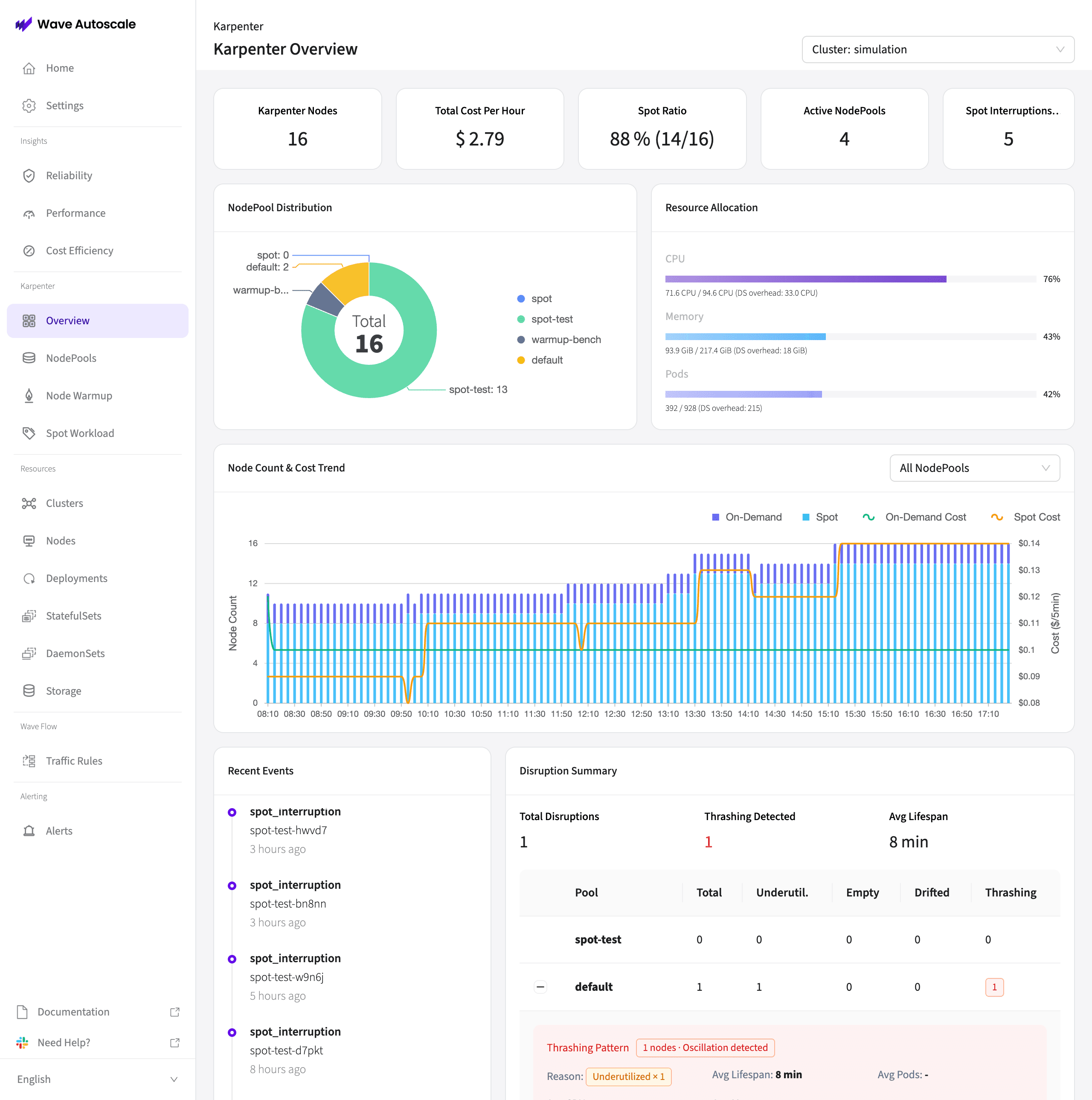
Real-time metrics at the top:
- Karpenter Nodes — total active node count across all NodePools
- Total Cost Per Hour — aggregated hourly cost of all Karpenter-managed nodes
- Spot Ratio — percentage of nodes running on spot instances (e.g., 88% = 14/16 nodes on spot)
- Active NodePools — number of configured NodePools
- Spot Interruptions — recent spot interruption count for immediate awareness
Deeper visibility below:
- NodePool Distribution — donut chart showing how nodes are distributed across NodePools, so you can see if one pool is over- or under-utilized
- Resource Allocation — CPU, memory, and pod usage vs. capacity across your cluster
- Node Count & Cost Trend — time-series graph tracking on-demand vs. spot node counts and associated costs over time
- Disruption Summary — tracks disruption events with thrashing detection that identifies nodes being repeatedly created and destroyed, showing pattern type, average lifespan, and affected pods
- Recent Events — live feed of spot interruptions, node lifecycle events, and disruption activity
NodePool Deep Dive
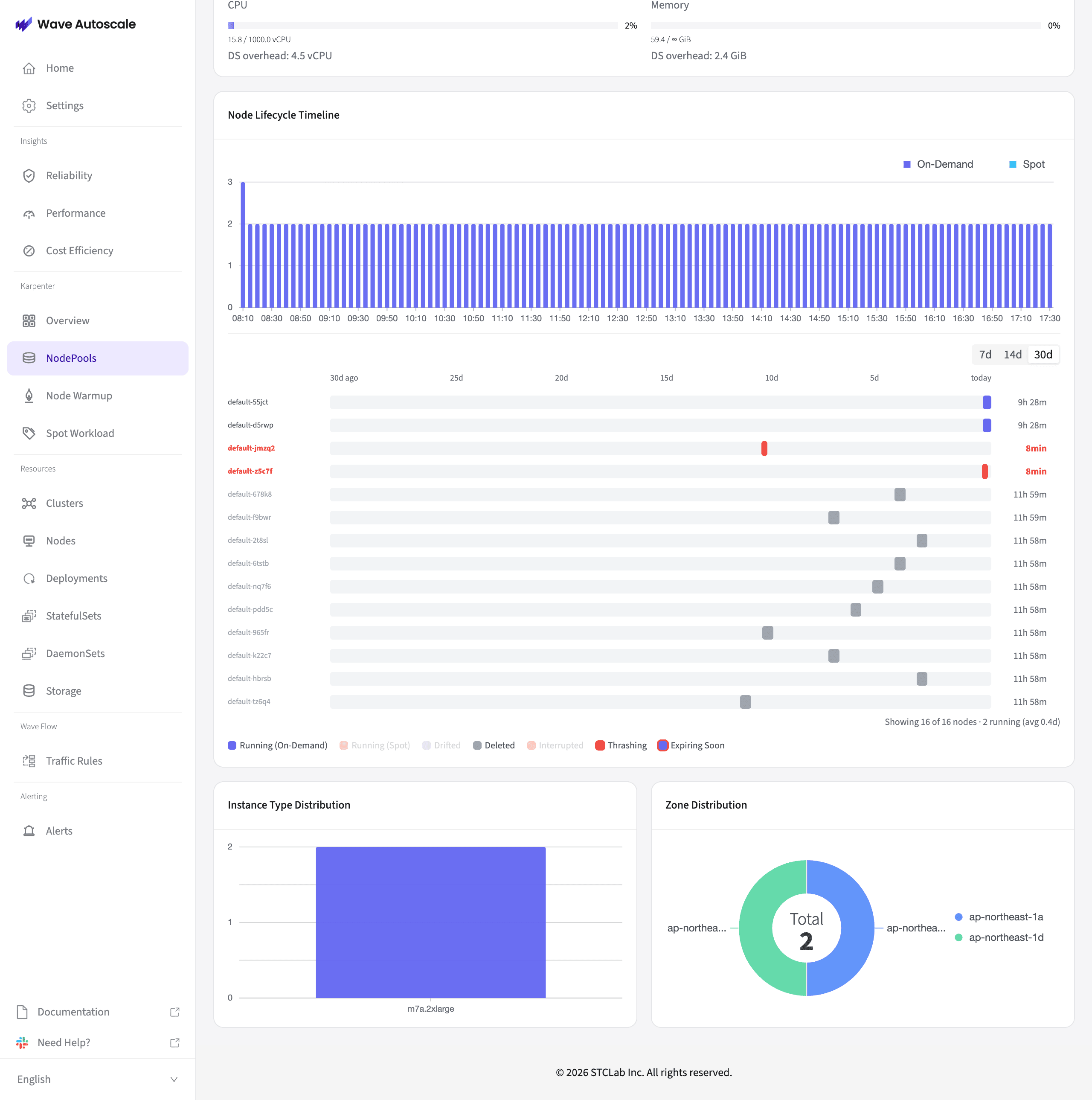
Click into any NodePool for a detailed analysis:
- Node Lifecycle Timeline — visualize when each node was provisioned, how long it ran, and whether it was on-demand or spot
- Instance Type Distribution — understand which instance types Karpenter is selecting and how often
- Zone Distribution — see geographic spread across availability zones for resilience awareness
- Per-NodeClaim tracking — drill down to individual NodeClaims with status, cost per node, and resource allocation
🔥 Karpenter Node Warmup: Eliminate Cold Starts
One of the biggest pain points with Karpenter is cold start latency. When a new workload needs capacity, Karpenter provisions a node — but by the time the node is ready and container images are pulled, users may already be experiencing degraded performance. This is especially painful during traffic spikes, scheduled events, or workload bursts.
Wave Autoscale 3.1.0 introduces Node Warmup — proactive node provisioning that ensures capacity is ready before demand hits.
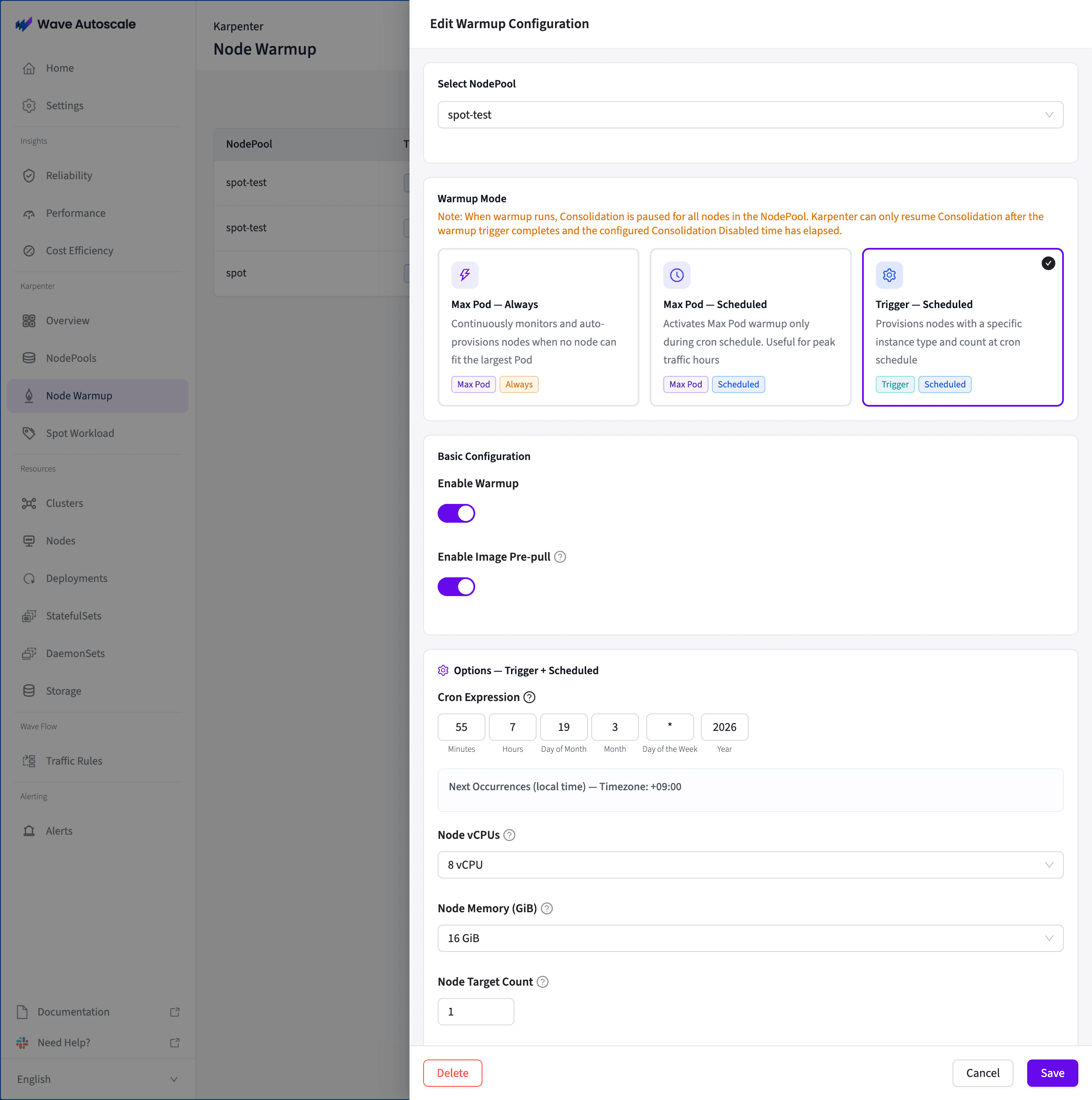
Three Warmup Strategies
Max Pod — Always Continuously monitors the largest pod in a NodePool. When no existing node can accommodate it, WA automatically triggers a warmup pod sized to the max pod plus a configurable buffer. This ensures that if your largest workload needs to scale, a node is already waiting. Runs 24/7.
Max Pod — Scheduled Same intelligent max-pod detection, but activates only during time windows you define with a cron schedule. Ideal for predictable traffic patterns — warm up before business hours, scale events, or marketing campaigns without paying for standby capacity overnight.
Trigger — Scheduled Provisions a specific number of nodes with a defined instance size on a cron schedule. Use this when you know exactly what capacity you need and when — for example, "provision 3 xlarge nodes every weekday at 8:50 AM before the 9 AM traffic rush."
What Makes This Different
- Image Pre-pull & Caching — After a node is provisioned, WA creates additional pods that pre-pull your container images in parallel. When real workloads land on the warmed node, images are already cached — delivering near-instant container startup instead of waiting for image pulls.
- Node Protection — Warmed nodes are automatically annotated with
karpenter.sh/do-not-disrupt=trueto prevent Karpenter from consolidating them away before your workloads arrive. Protection duration is configurable. - Smart Spreading — Uses pod anti-affinity rules to ensure each warmup pod provisions a separate new node, never stacking on existing capacity.
- Fully Configurable — CPU, memory, target node count, size buffer percentage, and consolidation protection duration are all adjustable per NodePool.
Benchmark: Max Pod Warmup in Action
We benchmarked Max Pod — Always against vanilla Karpenter on EKS (c5n.xlarge/c6i.xlarge spot instances, ap-northeast-1). When a fully packed cluster needs one additional pod, Karpenter has to provision a new EC2 instance from scratch. With Max Pod Warmup, a standby node is already waiting.
During a traffic surge, those 31 seconds are critical. Your existing pods are absorbing the overload while a new instance boots, images pull, and the kubelet registers. Max Pod Warmup eliminates that window almost entirely — reducing it to just 3 seconds.
💰 Spot Workload Placement: Smart Cost Optimization Without the Risk
Spot instances can save 60-90% compared to on-demand — but most teams either avoid them entirely (overpaying for guaranteed capacity) or apply them blindly across all replicas (risking service disruption during spot interruptions). There's no middle ground built into Kubernetes.
Wave Autoscale 3.1.0 introduces Spot Workload Placement — per-deployment controls that intelligently split replicas between on-demand and spot instances.
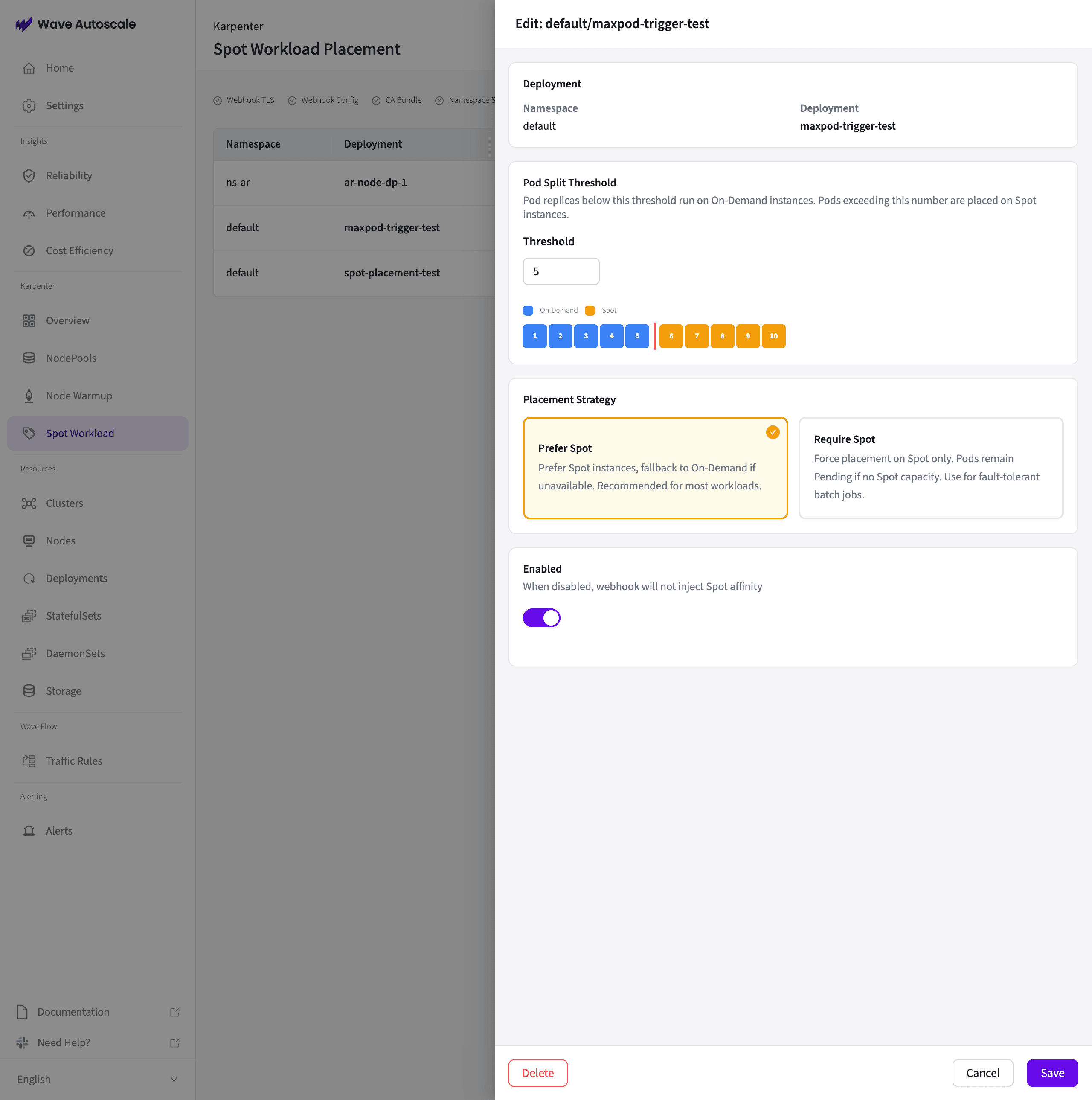
Pod Spot Threshold
Set a threshold per deployment (e.g., 5 replicas). Pods below the threshold stay on on-demand for guaranteed availability. Pods above the threshold are placed on spot for cost savings. A visual indicator shows the exact on-demand/spot split across your replicas.
For example, if your deployment has 10 replicas with a threshold of 5: replicas 1-5 run on on-demand (your safety net), replicas 6-10 run on spot (your cost savings). If spot capacity is interrupted, you still have your on-demand baseline serving traffic.
Two Placement Strategies
Prefer Spot — Spot-first with automatic on-demand fallback. If spot capacity is unavailable, pods gracefully fall back to on-demand nodes. Recommended for most workloads.
Require Spot — Strict spot-only placement. Pods remain Pending if no spot capacity is available. Use for fault-tolerant batch jobs, data processing pipelines, or workloads where cost savings outweigh scheduling speed.
Zero-Touch Webhook Injection
The key differentiator: developers don't need to modify any deployment YAMLs. Wave Autoscale uses a Kubernetes MutatingWebhookConfiguration to automatically inject the correct nodeAffinity rules into pods at creation time. Configure the threshold and strategy through the WA console, and the webhook handles everything — no YAML changes, no redeployments, no developer friction.
Each deployment can be independently enabled or disabled, giving you granular control over which workloads participate in spot placement.
⚡ WA Metrics Agent: 2x Faster with gRPC
The WA Metrics Agent — responsible for collecting and transmitting cluster metrics — has been upgraded from HTTP/REST to gRPC with Protocol Buffers. This isn't just a protocol swap; it's a fundamental improvement in how metrics flow through the system.
| Metric | HTTP (baseline) | gRPC | Improvement |
|---|---|---|---|
| Client serialization | baseline | ~2x faster (Large+) | Protobuf advantage |
| Single transmission latency (p50) | baseline | ~2x faster | gRPC advantage |
| Tail latency (p99) | baseline | 2-3x lower | More stable |
| Throughput (100 agents) | ~908 req/s | ~1,707 req/s | 1.9x higher |
| Throughput saturation point | ~800 req/s (30+ agents) | ~1,700 req/s (50+ agents) | 2x higher ceiling |
The gRPC upgrade is the infrastructure backbone that powers the new Karpenter features. Real-time dashboard metrics, fast warmup trigger decisions, and immediate spot placement responses all depend on low-latency, high-throughput metric delivery. With 2x lower latency and nearly 2x higher throughput, Wave Autoscale can now monitor and react to cluster state changes faster than ever.
🔮 What's Next
In the Wave Autoscale 3.0 roadmap, we promised Karpenter visualization and management. Version 3.1.0 delivers on that promise — and goes beyond with proactive node warmup and intelligent spot placement.
Looking ahead, we're building two major capabilities:
-
Wave AI Agent — An agentic Kubernetes operations system that goes beyond generic AI chatbots. With 50+ specialized tools, pre-built skills (cluster health checks, cost optimization audits, incident response, capacity planning), and a progressive adoption model (Explain → Suggest → Execute), Wave AI Agent turns natural language into automated Kubernetes operations. Works with your choice of LLM provider — on-prem (vLLM, Ollama) or cloud (Amazon Bedrock, Anthropic).
-
GPU Observability & Optimization — Purpose-built monitoring and optimization for AI/ML workloads running on Kubernetes, helping teams manage GPU resources as efficiently as CPU and memory.
Your feedback shapes our roadmap — let us know what you need.
Get Started with Wave Autoscale 3.1.0
Wave Autoscale 3.1.0's Karpenter features are available exclusively for Amazon EKS. Whether you're managing a handful of NodePools or hundreds of spot-heavy workloads, Wave Autoscale gives you the visibility and control that Karpenter alone doesn't provide.
Ready to take control of your Karpenter infrastructure?
- Website: https://wavek8s.com (opens in a new tab)
- Contact: team@waveautoscale.com
Wave Autoscale is developed by STCLab, a CNCF Silver Member and AWS EKS Service Ready Partner trusted by 600+ customers across Korea, Japan, and APAC.