Wave Autoscale Works with Your Existing Infrastructure: Understanding Workload Management vs Infrastructure Management
Author: Thomas Mathew (opens in a new tab) Date: January 20, 2026
TL;DR: Wave Autoscale complements your existing infrastructure tools like Karpenter and Cluster Autoscaler by focusing on workload optimization. While infrastructure tools handle node provisioning, Wave Autoscale uses ML-driven intelligence to eliminate scaling delays, reduce operational toil, and cut hidden costs through features like performance model-based scaling, Smart Sizing, and predictive insights—delivering up to 40% cost savings while improving application performance.
What is Wave Autoscale?
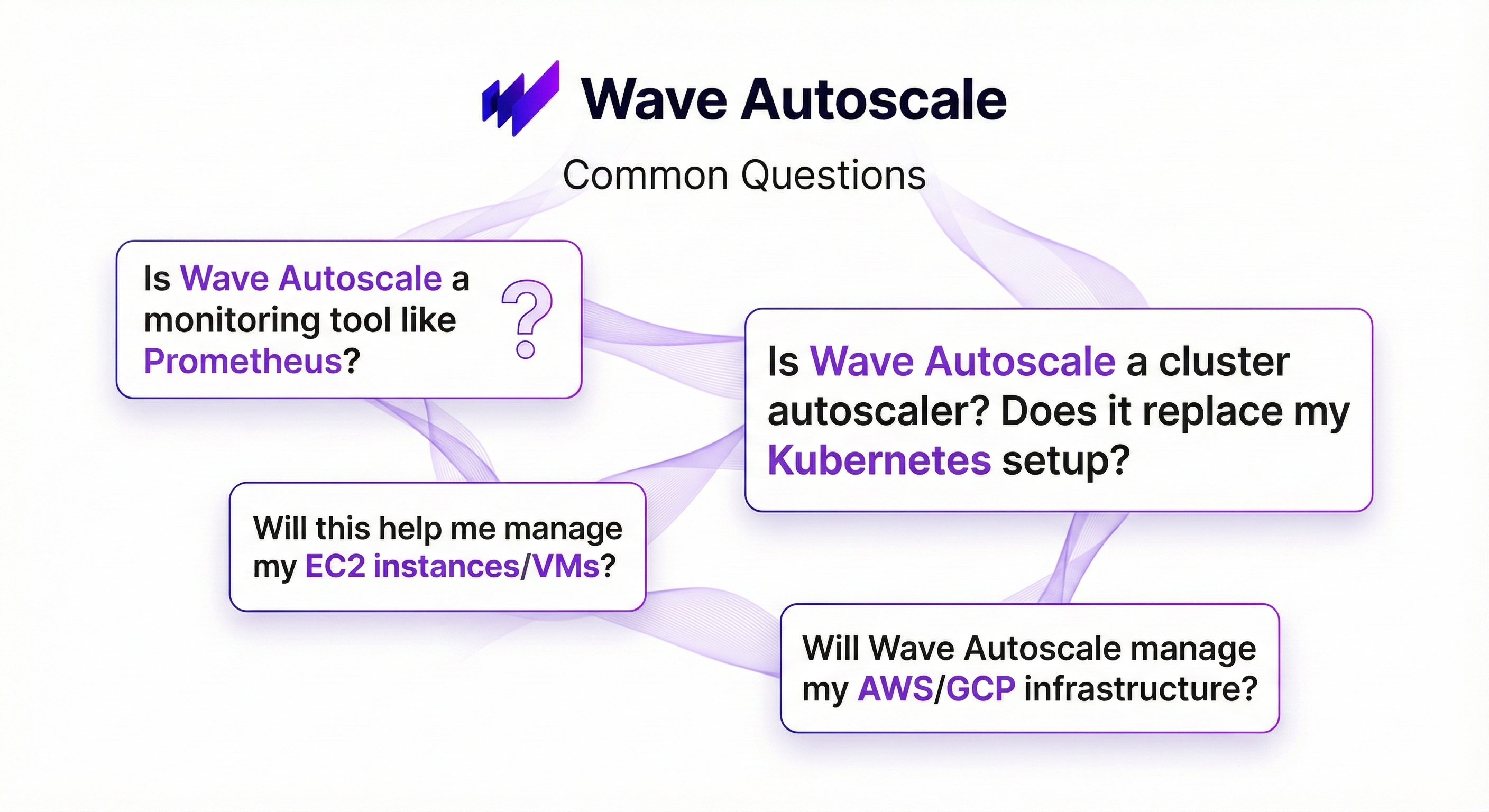
We hear these questions often, and they reveal a common confusion in the Kubernetes ecosystem: the difference between infrastructure management and workload management. Many organizations conflate these two concepts, leading to wrong tool selection, missed optimization opportunities, and continued operational challenges despite investing in cloud-native infrastructure.
Understanding this distinction is critical for Kubernetes success. Let's clarify what Wave Autoscale actually does and why it matters.
The Four Layers of Cloud Native Operations
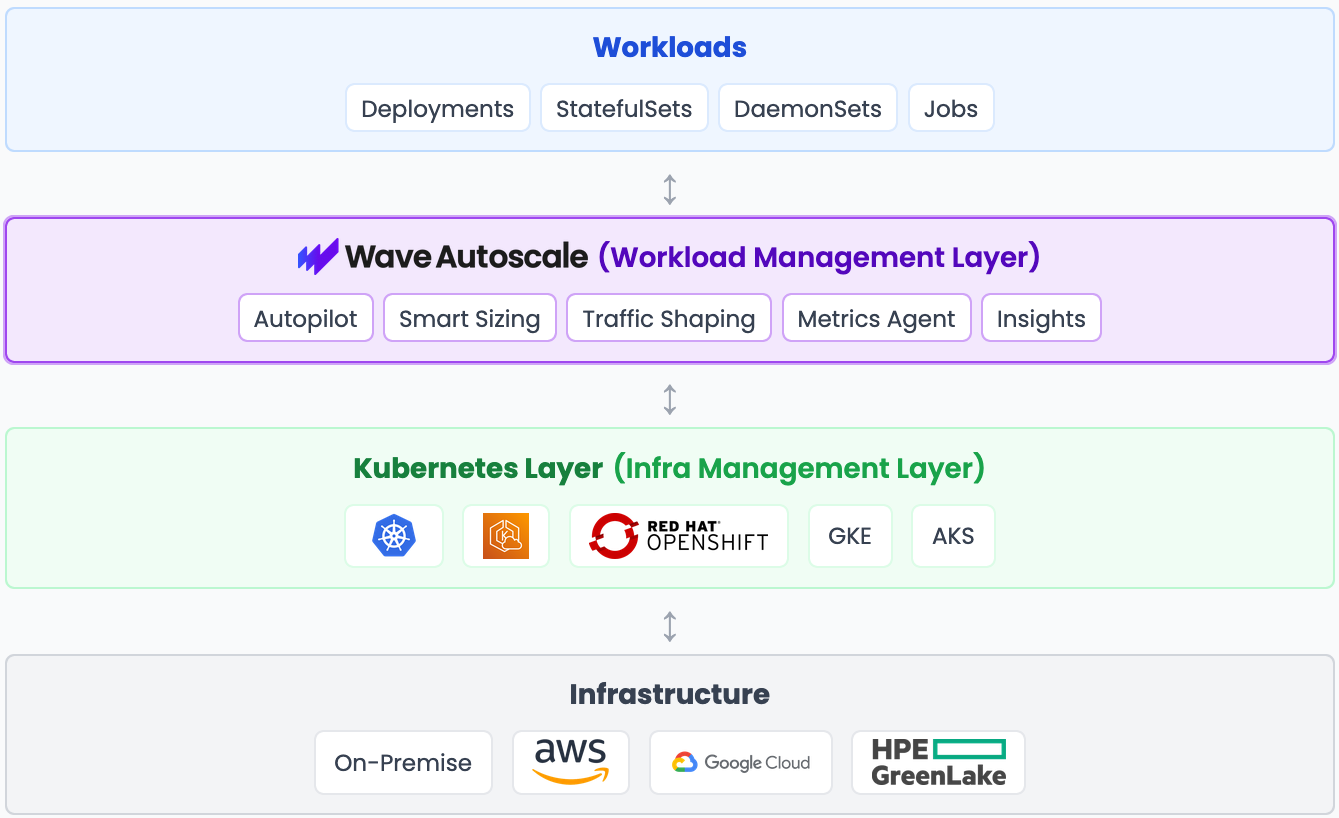
To understand where Wave Autoscale fits, let's examine the four distinct layers in modern cloud-native operations:
Layer 1: Infrastructure
Question it answers: "Do I have enough servers?"
Tools: Terraform, CloudFormation, cloud provider consoles
This is the foundation layer where you provision compute, storage, and networking capacity. Infrastructure management focuses on ensuring you have the raw resources to run your workloads. For more context on infrastructure tooling, see the CNCF Cloud Native Landscape.
Layer 2: Kubernetes (Infrastructure Management Layer)
Question it answers: "Can I schedule this pod?"
Native tools: HPA, VPA, Cluster Autoscaler
Kubernetes orchestrates containers, schedules pods onto nodes, and provides the API layer for container management. Its native autoscaling tools respond to metrics after thresholds are breached. Learn more about Kubernetes autoscaling. (opens in a new tab)
Key limitation: They operate without understanding your application's specific behavior patterns.
Layer 3: Wave Autoscale (Workload Management Layer) ⭐
Question it answers: "How do I make my apps perform optimally while minimizing cost?"
Application-aware optimization using ML-driven intelligence that learns your workload patterns. Operates at the application level. Doesn't provision infrastructure or replace Kubernetes, but makes your existing stack smarter by understanding and optimizing how applications actually behave.
Layer 4: Your Workloads
What it is: The applications you're running (Deployments, StatefulSets, DaemonSets, Jobs)
This is what your users actually experience - your applications. Workload management focuses on optimizing these applications, not the infrastructure beneath them.
It's Not Either/Or
Here's the critical point: Wave Autoscale doesn't replace your infrastructure or Kubernetes. It adds intelligence on top of your existing stack.
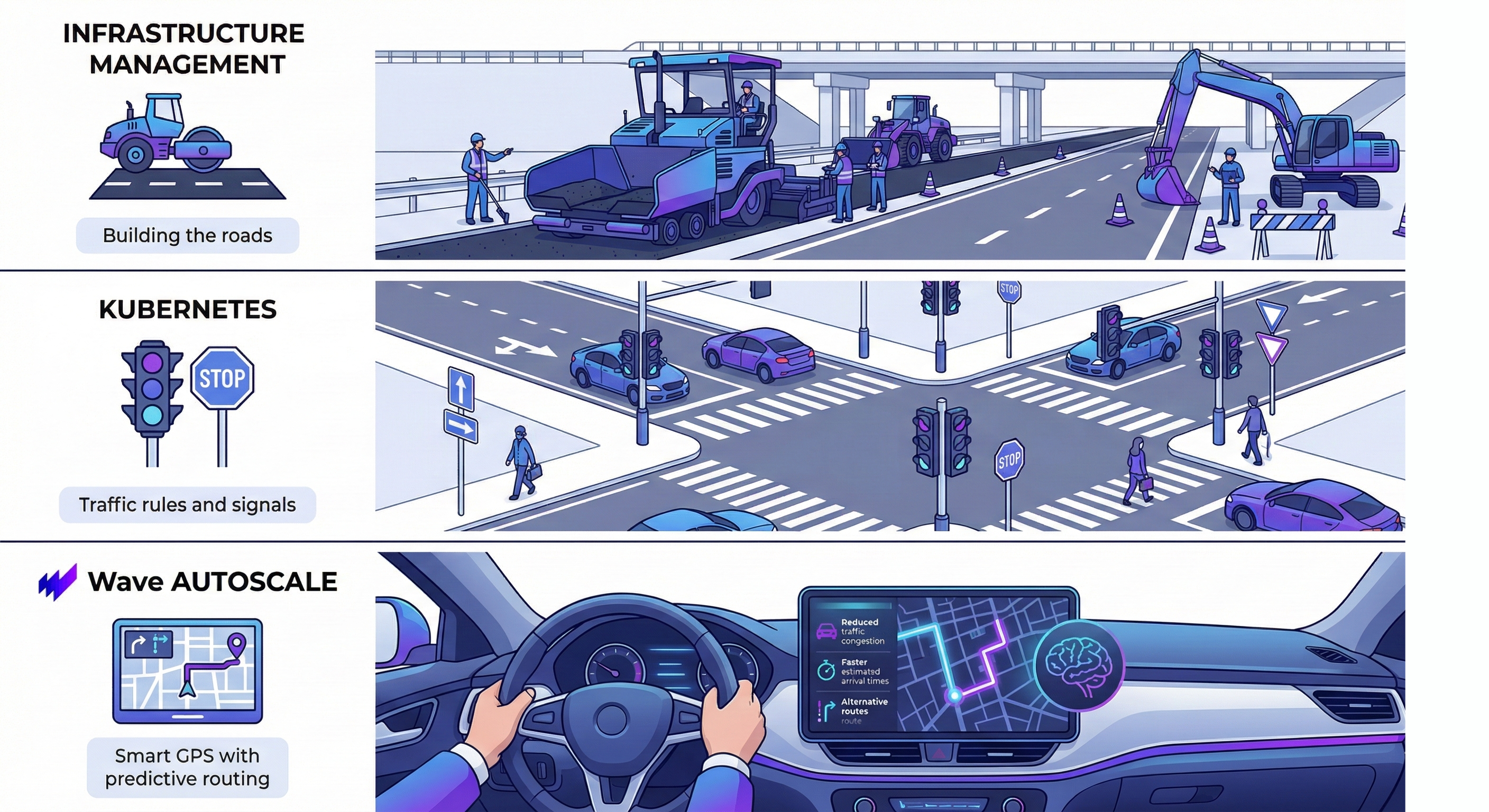
Think of it this way:
- Infrastructure management = Building roads
- Kubernetes = Traffic rules and signals
- Wave Autoscale = Smart GPS that predicts traffic patterns and reroutes you proactively
You need all three layers. Infrastructure provides capacity. Kubernetes orchestrates containers. Wave Autoscale optimizes your applications to perform better and cost less.
Wave Autoscale works with AWS, GCP, Azure, HPE GreenLake, on-premise infrastructure, and any Kubernetes distribution (vanilla Kubernetes, OpenShift, GKE, AKS, EKS). It's a complementary layer, not a replacement.
Why Workload Management Matters: The Gap Default Tools Can't Fill
Kubernetes is excellent at what it does - container orchestration. But there are three critical pain points that infrastructure and native K8s tools simply can't solve:
1. Threshold-Based Scaling Delays
HPA's observe-then-act cycle creates inherent delays. The system must wait for metrics to breach thresholds (typically 80% CPU), calculate desired replicas, and then provision pods. During traffic spikes, this delay window means users experience degraded performance while the system catches up.
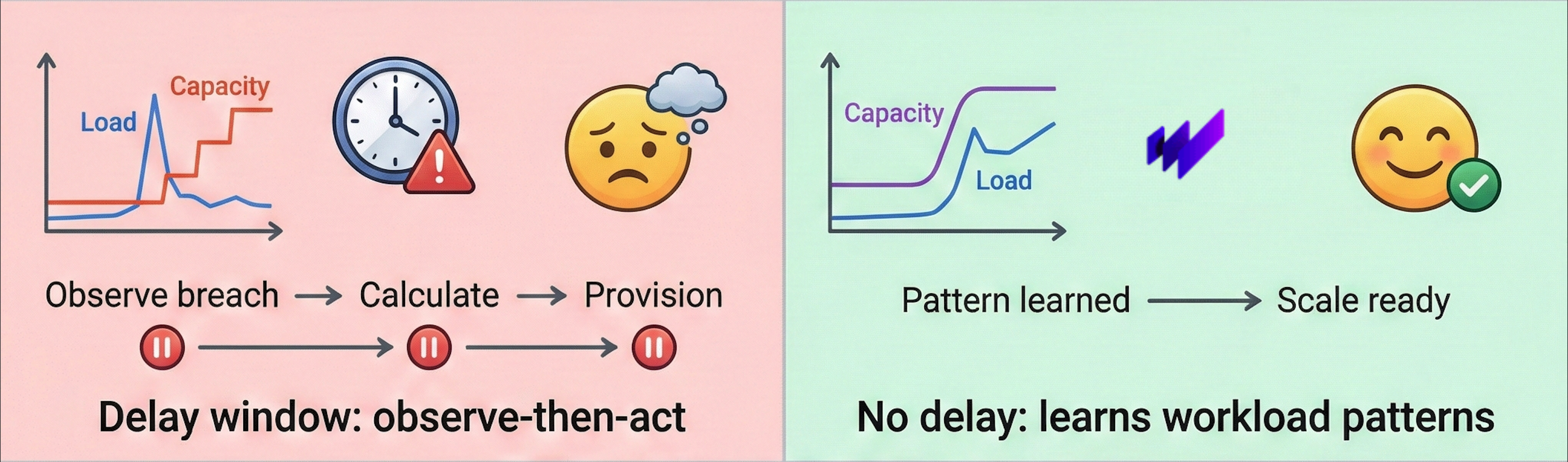
Wave Autoscale solution: Performance model based scaling learns application behavior patterns and scales based on what the workload will need, eliminating the observation delay window.
2. Operational Toil: The Human Bottleneck
When you need to scale for scheduled events (product launches, promotions, peak business hours), you have two bad options:
- Overprovision 24/7 and waste money
- Have engineers manually scale up/down and create operational toil (opens in a new tab)
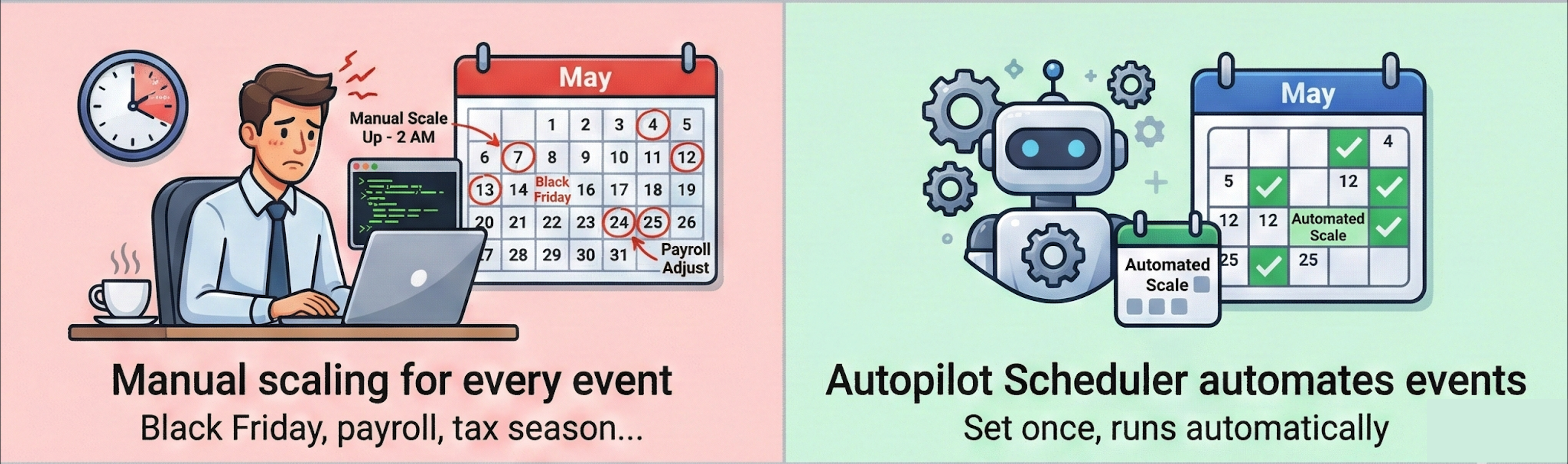
Wave Autoscale solution: Autopilot Scheduler with presets for business events eliminates manual intervention. Set your Tax season, Black Friday, etc. schedule once, and let the system handle it automatically.
3. Hidden Cost Waste: Resource Over-Allocation
You're paying for infrastructure, but do you know where the money goes? Most Kubernetes platforms lack visibility into resource waste - oversized pods, idle nodes, and forgotten storage silently drain budgets. Industry research consistently shows that typical Kubernetes clusters operate at 40-60% resource utilization. According to the CNCF FinOps Report (opens in a new tab), meaning you're paying for capacity you don't use.
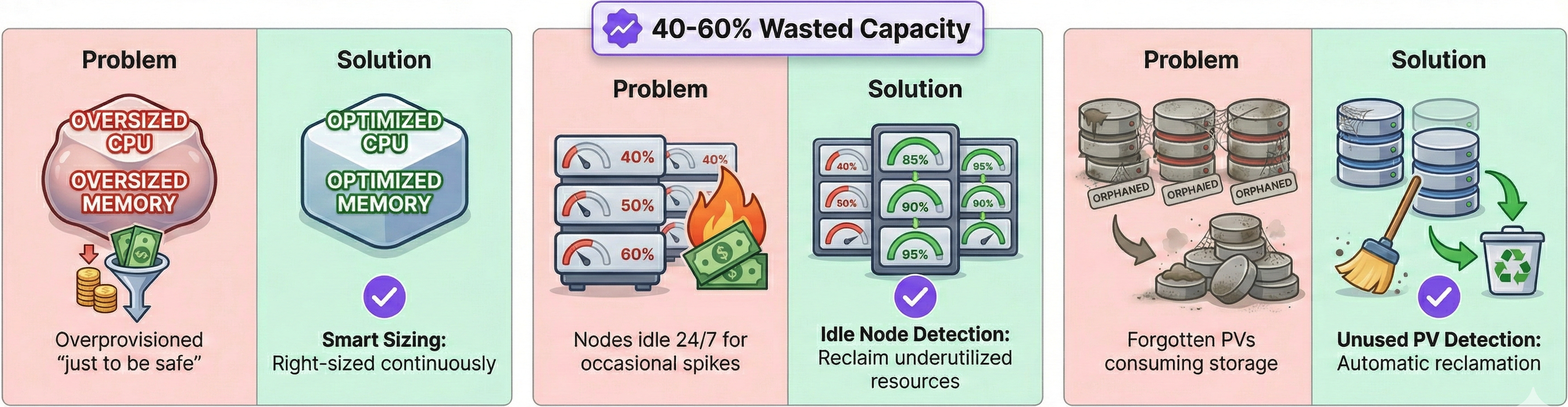
Common waste sources:
- Pods with oversized CPU/memory requests "just to be safe"
- Idle nodes kept running 24/7 for occasional traffic spikes
- Abandoned PersistentVolumes consuming storage after workloads are deleted
Wave Autoscale solution: Smart Sizing continuously right-sizes pod resources based on actual usage, Idle Node Detection identifies underutilized infrastructure and Unused PV Detection reclaims abandoned storage, automatically eliminating waste before it accumulates.
A Real-World Example: Banking During Tax Season
During peak business periods, different approaches reveal their operational characteristics. Imagine you're running a digital banking platform preparing for the May income tax filing deadline and monthly payroll processing:
Infrastructure Approach: Manual Overprovisioning
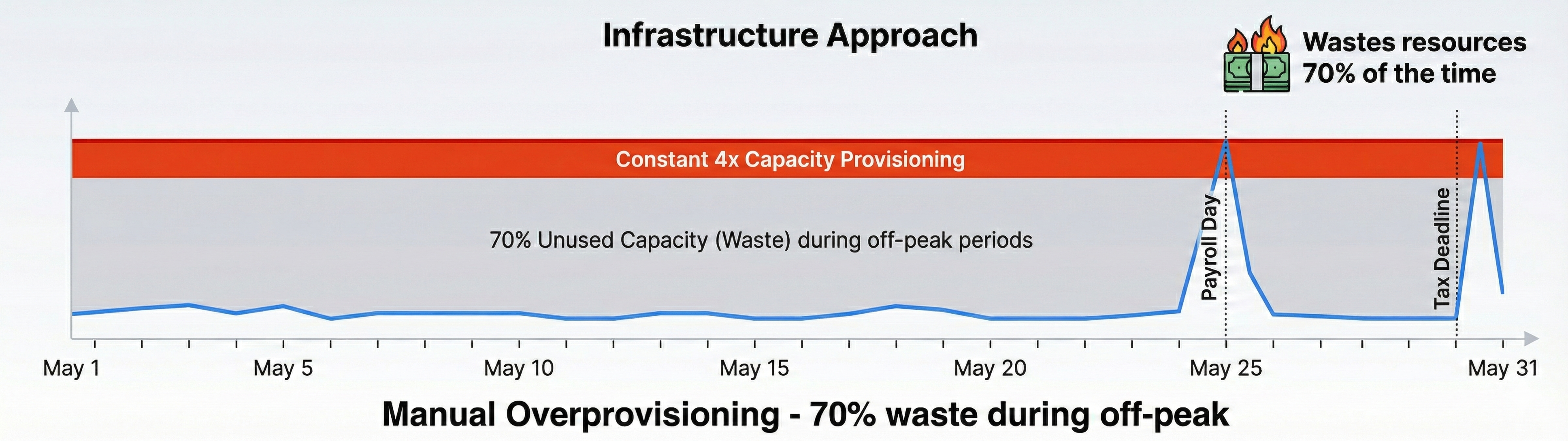
Platform engineers manually maintain 4x capacity throughout the entire May tax season (May 1-31). While this prevents outages, it wastes resources during off-peak hours, resulting in 70% unused capacity most of the time.
Kubernetes HPA: Threshold-Based Scaling
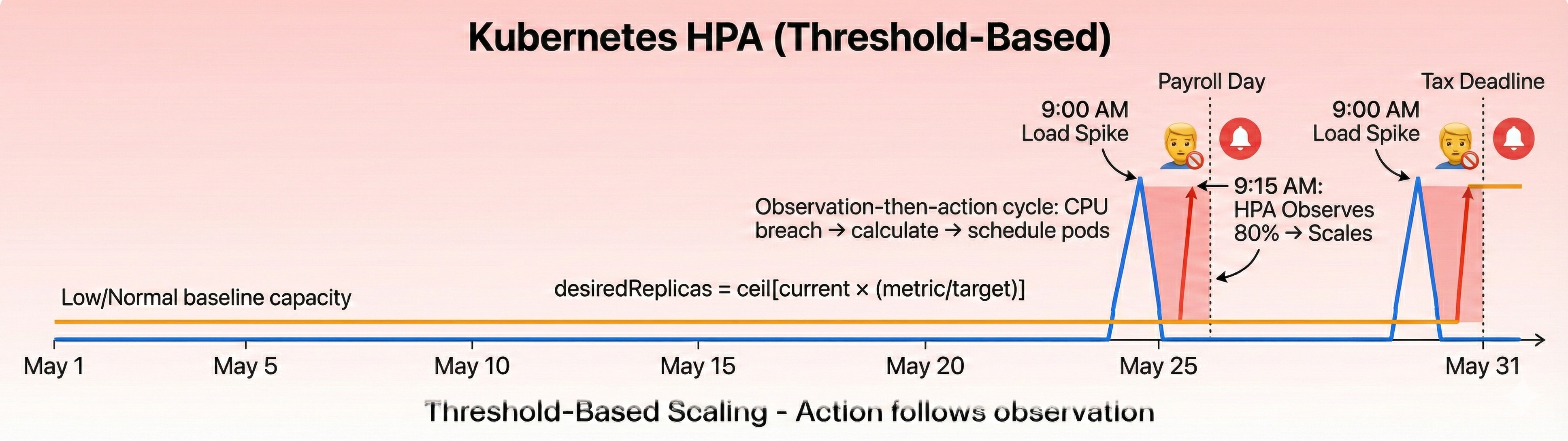
HPA uses a formula:
desiredReplicas = ceil[currentReplicas * (currentMetric / targetMetric)]
It monitors CPU usage and scales when the metric crosses a threshold(typically 80%). When the May 31 tax deadline hits and traffic spikes at 9:00 AM, **HPA must first observe the CPU breach, then calculate new replicas, and finally schedule pods. **
This observation-then-action cycle means scaling happens after load has already increased. Customers experience login delays and transaction timeouts during the critical morning rush while the system catches up.
Wave Autoscale: Performance Model Learning
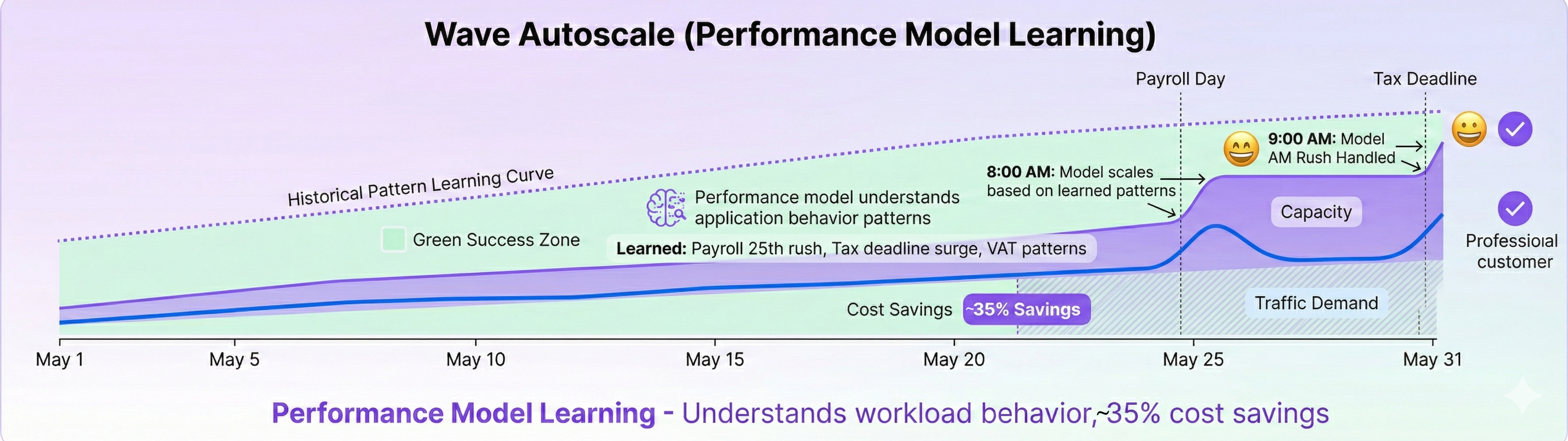
Wave Autoscale's performance model learns from the application's actual behavior patterns, not formulas or thresholds. By analyzing historical data , it understands how this specific banking workload behaves during peak periods. The performance model scales payment processing services at 8:00 AM before the 9:00 AM business rush begins with zero transaction failures, zero manual intervention, and resources scale back during off-peak periods.
Result: 35% infrastructure cost savings while improving reliability.
Research consistently shows that even small increases in response time significantly impact user experience and conversion rates. (opens in a new tab) Reactive scaling means your users experience the problem before the solution kicks in.
What Wave Autoscale Actually Does
Wave Autoscale provides workload-level intelligence. Core capabilities include:
Autopilot: ML-based scaling that learns your workload's specific patterns - not generic rules, but intelligence trained on your actual usage data with strategies to optimize for performance or cost. Smart Sizing: Dynamic resource optimization that continuously right-sizes your containers based on real usage patterns - and unlike VPA, it works alongside horizontal scaling. Wave Flow: Intelligent traffic prioritization during overload. When capacity is constrained, automatically prioritize Critical traffic over Bulk traffic to protect your revenue-generating endpoints. Insights: Predictive analytics that detect issues before they impact users - memory leaks, capacity exhaustion, scheduling delays - across reliability, performance, and cost dimensions. And more: From advanced scheduling to custom optimization strategies, explore the complete feature set at wavek8s.com (opens in a new tab).
These are workload-level features. They understand your applications, not just your infrastructure.
Next Steps
If you're currently managing Kubernetes workloads and facing challenges with:
- Reactive scaling delays - Users experience slowness before HPA/VPA respond
- Cost inefficiency - Overprovisioning, VPA/HPA limitations, plus hidden operational costs from alert fatigue and performance firefighting
- Operational toil - Manual scaling for events, continuous threshold tuning, and chasing evolving workload patterns
- Lack of visibility - No predictive insights into performance degradation, reliability issues, or capacity exhaustion
Then workload management is the missing piece in your stack.
Learn more about how Wave Autoscale integrates with your existing infrastructure at Wave Autoscale Documentation (opens in a new tab).
Wave Autoscale is a Kubernetes Day 2 operations platform that delivers 2x faster scaling and up to 40% cost savings through ML-driven workload optimization.