AI-driven vs Rules-based Scaling: What Saves More?
Author: Thomas Mathew (opens in a new tab) Date: December 30, 2025
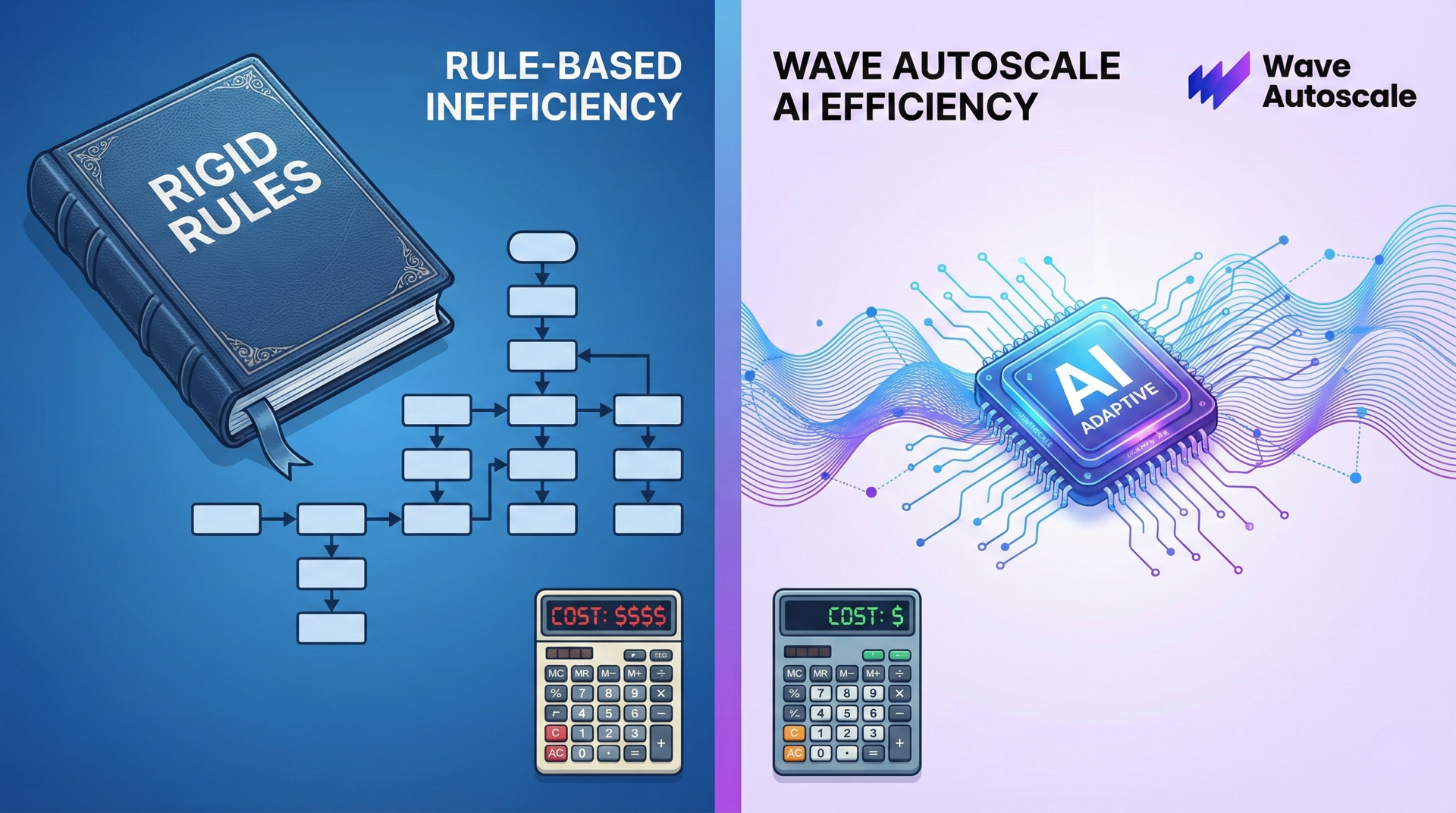
TL;DR: Rules-based autoscaling (HPA/KEDA) works fine for a few services, but becomes unmanageable at scale. 200 deployments means 200 configs to tune and maintain. Static thresholds drift as apps evolve, leading to 99% of clusters being overprovisioned with only 13% average utilization. AI-driven scaling eliminates manual threshold tuning by learning workload patterns automatically, detecting drift, and optimizing across dependent services.
Key Takeaways
- Rules-based scaling works, but maintaining thresholds at scale becomes operationally unsustainable
- Most clusters remain massively overprovisioned because thresholds drift and rarely get revisited
- Event-driven tools like KEDA improve metric sources, but still rely on static thresholds
- AI-driven scaling removes configuration burden, adapts continuously, and optimizes based on real behavior
- Wave Autoscale provides predictive scaling, SmartSizing, drift detection, and cross-service optimization
The Scaling Dilemma Every Platform Team Faces
You've set up your Kubernetes autoscaling. HPA triggers at 70% CPU. Nodes scale when pods are pending. It works.
But then you add another service. And another. Now you're managing 50 deployments, each with different resource profiles. The API gateway is CPU-bound. The image processor needs memory. The queue workers spike unpredictably.
Each workload requires its own thresholds, stabilization windows, and policies. These must be tuned, monitored, and retuned over time.
Meanwhile, the industry numbers are staggering:
99.94% of Kubernetes clusters are overprovisioned with CPU (opens in a new tab), yet average utilization sits at just 13% (opens in a new tab). The root cause isn’t that rules-based scaling is bad, it’s that maintaining it at scale becomes unmanageable.
In this article, we'll break down why rules-based scaling becomes unmanageable as your cluster grows, where tools like KEDA help (and where they fall short), and how we can use AI-driven scaling to eliminate maintenance burden.
How Rules-Based Scaling Works (and Why It Doesn’t Scale)
Rules-Based Scaling
Traditional autoscaling follows a simple formula:
📊 Metric → 📏 Threshold Check → ⬆️ Scale Up / ⬇️ Scale Down
For a single workload, this is fine. But organizations rarely operate “a single workload.”
Key Problems With Rules-Based Scaling
Problem 1: Configuration Sprawl
Every workload has different characteristics. Your API gateway is CPU-bound. Your image processor is memory-hungry. Your queue workers spike on I/O.
Each needs its own HPA configuration with carefully tuned thresholds, stabilization windows, and scaling policies that match their characteristics.
Example: 200 deployments × unique thresholds = 200 configs to maintain
- Profiling
- Testing
- Validation
- Retuning whenever behavior changes
No engineering team has enough context across all workloads, so companies default to conservative static thresholds, sacrificing efficiency for perceived safety.
Problem 2: Workloads Change, Thresholds Don’t
Applications evolve constantly overtime.
A new feature adds a memory-intensive code path. A database migration changes query patterns. A dependency upgrade shifts CPU utilization. Suddenly your carefully tuned thresholds are wrong, but nothing alerts you until users complain or costs spike.
The feedback loop is brutal:
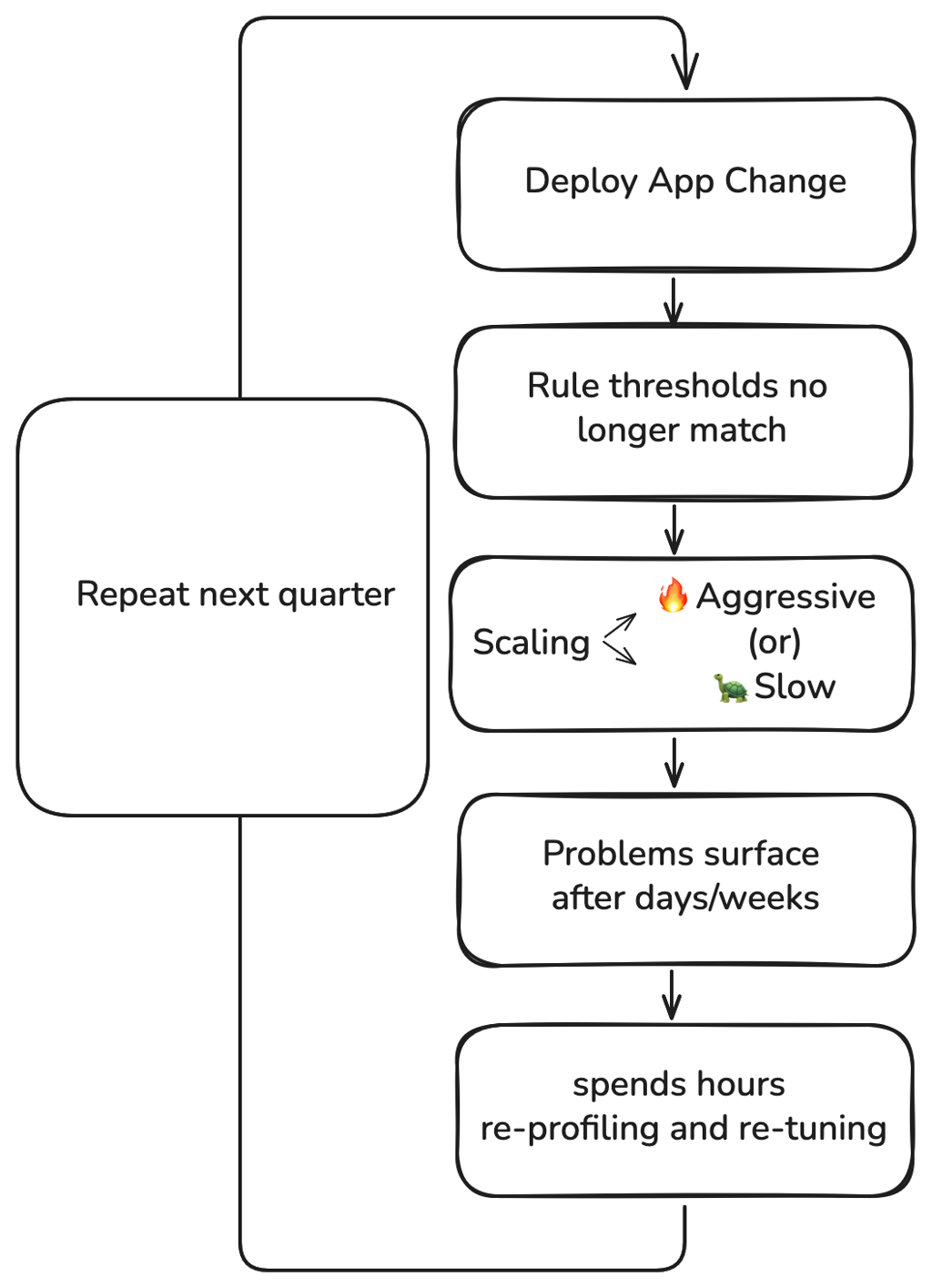
For platform teams, this creates an impossible choice: dedicate engineering time to perpetual HPA maintenance, or accept that most of your scaling configs are stale.
Google SRE principles recommend keeping manual operational work below 50% of engineering time (opens in a new tab). For teams managing hundreds of deployments, autoscaling configuration alone can eat a significant chunk of that budget.
Problem 3: KEDA Improves Metrics, Not Operations
KEDA (opens in a new tab) (Kubernetes Event-Driven Autoscaling) expands metric sources:
- queue depth
- request rate
- DB connections
- Prometheus metrics
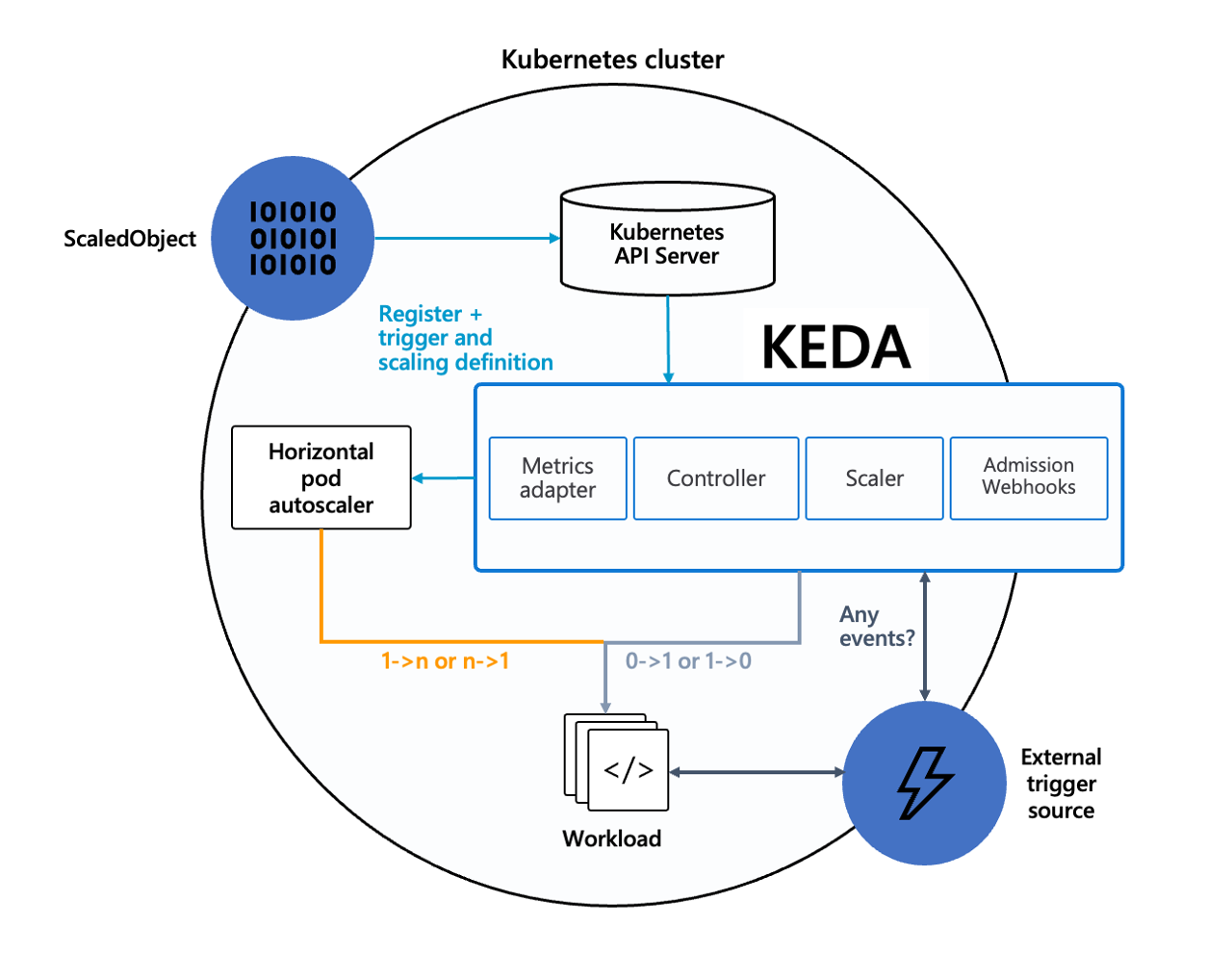
KEDA extends HPA with external metrics — but scaling decisions are still driven by static thresholds defined in each ScaledObject.
Scaling your order processor based on Kafka lag is more meaningful than CPU percentage. Consider an NGINX ingress sitting in front of your API. CPU-based scaling reacts too late — by the time utilization spikes, requests are already queuing and latency has degraded. With KEDA's Prometheus scaler (opens in a new tab), you can trigger scaling based on nginx_ingress_controller_requests rate or active connection count. Pods scale up when traffic increases, not when the existing pods are already struggling under load.
But KEDA doesn't solve the fundamental problem, it actually compounds it:
| ✅ What KEDA solves | ❌ What remains unsolved |
|---|---|
| Limited metric sources | Choosing the right thresholds |
| Event-driven scaling triggers | Maintaining configs across hundreds of workloads |
| Custom scaler integrations | Detecting when thresholds drift |
| Scale-to-zero for idle workloads | Optimizing across dependent services |
AI-Driven Scaling: Solving What Rules and KEDA Cannot
AI-driven scaling model:
📈 Historical Data → 🧠 Performance Model → ⚡ Scale on Actual Behavior
KEDA gives you better metrics to scale on. But four fundamental problems remain unsolved. AI-driven scaling addresses each of these directly.
AI Solves Problem 1: Choosing the Right Thresholds
Rules-based scaling requires humans to pick values like 'scale at 70% CPU vs 80%.'
These numbers rarely reflect reality.
ML-based scaling:
- observes real workload patterns
- learns normal vs abnormal behavior
- determines optimal scale points automatically
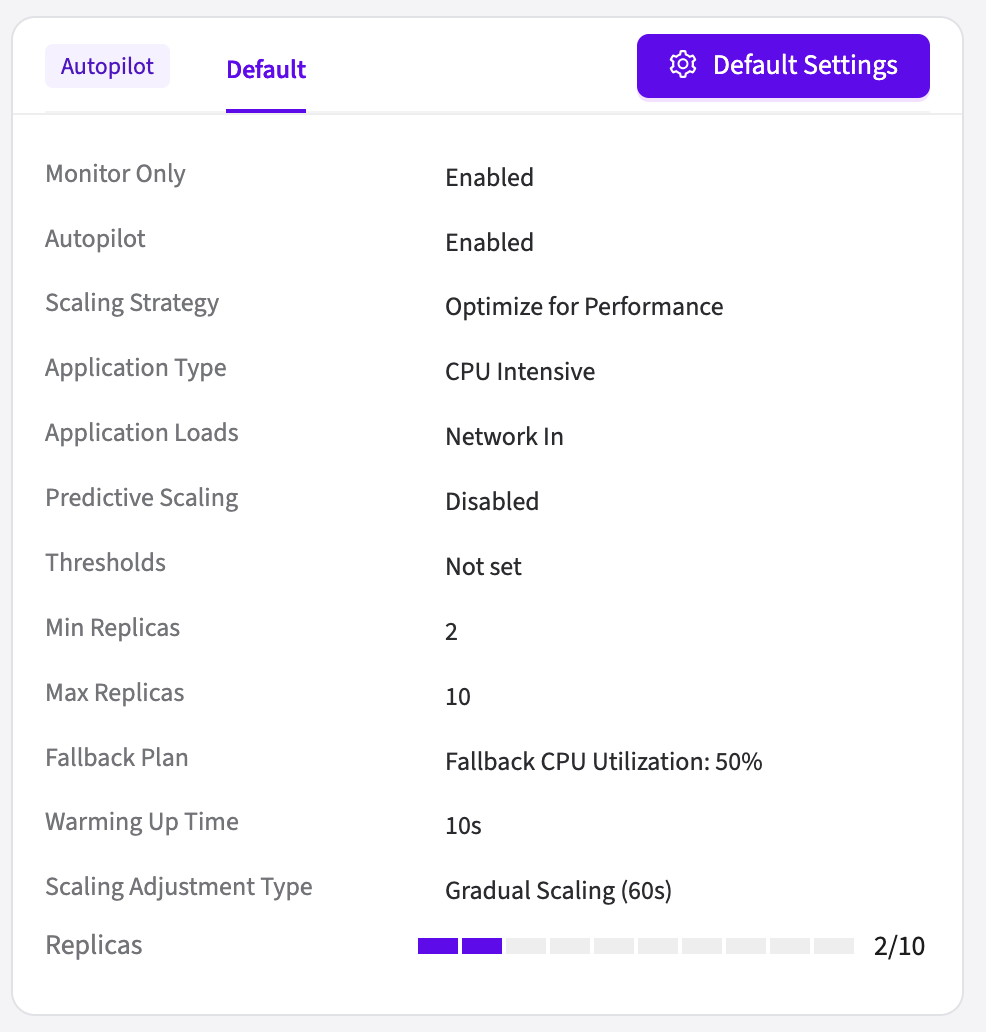
Wave Autoscale's Autopilot handles this automatically. Enable it per-deployment and the model determines optimal scaling points based on observed behavior. The system learns what your workload actually needs.
AI Solves Problem 2: Maintaining Hundreds of Configurations
200 deployments means 200 HPA or ScaledObject configurations to maintain. Each with its own thresholds, cooldown periods, and scaling policies. Most teams play it safe and apply identical defaults everywhere.
Wave Autoscale auto-discovers your deployments and starts learning immediately upon installation. No per-workload configuration required. Once the model has enough data, enable Autopilot to manage scaling across all the deployments you choose or start with a subset and expand as you build confidence.
AI Solves Problem 3: Threshold Drift
Applications change constantly and your thresholds don't update themselves, they just quietly become wrong.
ML models continuously relearn what "normal" looks like. When your application's behavior changes, the model's baseline updates with it, no manual retuning required.
Wave Autoscale features that address threshold drift:
- SmartSizing
- analyzes real CPU and memory usage
- continuously adjusts requests/limits
- Memory Leak Detection
- identifies monotonic memory growth
- flags anomalies early
- Cluster Resource Forecast
- predicts 7–30 day utilization shifts
- provides cluster-level trend analysis
No retuning required.
AI Solves Problem 4: Cross-Service Optimization
Rules-based scaling treats each workload in isolation. But for example, your frontend, API gateway, and backend database aren't independent, traffic through one predicts load on the others. The ML model also learns metric correlations, network I/O on your ingress often predicts CPU load on downstream services seconds later. Scaling decisions factor in these relationships automatically.
Wave Autoscale's Autopilot Scheduler lets you coordinate scaling across services. You tell the system which workloads to expect unusual demand and when. Autopilot enables during the event and manages scaling seamlessly. Here we can see how workloads can be grouped and scaled for certain events.
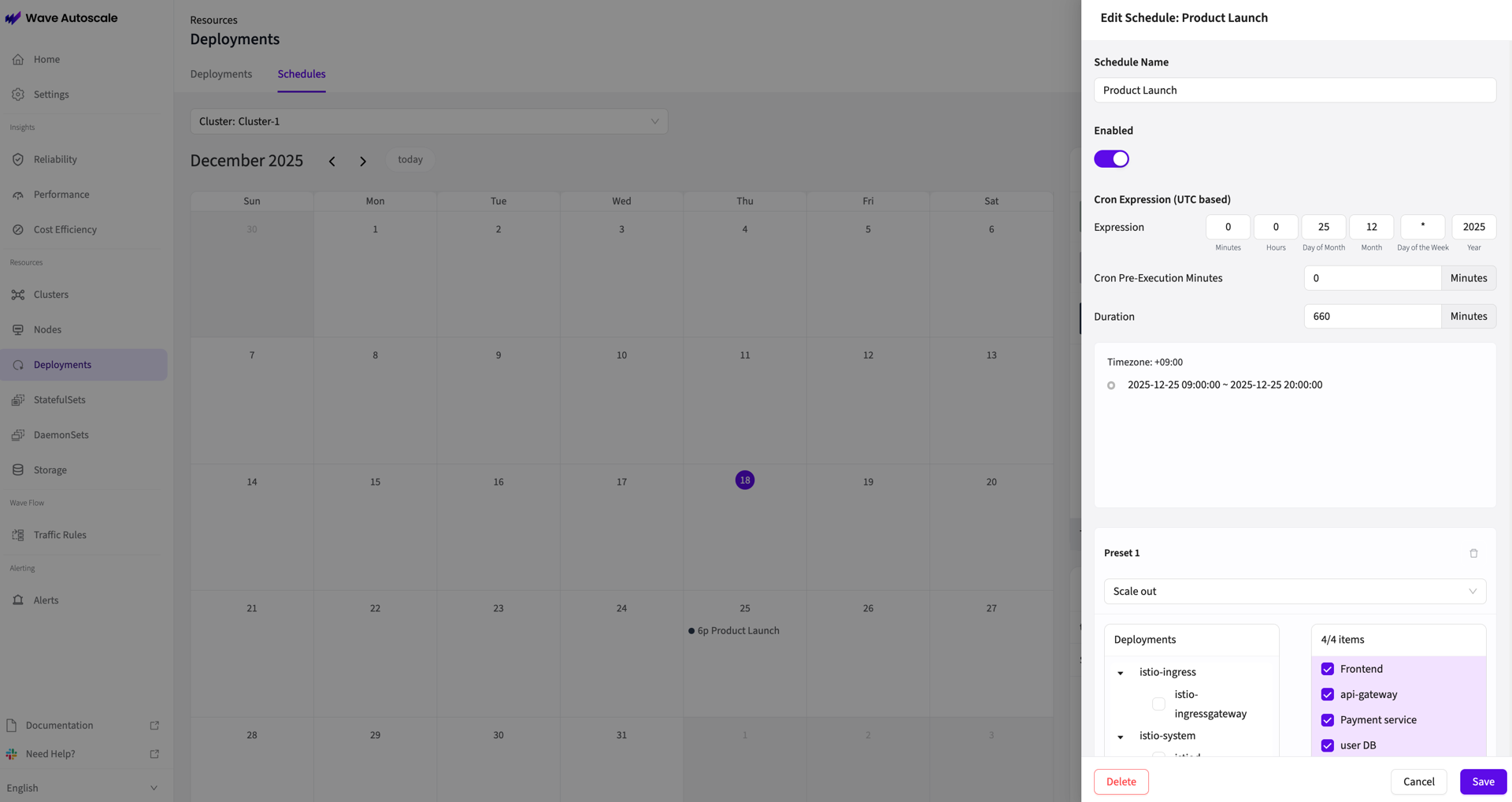
For example, say you're launching a new product on the 25th at 9:30am. You know your marketing emails go out at 9:45am, and traffic will hit your frontend, api-gateway, payment service and user db simultaneously. Instead of manually scaling each deployment the night before (and hoping you guessed the right replica counts), you create a scheduled scaling event:
- Event: Product Launch
- Time: Tuesday 9:00am – 8:00pm
- Workloads:
frontend,api-gateway,payment-service,user-db - Preset: Scale Out
Autopilot spins up the additional capacity 30 minutes before launch, manages scaling throughout the event based on actual demand, and scales back down once traffic normalizes.
Making the Shift to AI-Driven Scaling
Simple Installation
Wave Autoscale runs via a single Helm chart
- no node agents
- no sidecars
- no complex CRDs
Auto-discovery begins immediately.
Zero-Risk Evaluation
Simulation mode is the key to confident adoption:
- ✅ Full ML analysis on your real data
- ✅ Every scaling decision logged with reasoning
- ✅ No cluster changes until you're ready
- ✅ Side-by-side comparison of AI recommendations vs. what HPA actually did
You're not committing to anything. You're just seeing what's possible.
Why AI-Driven Scaling Becomes Inevitable
Rules-based scaling was built for a simpler era. Static thresholds made sense when workloads were predictable.
Today? Every percentage point of efficiency matters. Every minute of degraded performance costs users. Every idle pod burns budget.
The organizations winning on cloud costs aren't just setting better thresholds. They're letting machines learn what humans can't see.
Wave Autoscale delivers 2x faster scaling response and up to 40% cost savings through ML-driven optimization. The Autopilot feature provides predictive scaling, smart resource sizing, and priority-based traffic shaping, all while keeping your team in control.